







































Table of Contents
Categories
Share it now!

Most Popular

Read summarized version with
Triggered emails are behavior-driven communications sent in response to specific customer actions or events rather than on a fixed schedule. Unlike newsletters and other broadcast campaigns, they respond to what customers do, such as signing up, abandoning a cart, or completing a purchase.
Because triggered emails are tied to real-time behavior, they can deliver relevant information when customers are most likely to need or engage with it, making them a core part of lifecycle marketing.
This guide explains what triggered emails are, how they differ from scheduled campaigns, which events can trigger them, and how marketers use them throughout the customer lifecycle.
Key Takeaways
- Triggered emails are automated messages initiated by customer behavior, events, milestones, or predefined conditions.
- Common email triggers include signups, purchases, cart abandonment, inactivity, renewals, and lifecycle milestones.
- Transactional emails can be triggered, but triggered emails can also serve marketing, engagement, and retention goals.
- Effective triggered campaigns combine the right trigger with eligibility rules, timing, personalization, suppression, and outcome measurement.
What Is a Triggered Email?
A triggered email is an automated message sent in response to a specific customer action, event, or condition. In lifecycle marketing, triggers can include signing up for an account, abandoning a shopping cart, completing a purchase, or reaching a customer milestone. Unlike scheduled campaigns, which are sent at predetermined times to a broad audience, triggered emails respond to individual customer behavior. This makes them more contextually relevant because the message is connected to something the customer has recently done or experienced.
Triggered emails help brands deliver timely communications throughout the customer journey, from onboarding and engagement to retention and reactivation.
Triggered Email vs. Automated Email
Triggered emails are a type of automated email, but not every automated email responds directly to an individual customer event. A triggered email begins when a predefined behavior, event, condition, or milestone occurs, while other email automations may run according to recurring schedules or campaign rules. For example, an abandoned-cart reminder is triggered by a customer’s cart activity, while an automated weekly digest can be sent on a recurring schedule without depending on an individual customer action.
Triggered Email vs. Transactional Email
Triggered and transactional describe different aspects of an email. “Triggered” describes how the email is initiated, while “transactional” describes its purpose. A transactional email such as an order confirmation, payment receipt, or password reset is usually triggered by a customer or account event. Marketing emails can also be triggered, such as an abandoned-cart reminder, product recommendation, or win-back email. The distinction therefore depends on the purpose of the message rather than whether an event caused it to send.
Triggered Email vs. Drip Campaign
The main difference is how the emails are initiated. Drip campaigns typically send a predefined sequence according to a schedule, such as one email on signup and another three days later. Triggered emails are initiated by specific customer behaviors or conditions and can therefore occur at different times for different customers. A drip campaign might move every new customer through the same predefined sequence, while a triggered journey can change what happens next based on the actions an individual customer takes.
| Email Type | What Initiates It | Primary Purpose | Example |
|---|---|---|---|
| Triggered email | Customer event, behavior, condition, or milestone | Respond to customer context | Abandoned-cart email |
| Automated email | Any predefined automation rule | Automate repeatable communication | Weekly automated digest |
| Transactional email | Transaction or account activity | Deliver expected or necessary information | Order confirmation |
| Drip campaign | Entry into a predefined sequence | Nurture customers through planned messages | New-user education series |
How Do Triggered Emails Work?
Triggered email campaigns connect customer behavior with timely, automated communication. When a predefined event occurs, the email platform evaluates whether the customer qualifies, prepares a relevant message, and delivers it according to the campaign rules. The email automation platform then tracks the customer’s response and can adjust or stop follow-up messages based on what happens next.
Trigger Event
The process begins when a customer completes an action or meets a defined condition. Common triggers include signing up, abandoning a cart, making a purchase, viewing a product, or becoming inactive. The email platform detects the event and starts the relevant workflow.
Audience and Eligibility
Before sending the message, the platform checks whether the customer meets the campaign’s eligibility criteria. These rules can include customer segments, previous actions, subscription status, or suppression conditions. For example, a cart-abandonment email should not be sent to someone who has already completed the purchase.
Personalization and Delivery
Once the customer qualifies, the platform can personalize the email using available customer and event data. This might include the customer’s name, recently viewed product, order details, or account status. The message is then delivered immediately or after a defined delay, depending on the campaign’s purpose and timing.
Customer Response and Follow-Up
After delivery, the platform tracks actions such as opens, clicks, purchases, or other conversions. These responses can determine what happens next. If the customer completes the desired action, the workflow can stop or suppress additional messages. If not, the platform can send a follow-up based on predefined timing and conditions.
Benefits of Triggered Emails
Triggered emails make email marketing more responsive to what customers are doing rather than relying only on predetermined campaign schedules. Their value comes from combining automation with behavioral context.
More Timely Communication
Triggered emails can reach customers shortly after a relevant action or change in status. A welcome email can arrive after signup, while a cart reminder can respond when a customer leaves without purchasing. This reduces the gap between customer intent and brand communication.
Greater Contextual Relevance
The event that initiates the email can also provide context for the message. Instead of sending the same promotion to an entire audience, marketers can reference the product viewed, item abandoned, purchase completed, milestone reached, or other activity connected to the trigger.
More Personalized Customer Journeys
Triggers can be combined with customer attributes, previous behavior, lifecycle stage, and preferences to determine who receives a message and what they see. This makes personalization part of the journey logic rather than simply adding a customer’s name to an email.
More Efficient Lifecycle Marketing
Once trigger conditions, eligibility rules, content, and exit criteria are established, campaigns can respond automatically as customers move through different lifecycle stages. Marketers can therefore manage recurring customer moments without manually launching a new campaign every time they occur.
Stronger Focus on Customer Outcomes
Because each triggered campaign begins with a defined customer event, marketers can connect it to a specific outcome, such as completing onboarding, recovering a purchase, encouraging another order, renewing a subscription, or re-engaging an inactive customer.
What Can Trigger an Email?
Marketers can use a wide range of email automation triggers, including customer behaviors, account events, lifecycle milestones, changes in customer data, and external events. A trigger can respond to something a customer does, something they fail to do, or a change in their relationship with a brand. The most useful triggers represent meaningful moments in the customer journey and have a clear connection to the message that follows.
Customer Actions
Direct customer actions are among the most common email triggers. These include creating an account, making a purchase, viewing a product, browsing a category, starting a free trial, downloading an app, or completing an onboarding step.
For example, a new signup can trigger a welcome email, while completing an initial setup step can trigger an onboarding message that guides the customer toward the next action. Product views or content downloads can also trigger follow-up emails with relevant information or recommendations.
Customer Inaction
A customer’s failure to take an expected action can also serve as a trigger. Common examples include abandoning a shopping cart, viewing products without purchasing, failing to complete onboarding, or remaining inactive for a defined period.
A cart-abandonment email can remind customers about products they left behind, while a win-back message can re-engage someone who has not opened the app or made a purchase recently. These triggers help marketers respond before temporary inactivity becomes long-term disengagement.
Transactions and Account Events
Transaction and account activity can trigger timely messages related to a customer’s account. Examples include purchases, shipping updates, payment failures, subscription upgrades, renewals, cancellations, password changes, and usage limits.
Some of these, such as order confirmations and password resets, are transactional rather than marketing emails, but they are still triggered by specific customer or account events. Their value comes from delivering relevant information when customers expect it.
Lifecycle and Time-Based Milestones
Emails can also be triggered when customers reach a particular stage, date, or milestone. Examples include signup or purchase anniversaries, birthdays, loyalty-tier changes, and significant purchase milestones.
Reorder reminders can use time-based triggers as well, such as sending a reminder when a customer is likely to need a consumable product again. These messages can strengthen engagement by recognizing important moments in the customer relationship.
Customer Data and External Events
Changes in customer data or external conditions can provide additional triggers. A customer entering a high-value segment could trigger an exclusive offer, while a profile update might prompt a confirmation or personalized message.
External events, such as a store visit or relevant weather change, can also trigger communication when the necessary data is available. These triggers allow brands to connect customer context with timely, personalized messaging.
Triggered Email Examples Across the Customer Lifecycle
Triggered emails can support customers at nearly every stage of the lifecycle, from their first interaction with a brand to repeat purchases, renewals, and re-engagement. The key is connecting each message to a specific customer action, milestone, or change in behavior. The following triggered email examples show how brands can use timely messages to support different lifecycle objectives.
| Customer Trigger | Triggered Email | Lifecycle Objective |
|---|---|---|
| Account signup | Welcome or onboarding email | Activation |
| Product or category view | Browse abandonment email | Conversion |
| Cart abandonment | Cart reminder | Conversion |
| Completed purchase | Post-purchase or replenishment email | Repeat engagement |
| Upcoming renewal | Subscription renewal email | Retention |
| Loyalty or purchase milestone | Milestone email | Loyalty |
| Defined period of inactivity | Win-back email | Reactivation |
Welcome and Onboarding Email
Trigger: A customer signs up or creates an account.
Customer objective: Help new customers get started and understand what to do next.
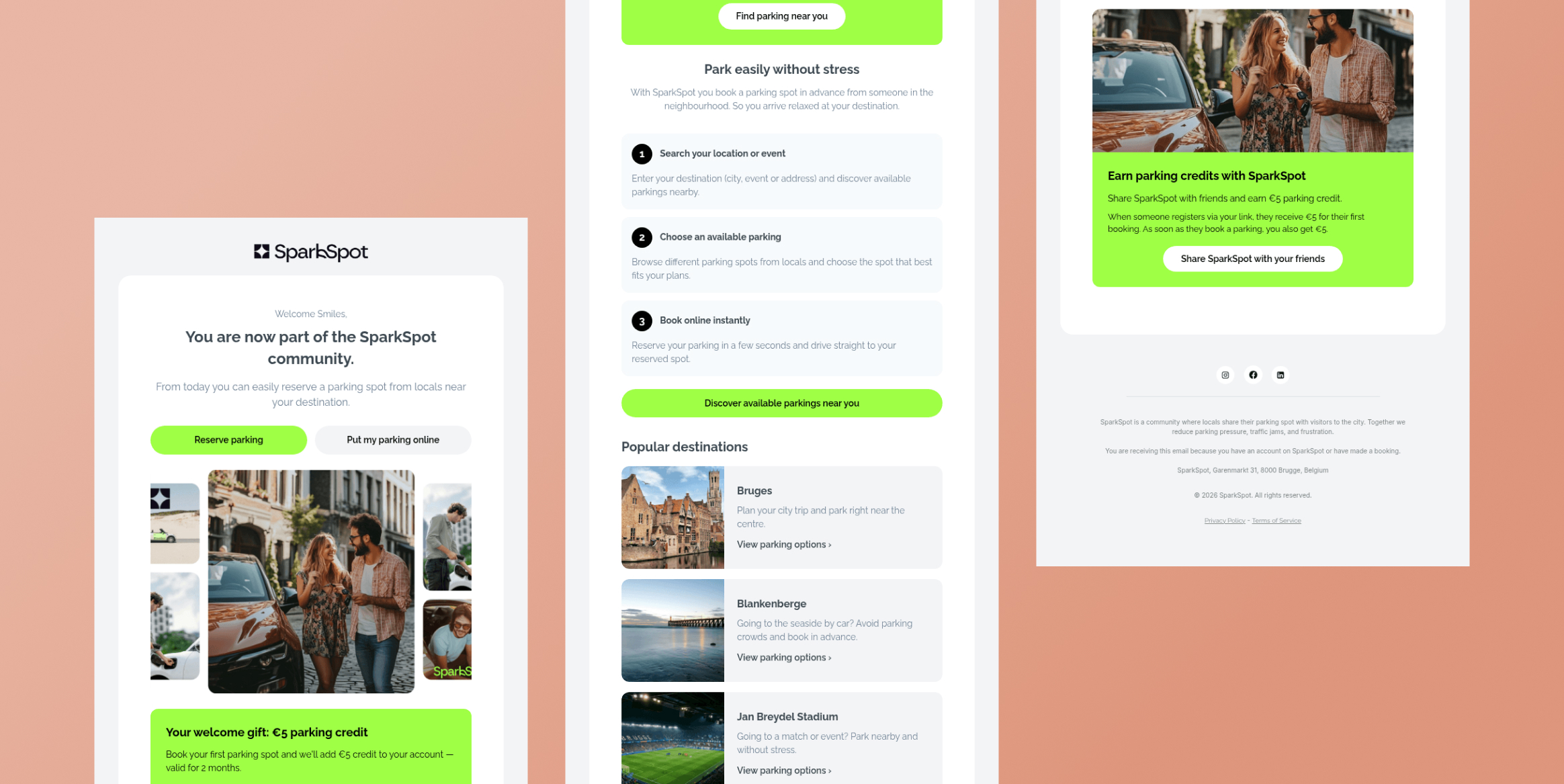
Why it works: A welcome email is most relevant immediately after signup, when interest and attention are typically high. SparkSpot’s welcome email uses a straightforward “Welcome to SparkSpot!” subject line, making the message clearly tied to the customer’s recent signup.
Rather than waiting for a scheduled campaign, marketers can use the signup event to begin an onboarding journey. Follow-up emails can then introduce key features, provide guidance, or encourage an activation event based on what the customer does next.
Browse Abandonment Email
Trigger: A customer views a product or category but leaves without purchasing.
Customer objective: Remind the customer about products they showed interest in and encourage them to return.
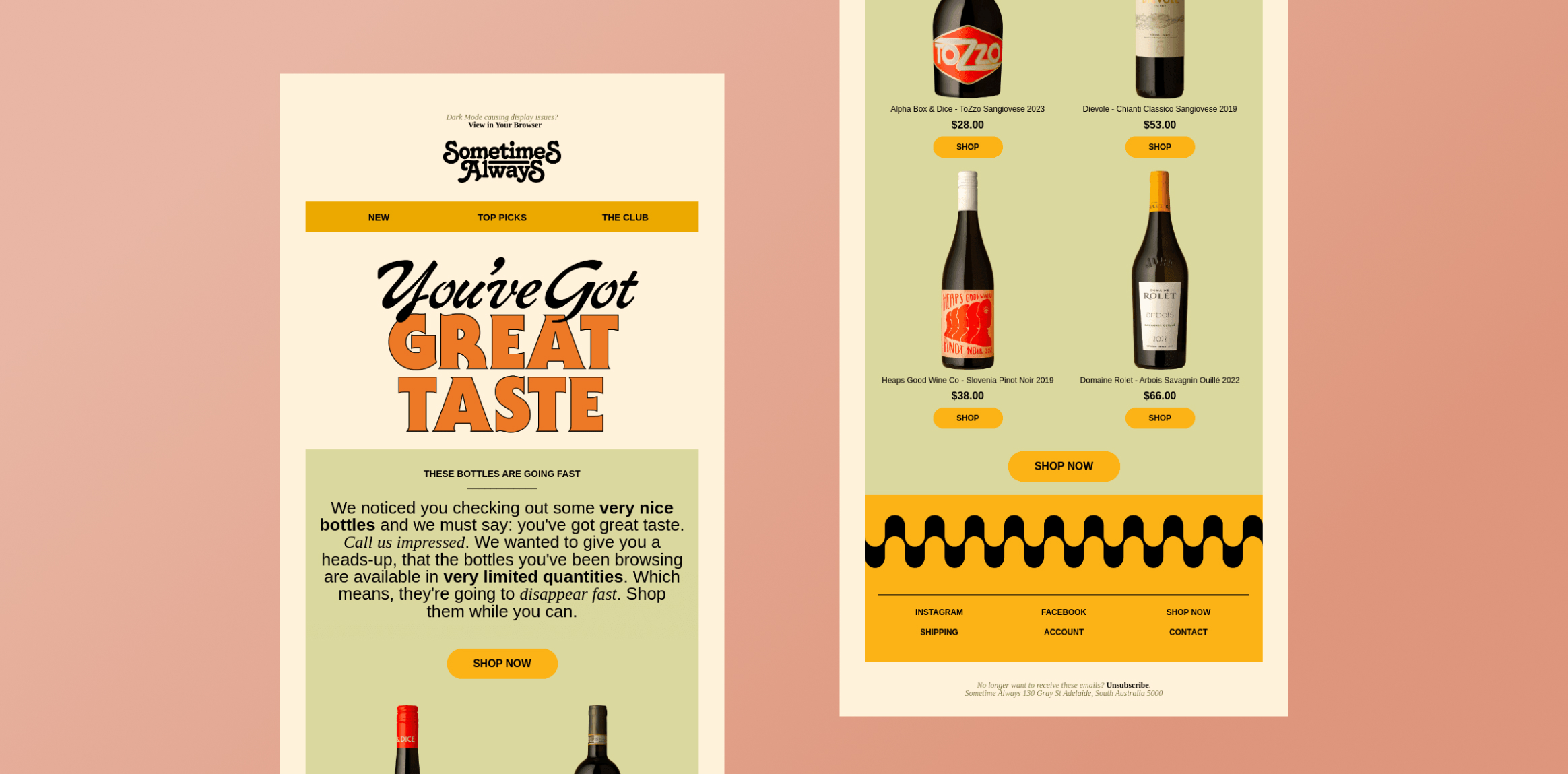
Why it works: A browse event provides a clear signal of product interest, even when the customer has not added anything to their cart. The “Sometimes Always” example uses the subject line “We noticed you checking out some very nice bottles,” directly connecting the email to the customer’s browsing behavior.
Because the trigger is based on demonstrated interest, the message can be more relevant than a generic promotional email. It can also include the products or categories the customer viewed, as seen in the example.
Abandoned Cart Email
Trigger: A customer adds an item to their cart but leaves without completing the purchase.
Customer objective: Bring the customer back to complete a high-intent purchase.
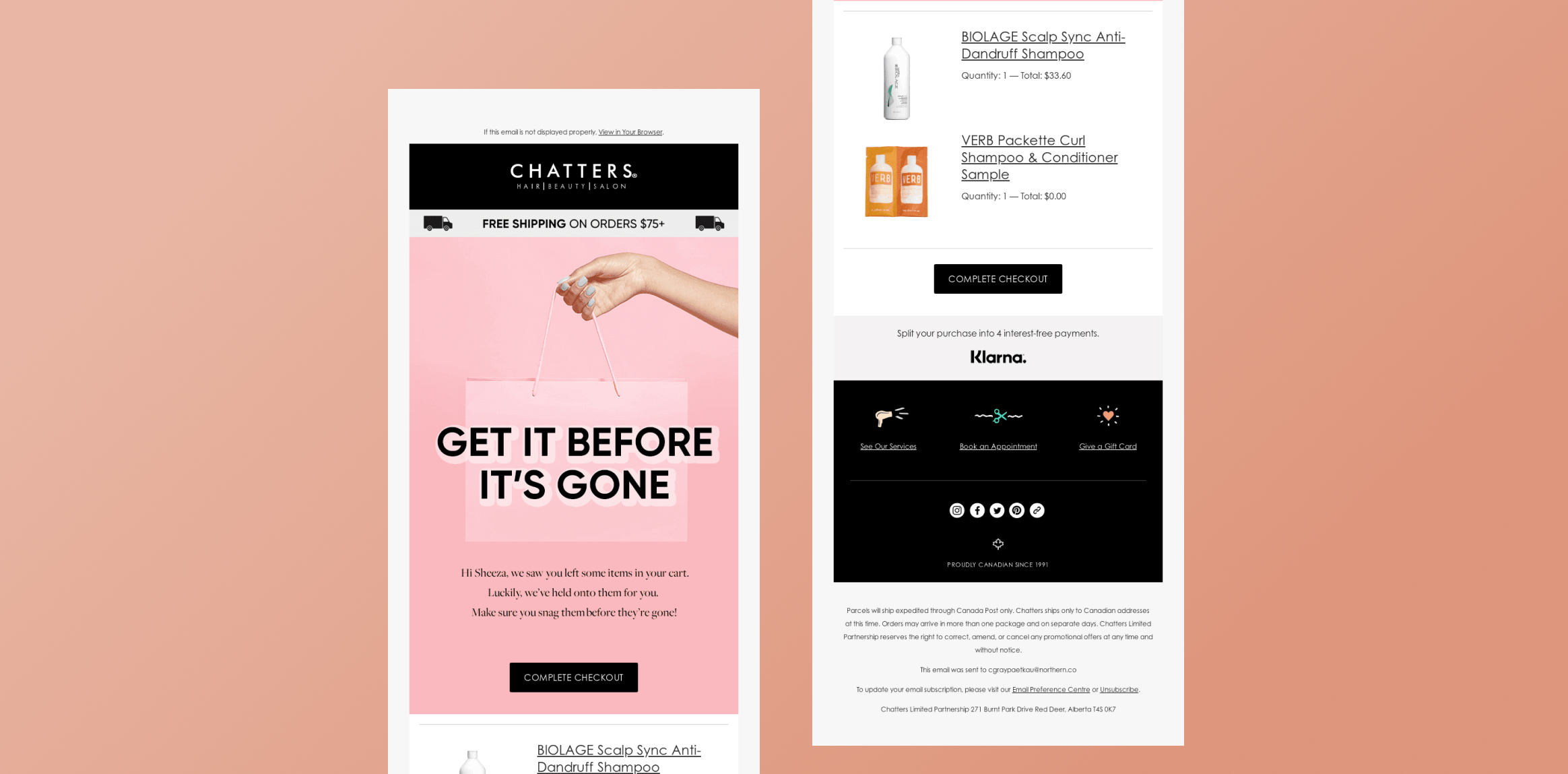
Why it works: Cart abandonment typically represents stronger purchase intent than browsing alone. A triggered reminder can reach the customer while the product is still relevant to their decision. The Chatters Salons example, “Don’t miss out! Get it before it’s gone,” uses urgency to encourage the customer to return to the purchase.
Marketers can strengthen this journey by showing abandoned-cart products, reminding customers of relevant benefits, or introducing an incentive when appropriate.
Post-Purchase or Replenishment Email
Trigger: A customer completes a purchase or reaches a defined point after purchase.
Customer objective: Encourage engagement after the transaction and create opportunities for repeat business.
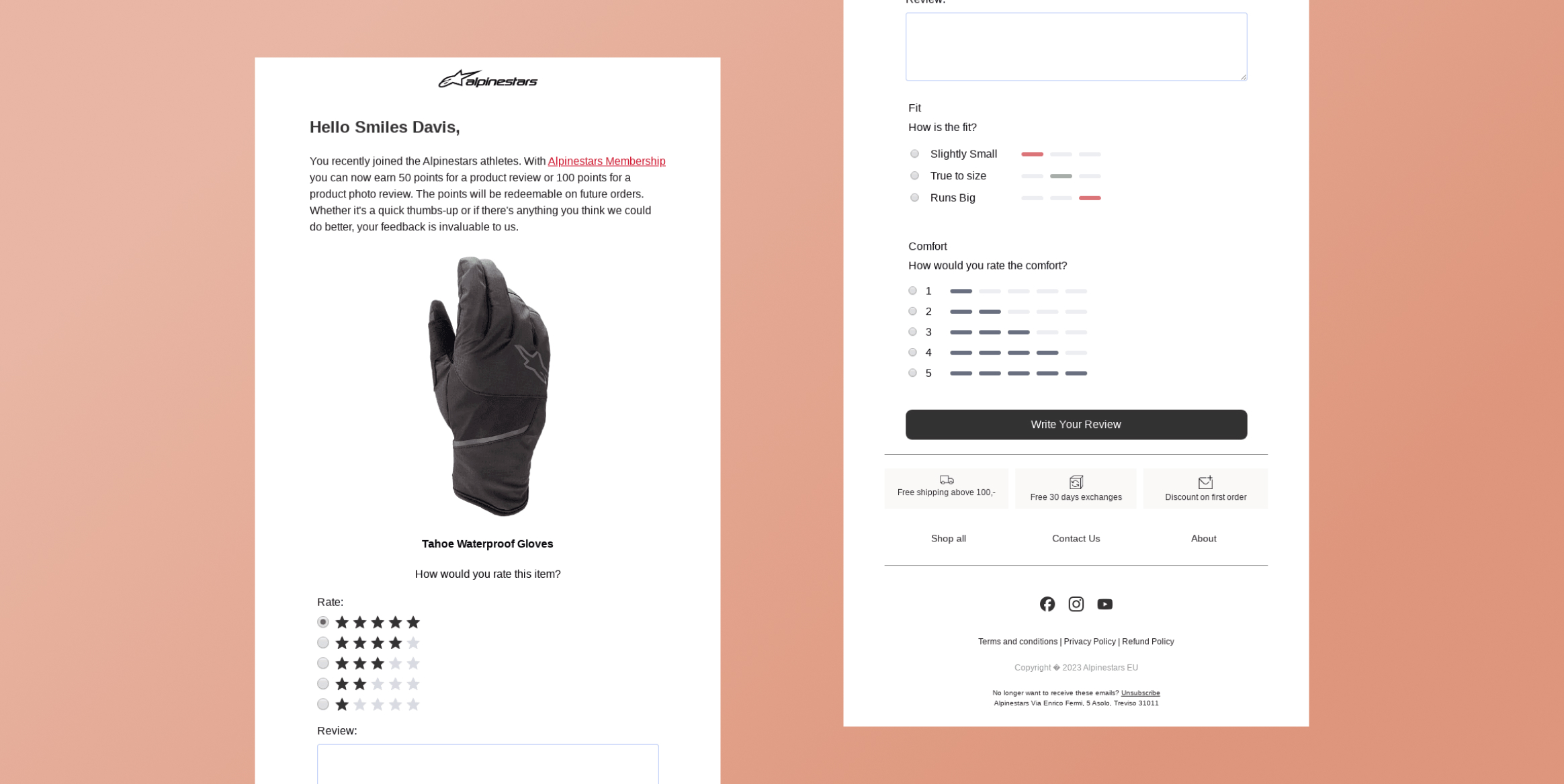
Why it works: The purchase itself provides useful context for determining the next message. For example, the Alpinestars email asks customers to leave a product review in exchange for 100 membership points. This connects the message directly to a completed purchase and gives the customer a reason to take another action.
The same principle can support replenishment journeys. For products that are regularly consumed or replaced, marketers can trigger a reminder based on the customer’s previous purchase date or expected usage cycle.
Subscription Renewal Email
Trigger: A customer’s subscription approaches its renewal date.
Customer objective: Remind the customer about the upcoming renewal and reduce accidental cancellations or interruptions.
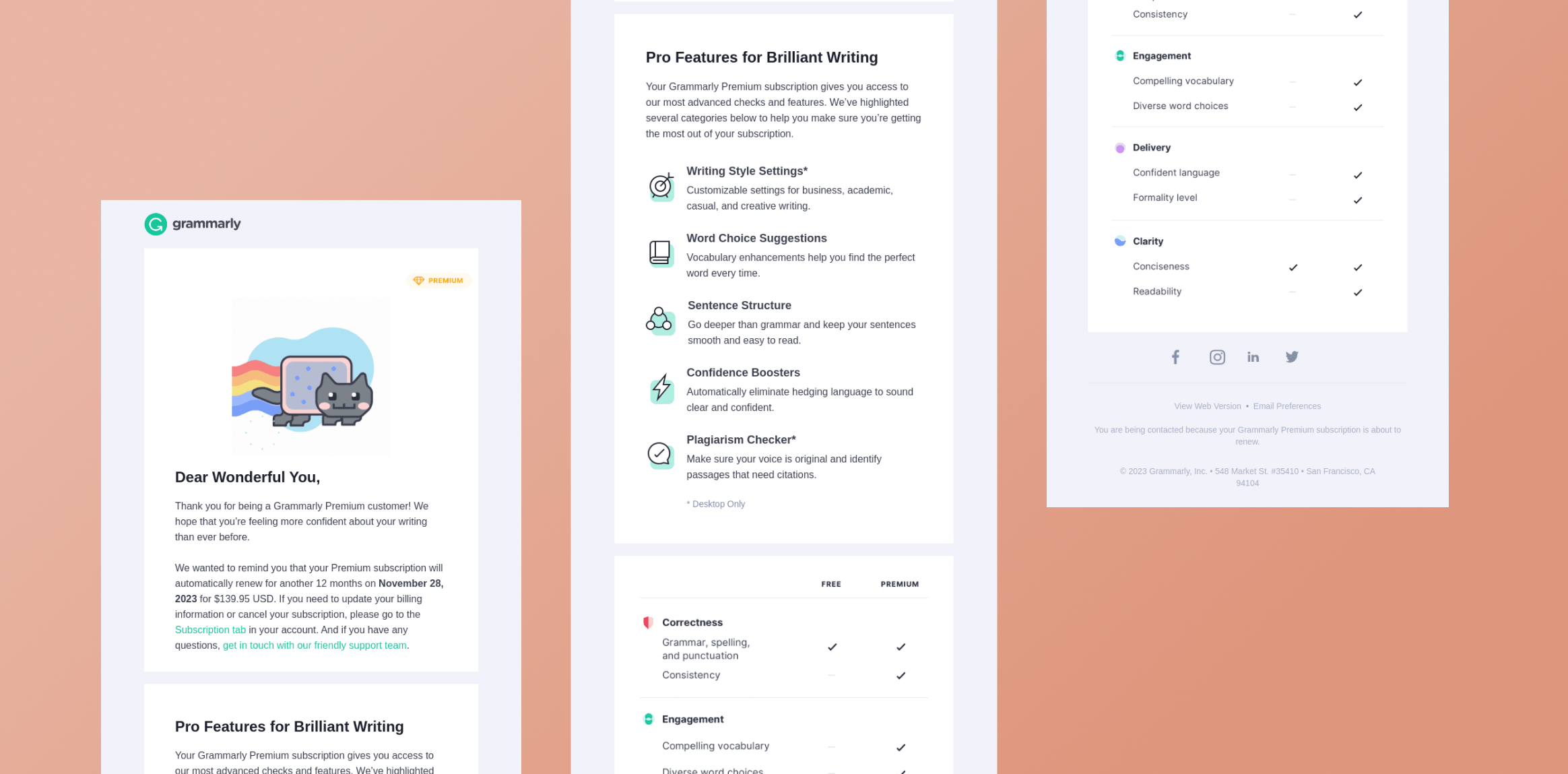
Why it works: Renewal timing is predictable, making it a natural lifecycle trigger. Grammarly’s “Friendly Reminder: Your Subscription Will Renew Soon” provides a clear example of connecting the email to an upcoming renewal event.
Sending the reminder before the renewal date gives customers time to review their subscription, update payment information, or make changes. It also creates a more transparent experience than notifying customers only after a renewal occurs.
Loyalty or Milestone Email
Trigger: A customer reaches a defined milestone, such as a purchase threshold, reward status, anniversary, or loyalty milestone.
Customer objective: Recognize customer value and encourage continued engagement.
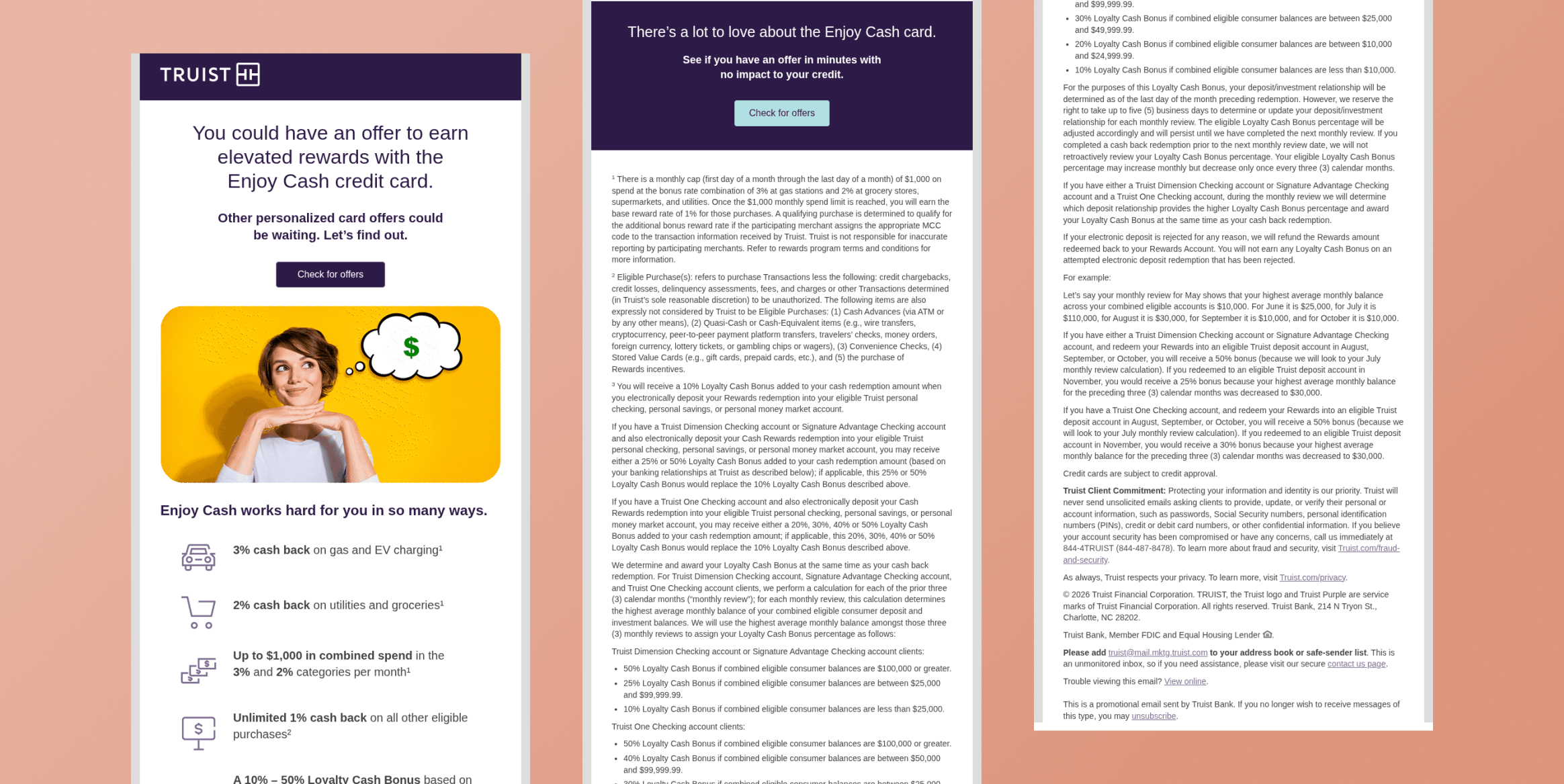
Why it works: Milestone triggers allow brands to make communications feel earned and relevant. The Truist example, “Want more from purchases? Rewards could be an offer away,” connects purchase activity with a potential rewards opportunity.
These emails can encourage customers to take the next action needed to unlock a benefit, reach another tier, or make better use of an existing loyalty program.
Inactivity or Win-Back Email
Trigger: A customer remains inactive for a defined period or has not completed an expected action.
Customer objective: Re-engage customers before they become permanently inactive.
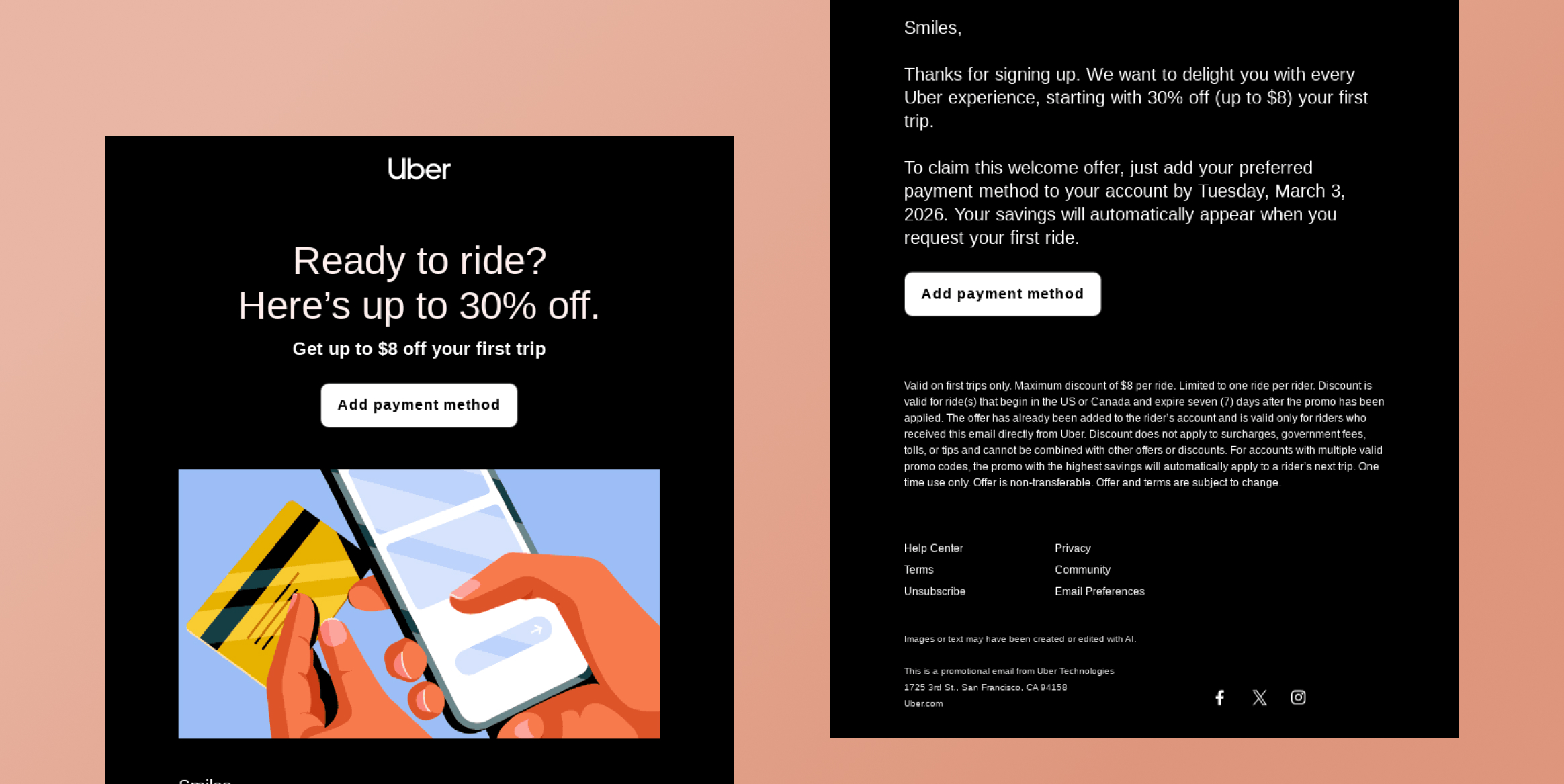
Why it works: Inactivity is a behavioral signal that can indicate declining engagement. Instead of sending a generic promotional email to an entire database, marketers can trigger a win-back message when a customer crosses a defined inactivity threshold.
The Uber example offers a related approach for encouraging an inactive user to complete a first ride, using a 30% discount of up to $8 as an incentive. The broader principle is to identify the missing action and use a timely, relevant message to encourage it. For established customers, this could mean highlighting new products, personalized recommendations, or an incentive based on past behavior.
Triggered Email Best Practices: How to Build an Effective Campaign
Effective triggered email campaigns depend on more than choosing an event and creating a message. Marketers need to decide what each campaign should accomplish, which customers should receive it, when it should arrive, and how it fits into the broader customer journey. These decisions help keep triggered emails relevant and timely while reducing unnecessary communication.
Define the Customer Outcome
Start by defining the outcome the campaign should influence. This might mean completing onboarding, making a first purchase, recovering an abandoned cart, increasing product adoption, encouraging a repeat purchase, or re-engaging an inactive customer. A specific outcome guides other campaign decisions and establishes how success should be measured.
The goal should extend beyond email engagement. For example, a cart campaign should ultimately be evaluated by recovered purchases rather than opens alone.
Choose the Right Trigger
Select a trigger that signals customer intent or a meaningful change in status. The trigger should have a clear relationship with the desired outcome. For example, cart abandonment is relevant to purchase recovery, while prolonged inactivity may indicate an opportunity for re-engagement.
Consider the strength of the signal, too. A product view may indicate weaker intent than adding that product to a cart. Decide whether one event is sufficient or whether multiple conditions should create the trigger.
Set Audience and Eligibility Rules
Not every customer who performs an action should automatically receive the same email. Define eligibility based on factors such as customer segment, purchase history, subscription status, previous engagement, or lifecycle stage.
Suppression and exit rules are equally important. Customers who have already completed the desired action or entered another relevant journey may need to be excluded. Clear rules reduce redundant communication and keep messages aligned with the customer’s current situation.
Determine Timing and Frequency
Consider how quickly the message should follow the trigger and how many messages the situation warrants. Some events call for immediate communication, while others benefit from a delay that gives customers time to act independently. Timing should reflect customer intent rather than an arbitrary schedule.
Frequency also matters. Multiple reminders can help when intent is strong, but repeated messages can become intrusive. Consider the customer’s overall communication volume when deciding how often to follow up.
Personalize the Experience
Decide which customer and event data can make the message more useful. Personalization can include products viewed, items left in a cart, purchase history, account status, loyalty information, or relevant recommendations.
Effective personalization reinforces why the email was triggered. A cart email should reflect the abandoned items, while a post-purchase message might recommend products related to the recent order. Avoid personalization that adds information without improving relevance.
Coordinate Across Customer Journeys
Triggered emails should work alongside other lifecycle campaigns and channels. Consider other emails, push notifications, SMS messages, or in-app communications the customer may receive around the same time. Establish priorities and suppression rules to prevent contradictory or repetitive messages.
This is particularly important when customers can qualify for multiple journeys. A recent purchaser, for example, may no longer need an abandoned-cart reminder related to the same product.
Build the Complete Trigger Logic
A triggered journey rarely consists of just an event followed by an email. Define what happens between the initial signal and the final customer action:
Trigger → Eligibility → Timing → Personalization → Message → Response → Branch, Suppression, or Exit
For example, adding an item to a cart might start a journey, but the customer should receive the reminder only if they remain eligible, have not completed the purchase, and have not entered another conflicting journey. Their response can then determine whether the journey ends or continues through another message or channel.
Test and Optimize
Triggered campaigns should evolve as customer behavior and business priorities change. Decide which variables are most important to test, such as trigger conditions, timing, frequency, messaging, personalization, or offers. Prioritize tests that could materially affect the campaign’s objective.
Evaluate performance against the original outcome. Opens and clicks can help diagnose engagement, but metrics such as purchases, activation, retention, or product usage provide a stronger indication of impact. Use these insights to refine the trigger, audience, timing, and content over time.
How to Measure Triggered Email Performance
Measuring triggered email performance requires looking beyond opens and clicks to determine whether messages influence meaningful customer and business outcomes.
Delivery and Engagement
Monitor delivery, bounce, spam complaint, open, and click rates to identify problems with reach or relevance. These metrics are useful diagnostic signals but should not be treated as the primary measure of success.
Trigger-to-Conversion Rate
Measure the percentage of recipients who complete the desired action after receiving a triggered email. Depending on the campaign, this could mean making a purchase, completing onboarding, upgrading a subscription, or returning to the product. This metric directly connects the trigger to its intended outcome.
Time to Action
Track how quickly customers complete the desired action after receiving the email. A shorter time may indicate that the message reached the customer at a relevant moment. Comparing response times can help marketers assess whether the campaign’s timing is appropriate.
Revenue or Customer Value
For revenue-focused campaigns, measure attributed purchases, revenue, average order value, or customer value generated after the trigger. This shows whether the campaign contributes meaningful financial results rather than simply generating engagement.
Retention and Repeat Engagement
For onboarding, re-engagement, or loyalty campaigns, measure outcomes such as retention, repeat purchases, product usage, or churn. These metrics reveal whether triggered emails contribute to lasting customer relationships.
Unsubscribe and Complaint Rate
Monitor unsubscribes and spam complaints for signs of excessive frequency, poor targeting, or irrelevant messaging. Rising rates can indicate that a triggered journey needs tighter eligibility or frequency controls.
Create Personalized Triggered Email Journeys With CleverTap
CleverTap is an AI-native customer engagement platform that brings customer data, analytics, AI decisioning, and omnichannel engagement into one system. For triggered email campaigns, this means marketers can use customer behavior and lifecycle context not only to determine when an email should be sent, but also who should receive it, what the message should contain, and what should happen next.
At the data layer, TesseractDB™ brings together real-time customer actions with historical behavior, profile attributes, and previous engagement data. Its extended historical lookback gives marketers more context than the latest event alone. A cart abandonment event, for example, can be evaluated alongside previous purchases, product affinity, engagement history, and other customer signals when defining audiences and personalizing the subsequent experience. CleverTap describes TesseractDB™ as its proprietary real-time engagement database, with up to 10 years of historical data available for deeper customer context.
CleverTap Journeys turns these signals into automated lifecycle flows. Marketers can build journeys around customer actions, inaction, dates, or other qualifying conditions, then use delays, conditional paths, goals, and engagement nodes to determine how the journey progresses. Triggered email can also work alongside push notifications, in-app messages, SMS, WhatsApp, and other channels rather than operating as an isolated campaign. For example, an abandoned-cart journey might begin with an email and change the next interaction depending on whether the customer completes the purchase or continues to remain inactive.
Email content can be personalized using user properties and event properties, while Liquid Tags allow marketers to introduce conditional content. Linked Content can bring external information into a message at send time, and catalogs and Recommendations can dynamically surface relevant products or content. CleverTap’s Recommendations capability can select and rank items for individual recipients at send time based on their behavior, preferences, and engagement history, allowing customers in the same campaign to receive different recommendations.
CleverAI™ adds another layer of intelligence beyond predefined trigger rules. Marketers define the business goal, strategy, and guardrails, while CleverAI™ combines context from TesseractDB™ with creation, decisioning, orchestration, and learning. The Tesseract Decisioning Engine can evaluate available actions against an individual’s current context and the marketer-defined goal, helping engagement move from simply responding to an event toward determining the more relevant next action for that customer. Each subsequent response can then become another signal for future decisions.
Marketers can then evaluate campaigns and journeys using engagement and conversion data rather than treating the send itself as the outcome. This creates a closed loop between customer signals, triggered engagement, customer response, and subsequent optimization.
Use CleverTap to create personalized triggered email journeys that respond to customer behavior and strengthen lifecycle engagement.
Move From Scheduled Campaigns to Triggered Engagement
Triggered emails help marketers deliver relevant messages based on customer behavior and intent rather than relying solely on fixed broadcast schedules. By responding to actions such as signups, purchases, inactivity, or cart abandonment, these emails can create more timely and personalized customer experiences.
Throughout the lifecycle, triggered campaigns can support onboarding, encourage engagement, recover potential sales, drive repeat purchases, and strengthen retention. Ultimately, event-driven email helps marketers deliver the right message at the right moment, making it a valuable part of an effective lifecycle marketing strategy.
Want to turn real-time customer signals into more relevant email journeys? CleverTap helps marketers trigger, personalize, and optimize emails based on customer behavior, lifecycle stage, and context. Schedule a demo.
Frequently Asked Questions
What Is an Example of a Triggered Email?
A welcome email sent after signup, an abandoned-cart reminder, a renewal notification, or a win-back email sent after a defined period of inactivity are all examples of triggered emails. Each message is initiated by a specific customer action, event, condition, or milestone.
What Is the Difference Between Triggered and Automated Emails?
Triggered emails are automated emails initiated by a specific customer event, behavior, condition, or milestone. Email automation is a broader category and can also include communications sent according to recurring schedules or other predefined rules.
Are Transactional Emails Triggered Emails?
Many transactional emails are triggered by customer or account events. An order confirmation, for example, is triggered by a completed purchase. However, triggered emails can also serve marketing and lifecycle objectives, such as recovering an abandoned cart or re-engaging an inactive customer.
What Events Can Trigger an Email?
Common email triggers include account signups, product views, cart abandonment, purchases, onboarding actions, periods of inactivity, subscription renewals, birthdays, loyalty milestones, profile changes, and other customer or account events.
Elevate Your Seasonal Email Campaigns
Don’t let your holiday campaigns get lost in overcrowded inboxes. Explore our complete collection of email blogss for Q4:
Drive pre-holiday engagement with Halloween Email Marketing Ideas.
Craft grateful messages with Thanksgiving Email Marketing Examples.
Maximize peak shopping days using Black Friday Email Marketing & Cyber Monday Emails.
End the year strong with Christmas Email Marketing Ideas & fresh December Email Newsletter Ideas.
Elevate Your Seasonal Email Campaigns
Don’t let your holiday campaigns get lost in overcrowded inboxes. Explore our complete collection of email blogs for Q4:
- Drive pre-holiday engagement with Halloween Email Marketing Ideas.
- Craft grateful messages with Thanksgiving Email Marketing Examples.
- Maximize peak shopping days using Black Friday Email Marketing & Cyber Monday Emails.
- End the year strong with Christmas Email Marketing Ideas & fresh December Email Newsletter Ideas.

Sagar Hatekar 
Leads product managementExpert in Marketing Analytics & Engagement platforms.
Free Customer Engagement Guides
Join our newsletter for actionable tips and proven strategies to grow your business and engage your customers.