









































Table of Contents
Categories
Most Popular

Interactive emails make it easier for subscribers to engage with content or complete actions without navigating away from their inbox. Instead of simply presenting text, images, or GIFs, these emails can let customers tap, swipe, answer questions, browse products, or provide feedback within the message. The goal, however, is not to add interactive elements simply to make an email more visually engaging.
Effective interactivity should remove unnecessary steps and help subscribers accomplish a specific goal more easily. Whether it helps a shopper find a product, a customer rates a purchase, or a subscriber responds to a survey, each interactive element should have a clear purpose.
What Is an Interactive Email?
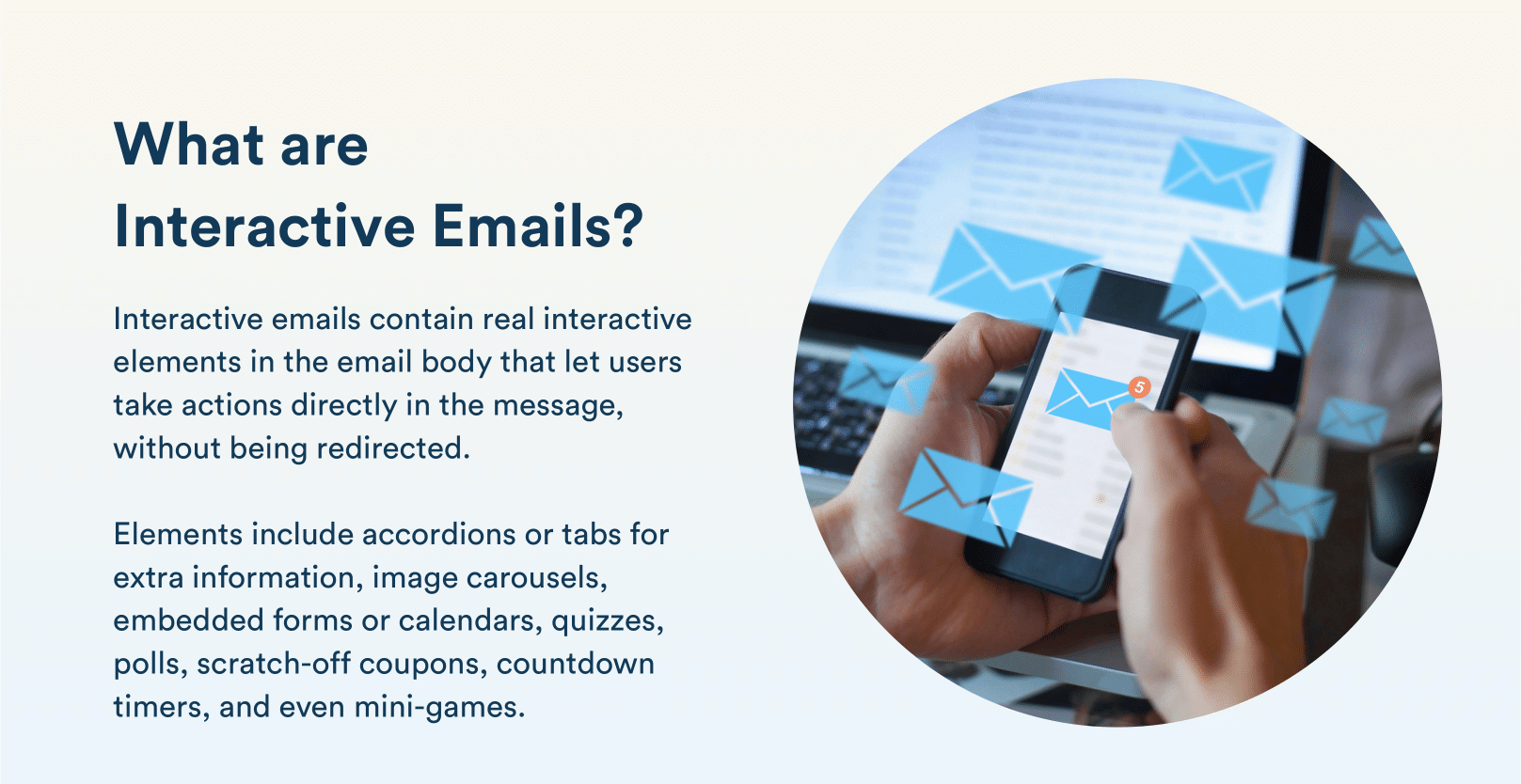
An interactive email is a marketing message that lets subscribers engage with content or complete an action directly within the email. Instead of requiring customers to click through to a website or landing page for every interaction, these marketing emails can support actions such as browsing products, answering questions, rating a purchase, or selecting an option within the inbox.
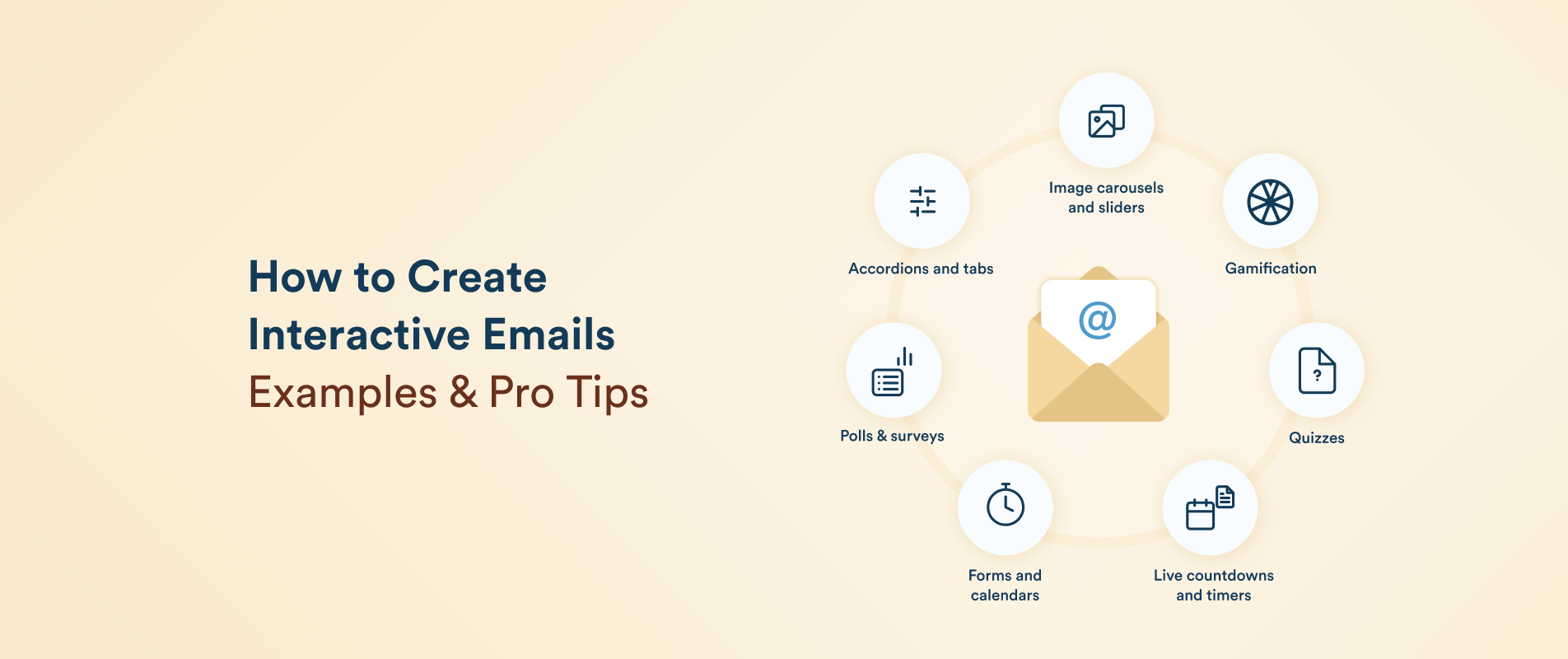
Common interactive elements include accordions, image carousels, polls, quizzes, forms, preference selectors, interactive calendars, hover or toggle effects, scratch-to-reveal offers, and gamified experiences. The purpose is to make relevant customer actions simpler and more convenient, not to add interactivity for visual appeal alone.
Interactive Email vs. Static Email
A static email primarily delivers information through text, images, GIFs, and links. While recipients can click a button or link, the main interaction usually takes place after they leave the email.
An interactive email, by contrast, allows subscribers to manipulate content or provide input within the message itself. For example, a static email might link to a survey, while an interactive version could let the subscriber answer the questions directly in the inbox. This reduces friction and creates a more engaging customer experience.
Interactive Email vs. AMP Email
Interactive email describes the experience, while Accelerated Mobile Pages (AMP) for Email is one technology that can enable it. AMP supports richer functionality, such as dynamic content, forms, carousels, and real-time information within supported email clients.
However, interactive emails do not always require AMP. Simpler interactions can use HTML and CSS, depending on email-client support. When using AMP, marketers should also provide a fallback version for subscribers whose email clients do not support it.
Benefits of Interactive Emails
Interactive emails can improve the customer experience when the interaction removes unnecessary steps or helps subscribers reach a useful outcome faster.
Reduce friction: Actions such as submitting feedback, selecting a preference, browsing products, or responding to an invitation can happen closer to the point of interest instead of requiring several additional clicks.
Increase active engagement: Interactive elements give subscribers something to do rather than only something to read. Polls, quizzes, product selectors, and games can encourage deeper participation when the interaction is relevant to the campaign.
Support product discovery: Carousels, catalogs, hotspots, and preference selectors can help customers explore multiple options without making the email excessively long.
Collect customer input: Surveys, quizzes, forms, and preference selectors can capture useful first-party and zero-party signals that marketers can use for segmentation, personalization, and future campaigns.
Improve lifecycle experiences: Interactive formats can support more than promotional email. They can simplify bookings, confirmations, feedback collection, post-purchase communication, recommendations, and other customer journey touchpoints.
12 Interactive Email Formats With Examples
Interactive emails can support different stages of the customer journey, from helping subscribers explore products to collecting feedback and reinforcing post-purchase engagement. The following formats and examples show how different types of interactivity can support specific marketing objectives.
1. Product Carousel
A product carousel lets subscribers browse multiple products or images within the email without requiring a long vertical layout. The Star Wars Outlaws launch email from Ubisoft is a useful example of using interactive product-style browsing to showcase content in a visually engaging format. This approach works particularly well for product launches, collections, seasonal campaigns, and recommendation emails where showing several options is more useful than promoting a single item.
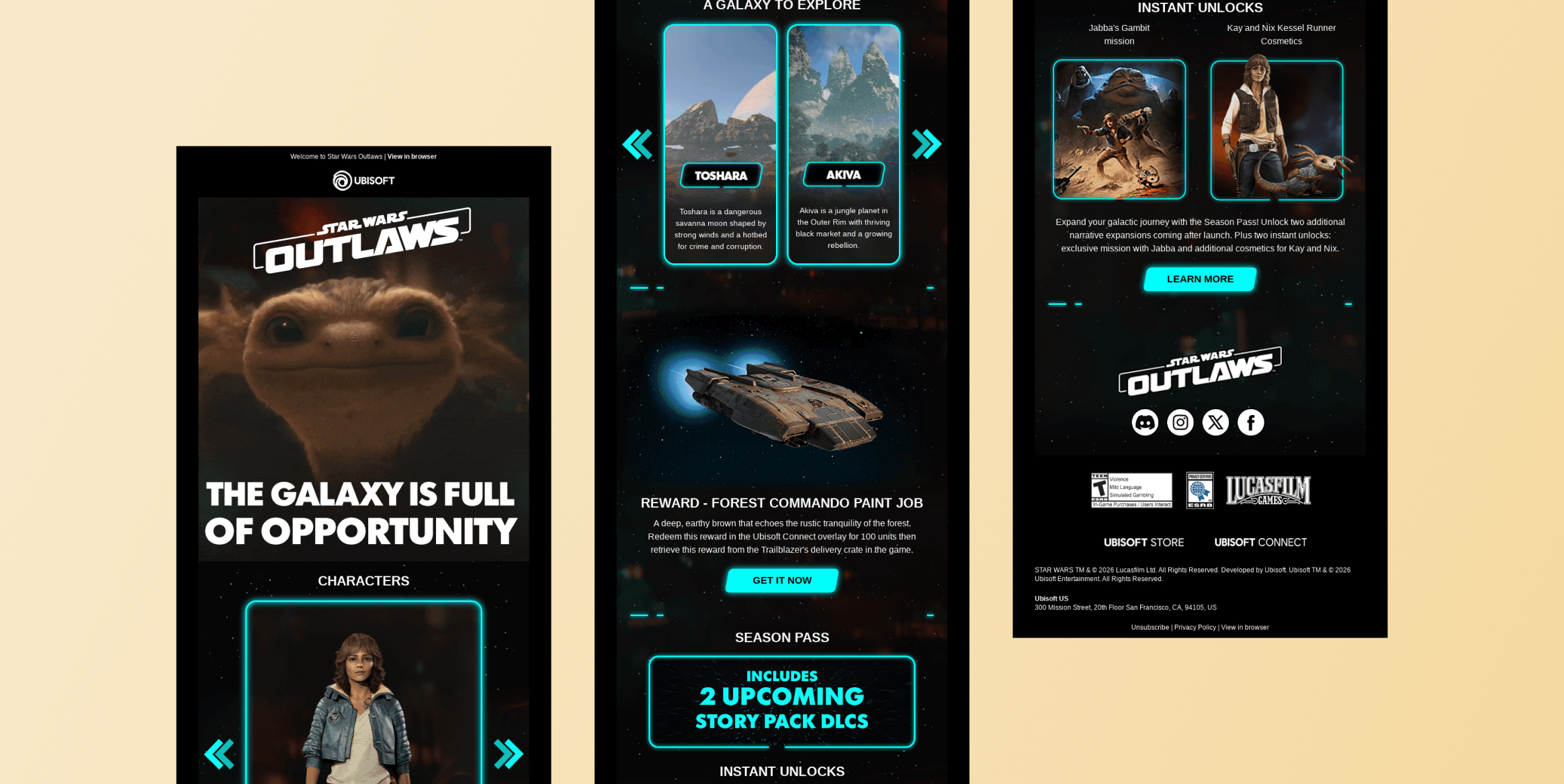
The main advantage is discovery, as subscribers can explore multiple options while remaining in the email. Marketers can make each item actionable by linking products or content to relevant landing pages. Carousels are most effective when the number of choices remains manageable, and the interaction has a clear next step.
2. Interactive Product Demo or Toggle
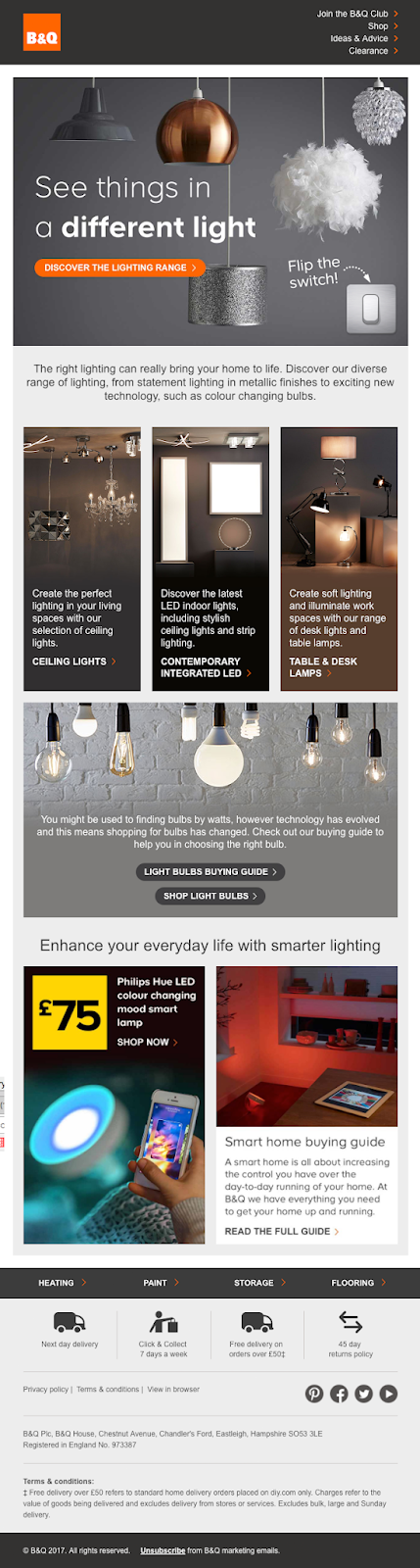
Interactive controls can also let subscribers experience a product feature rather than simply read about it. B&Q used this approach in an email that allowed recipients to interact with a virtual light switch. Tapping the switch changed the lamp from off to on within the email, turning a basic product promotion into a simple demonstration.
This format works particularly well when a product has a feature that can be demonstrated visually, such as lighting, color changes, product configurations, or before-and-after effects. Instead of describing the feature, the email lets the customer experience it. Keep the interaction simple and closely tied to the product benefit so the novelty supports product understanding rather than distracting from it.

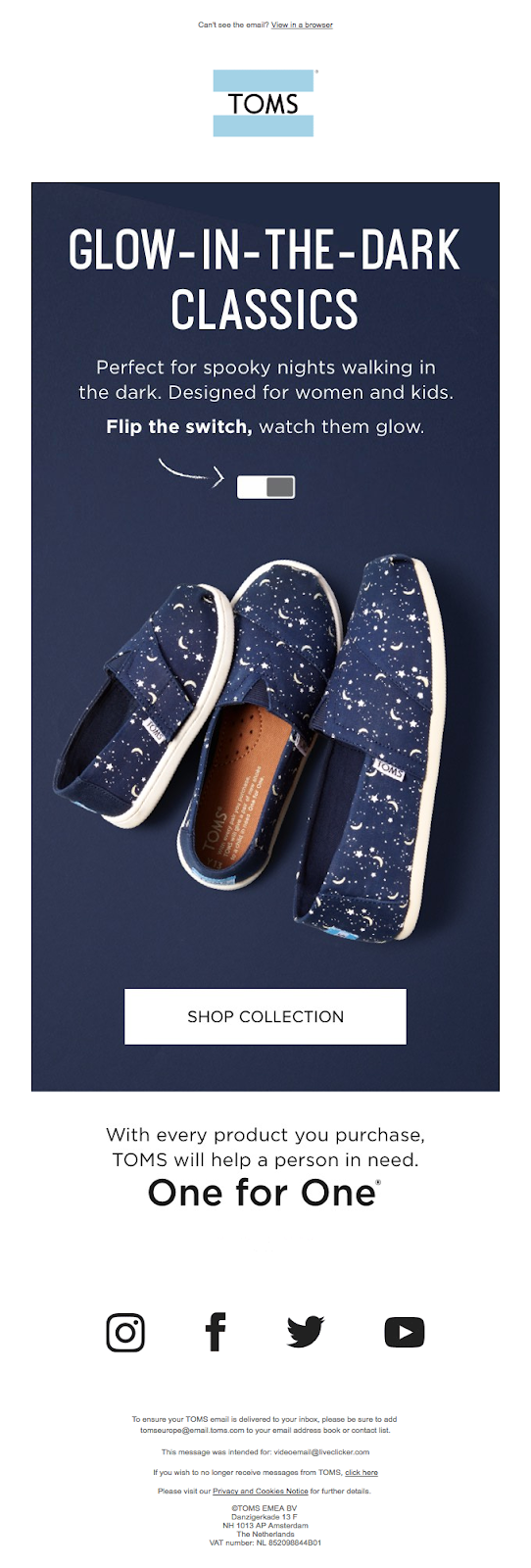
A similar approach was used by TOMS, which allowed subscribers to toggle a visual effect to see how its glow-in-the-dark shoes appeared in different conditions.

3. Interactive Image Hotspots
Hotspots let subscribers interact with specific areas of an image to reveal additional information or actions. Nike used clickable areas within a product image so recipients could explore individual products and access more information without crowding the email with multiple visible buttons.
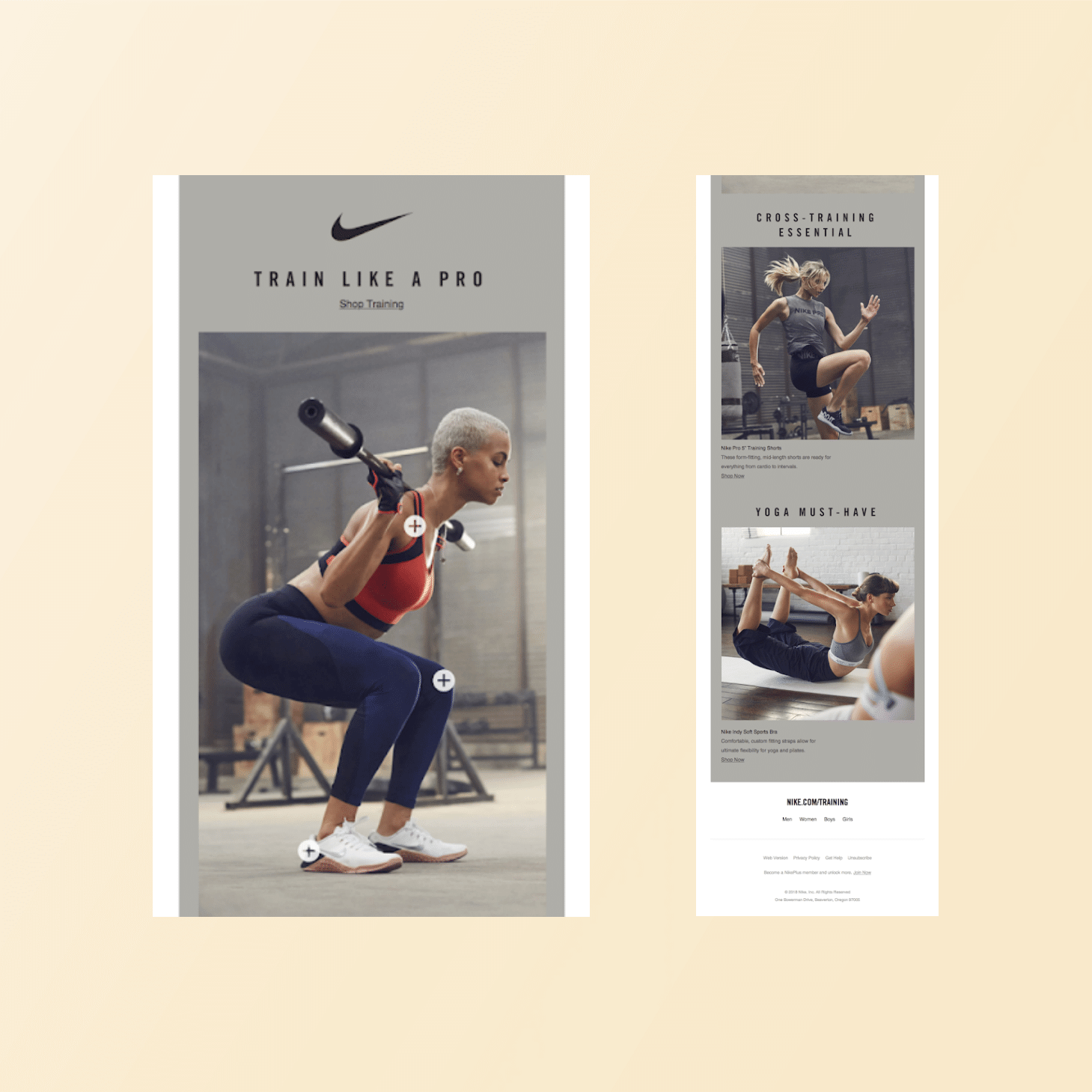
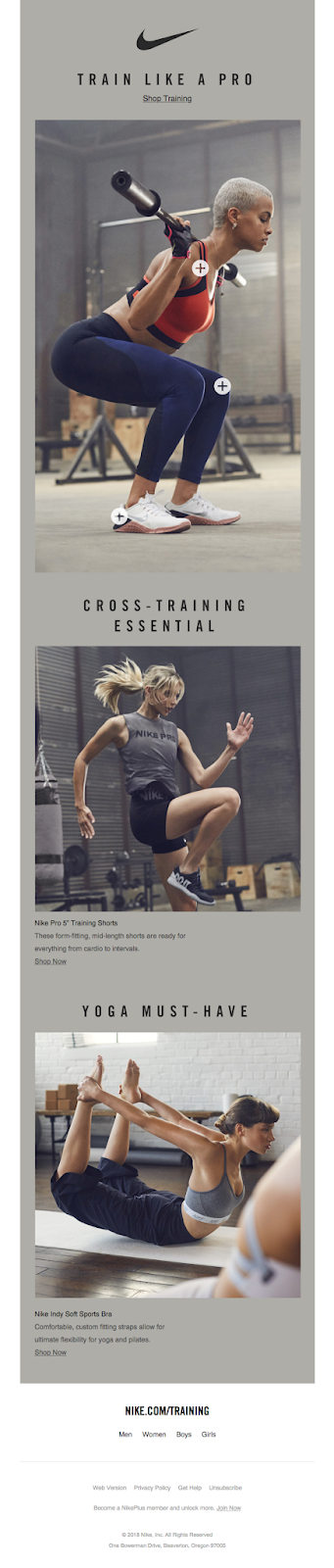
This approach can be useful for product collections, lookbooks, room layouts, travel content, or other campaigns where several items appear within one visual. Hotspots keep the design clean while allowing subscribers to choose what they want to explore. Make the interactive areas intuitive enough that customers understand where they can tap or click.
4. In-Email Survey or Poll
An in-email poll allows subscribers to share an opinion without being sent to a separate survey page. Burger King’s “What will the next Whopper by You be?” email demonstrates how a brand can turn product ideation into an engagement opportunity by inviting customers to participate in a choice.
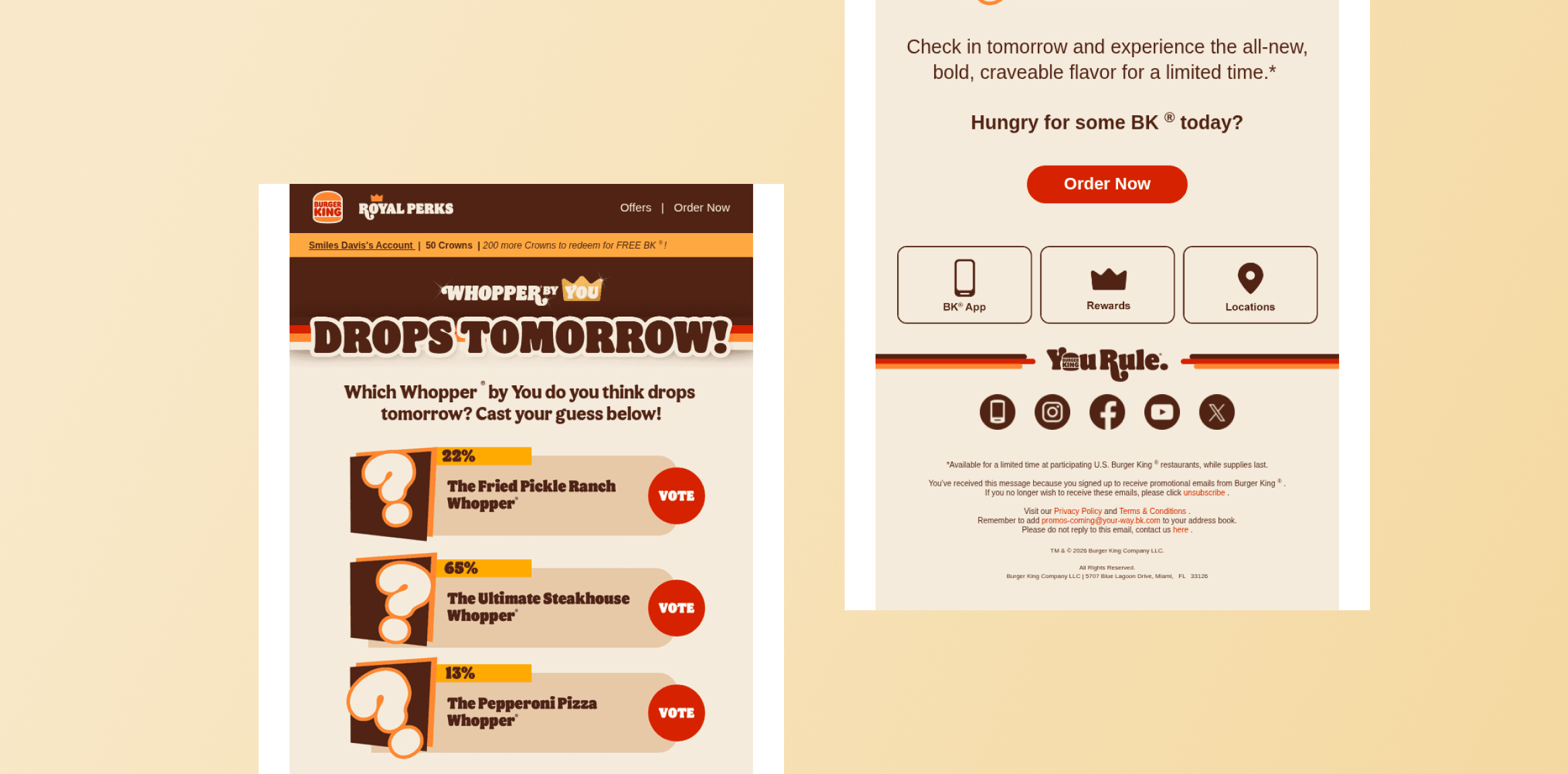
This format is useful when marketers want quick feedback, preference data, or audience participation. A short poll can also make promotional emails feel more participatory. Keep the number of questions low and make the value of responding clear. Poll responses can provide useful signals for future content, product decisions, segmentation, or personalization.
5. Feedback or Rating Form
A feedback or rating interaction gives customers a simple way to respond after an experience. Graza’s feedback email demonstrates how a dedicated request for customer input can create a direct feedback loop.
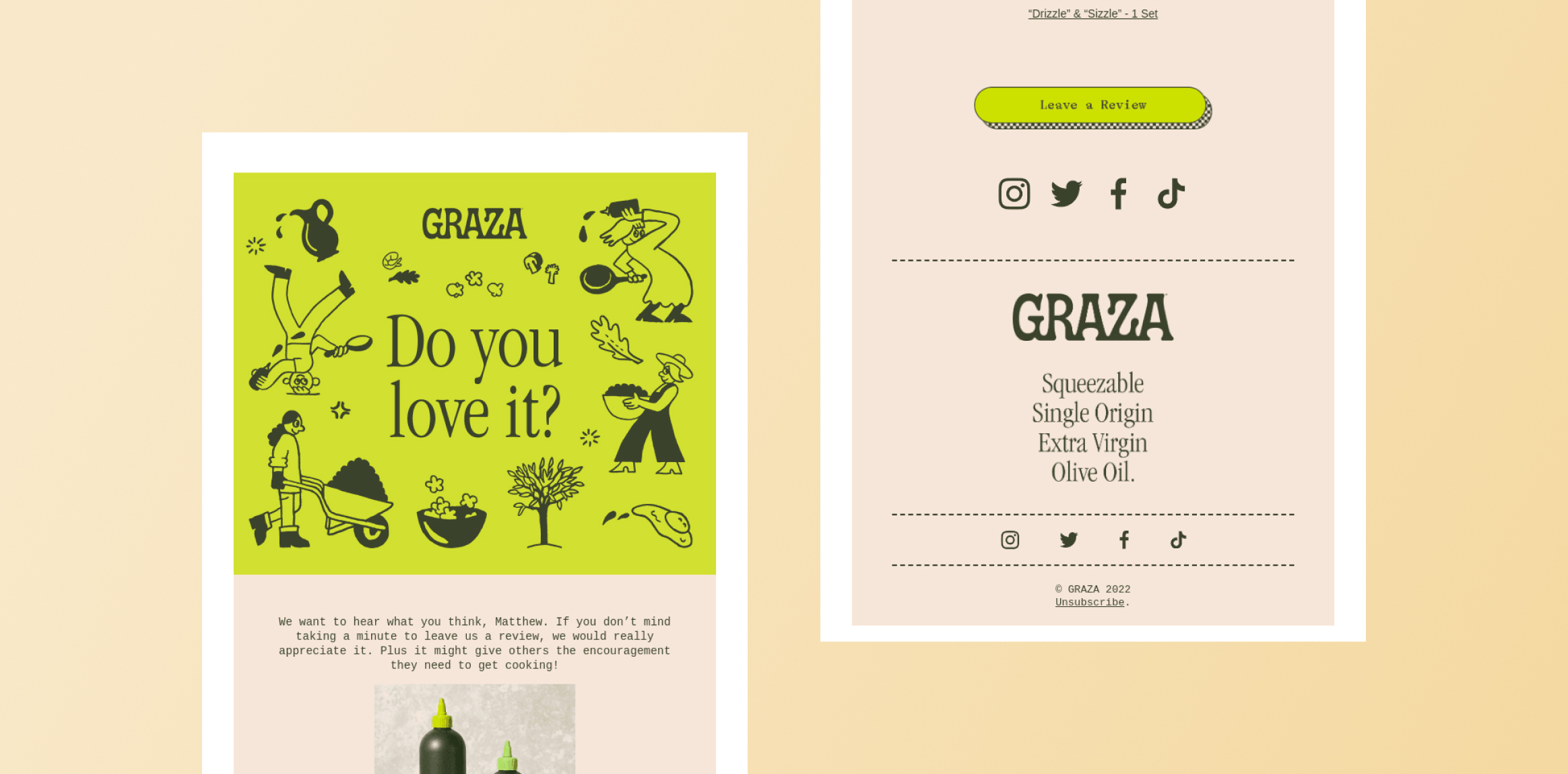
This format is particularly useful after purchases, customer service interactions, deliveries, or product experiences. Asking for a rating directly in the email can reduce the friction associated with opening a separate form. Marketers can use responses to identify satisfaction trends, uncover issues, and segment customers for appropriate follow-up. The interaction should be short and focused on one clear question or feedback objective.
6. Quiz or Preference Selector
A quiz turns an email from a message into a guided discovery experience. Xumo’s “Faithful or Traitor?” trivia game shows how a quiz-style interaction can use entertainment to encourage subscribers to participate.
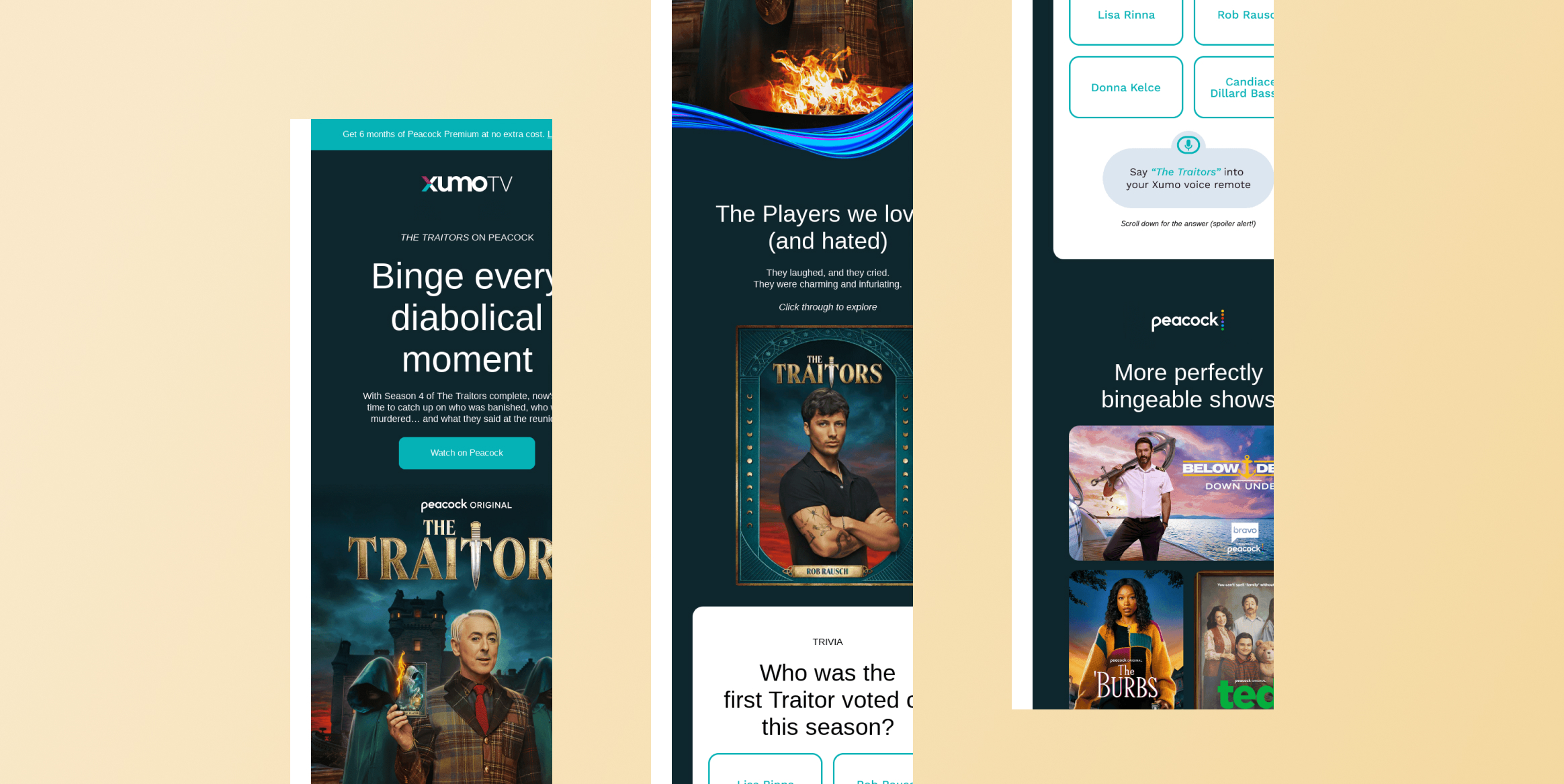
Quizzes are useful for entertainment brands, publishers, retailers, and businesses that want to learn about customer preferences while keeping engagement high. A preference selector can also help subscribers identify products, content, or recommendations that match their interests. The strongest quizzes connect the result to a meaningful next action, such as watching a show, exploring a product, or receiving tailored recommendations.
7. Interactive Product Catalog
An interactive product catalog allows subscribers to explore several offerings within one email rather than receiving separate messages for each item. McDonald’s McCafé email provides an example of presenting products in a way that encourages recipients to browse and consider their options.
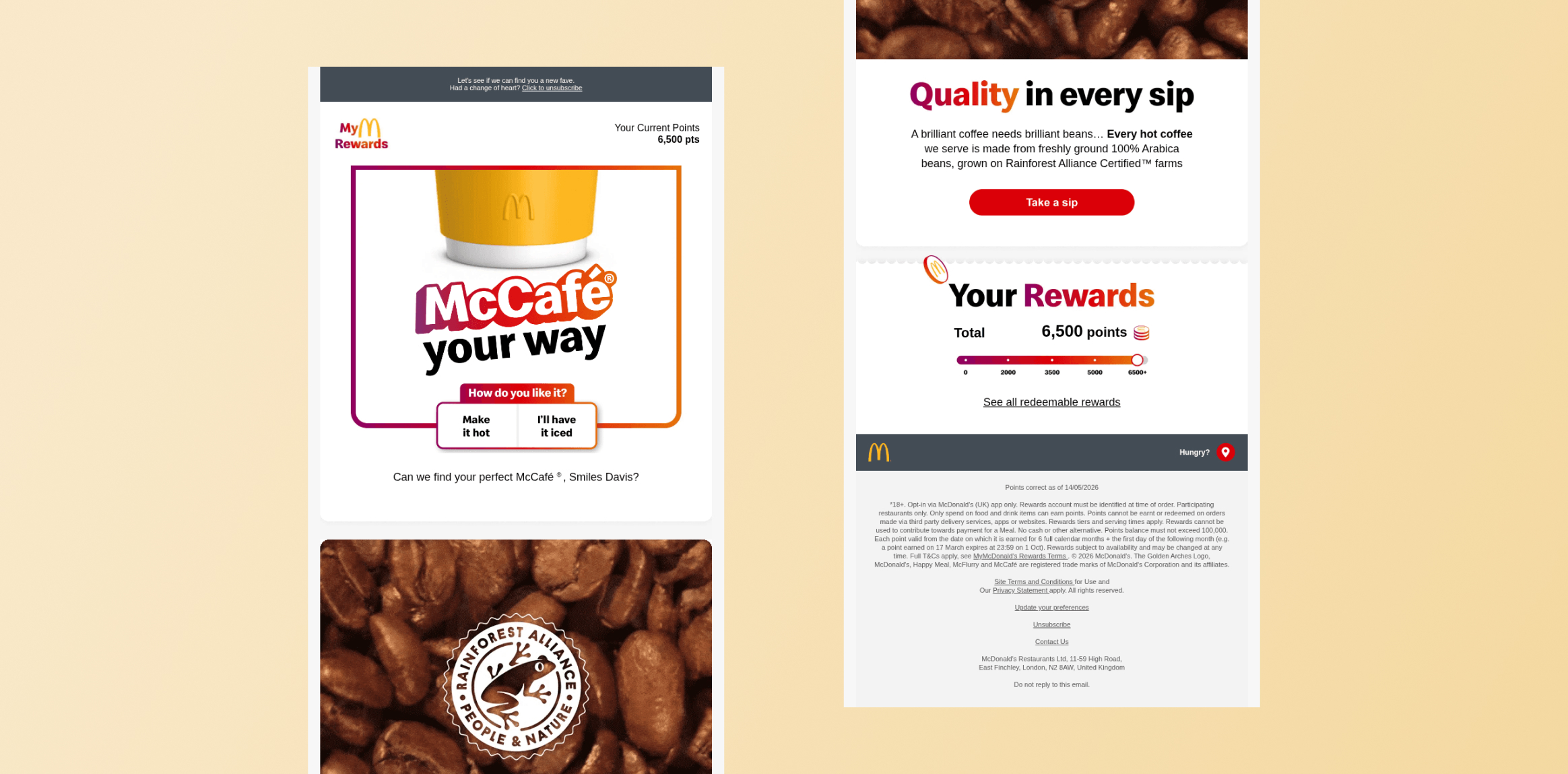
This format works well for menus, collections, seasonal offerings, and product discovery campaigns. It can be particularly useful when customers need to compare several choices before deciding what they want. Personalization can make the experience more relevant by prioritizing products based on location, preferences, purchase history, or previous engagement.
8. Add-to-Cart or Shoppable Email
A shoppable email shortens the path between product discovery and purchase. Ralph Lauren’s “Finish Your Order” email illustrates how an email can reconnect with a customer who has already shown purchase intent and direct them back toward completing the transaction.
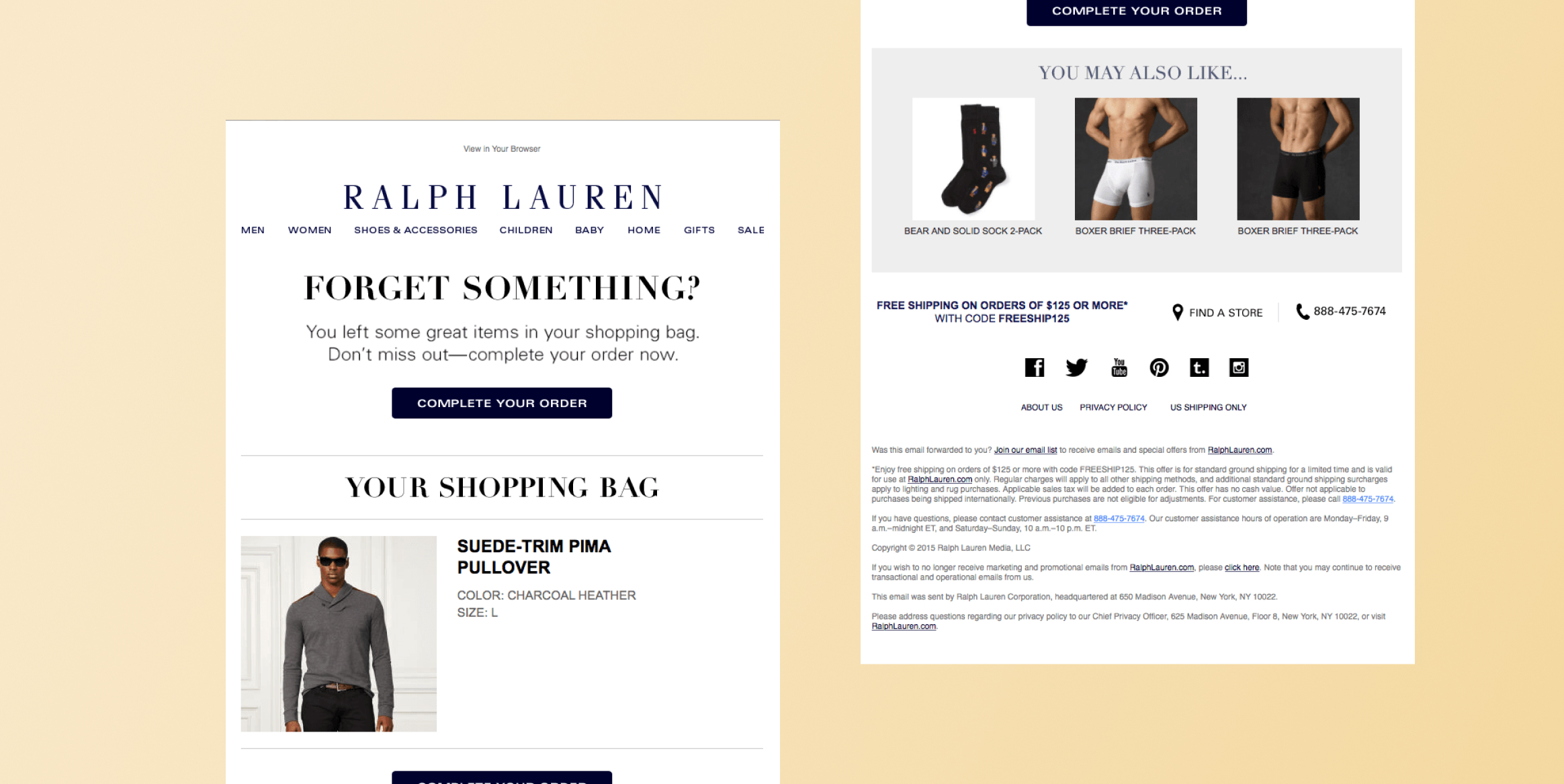
This approach is especially useful for cart abandonment, replenishment, product recommendations, and limited-time offers. The interaction should make the next step obvious and minimize unnecessary navigation. Because the customer has already demonstrated interest, the email can focus on removing friction rather than introducing extensive new information. Product details, pricing, and a prominent purchase action can help move the customer closer to conversion.
9. Appointment or Event Booking
Interactive email can also simplify scheduling and event participation. An appointment or RSVP experience can let recipients respond to an invitation or select an available option without navigating through multiple pages.
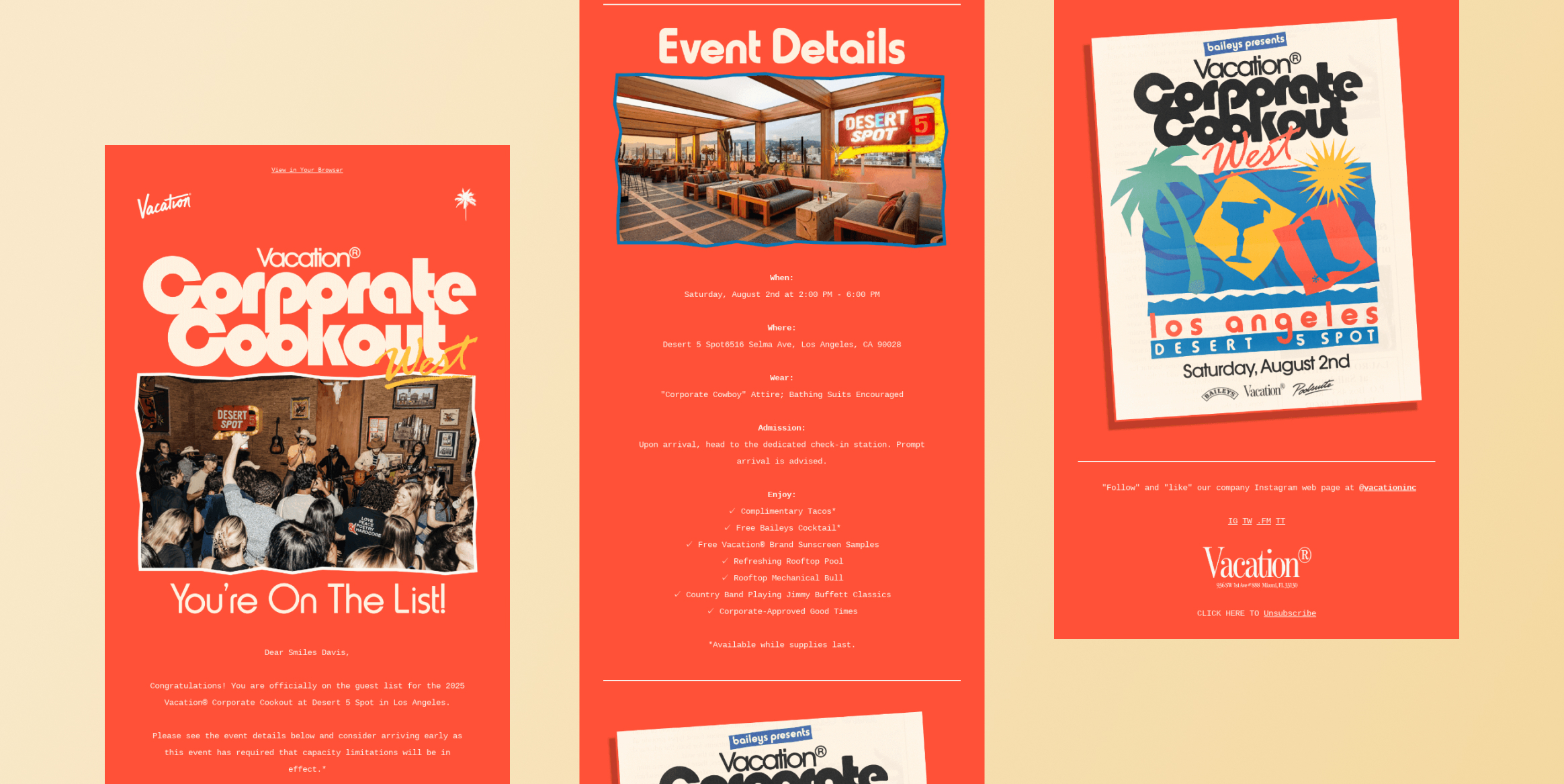
The Corporate Cookout West RSVP example shows how email can support event-related engagement beyond simply announcing an event. This format is useful for webinars, appointments, classes, conferences, launches, and private events. The key benefit is convenience, as subscribers can act while the invitation is still top of mind. Confirmation details should remain clear, and the experience should provide an obvious indication that the action was completed successfully.
10. Scratch-to-Reveal Offer
Interactive reveal mechanics can make promotional offers feel more participatory. Bose used a digital scratch-off experience that allowed recipients to reveal a promotional offer by interacting with the email rather than simply displaying the discount immediately.
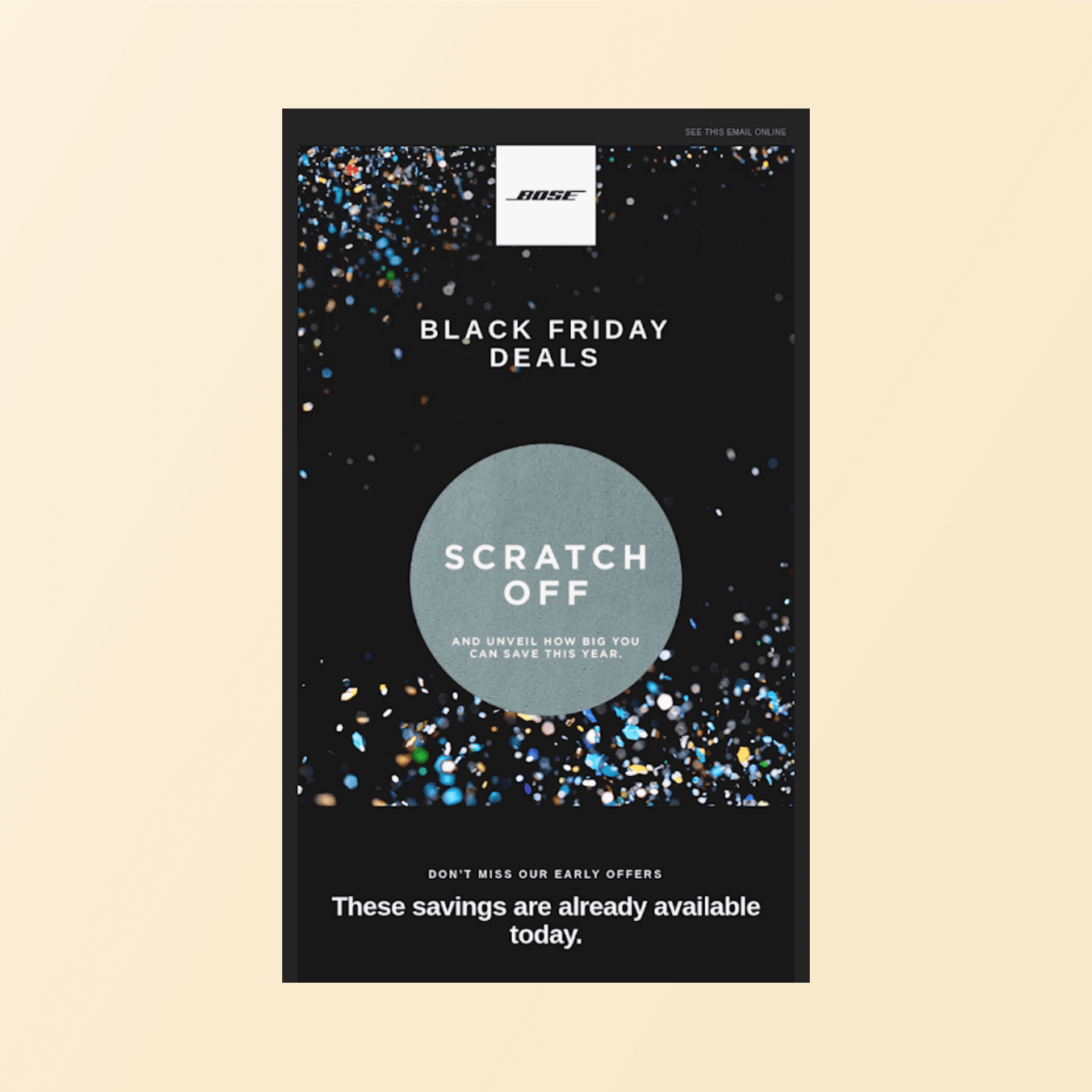
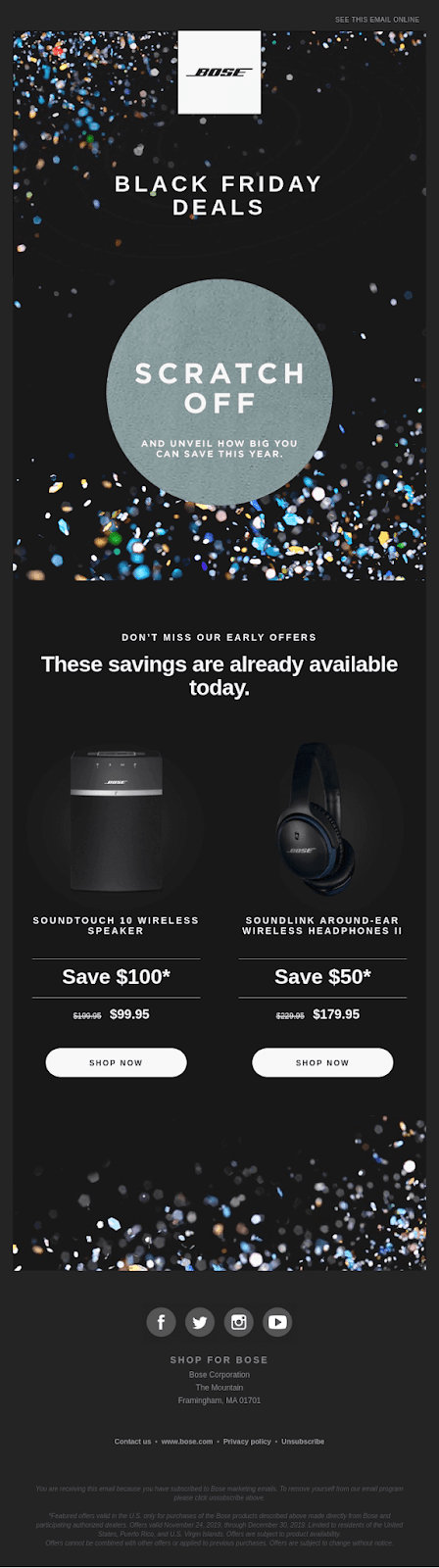
This format works well for seasonal promotions, loyalty campaigns, product launches, and limited-time offers. The interaction creates anticipation, but the reward should still be worthwhile and easy to redeem. The reveal itself should remain quick because making customers work too hard for an offer can add friction instead of engagement.
11. Gamified Email Experience
Gamification adds an element of play to an email, encouraging subscribers to interact for entertainment, discovery, or a reward. Echo’s “Let’s play a game!” example demonstrates how a simple game can make an email feel more like an experience than a conventional promotional message.
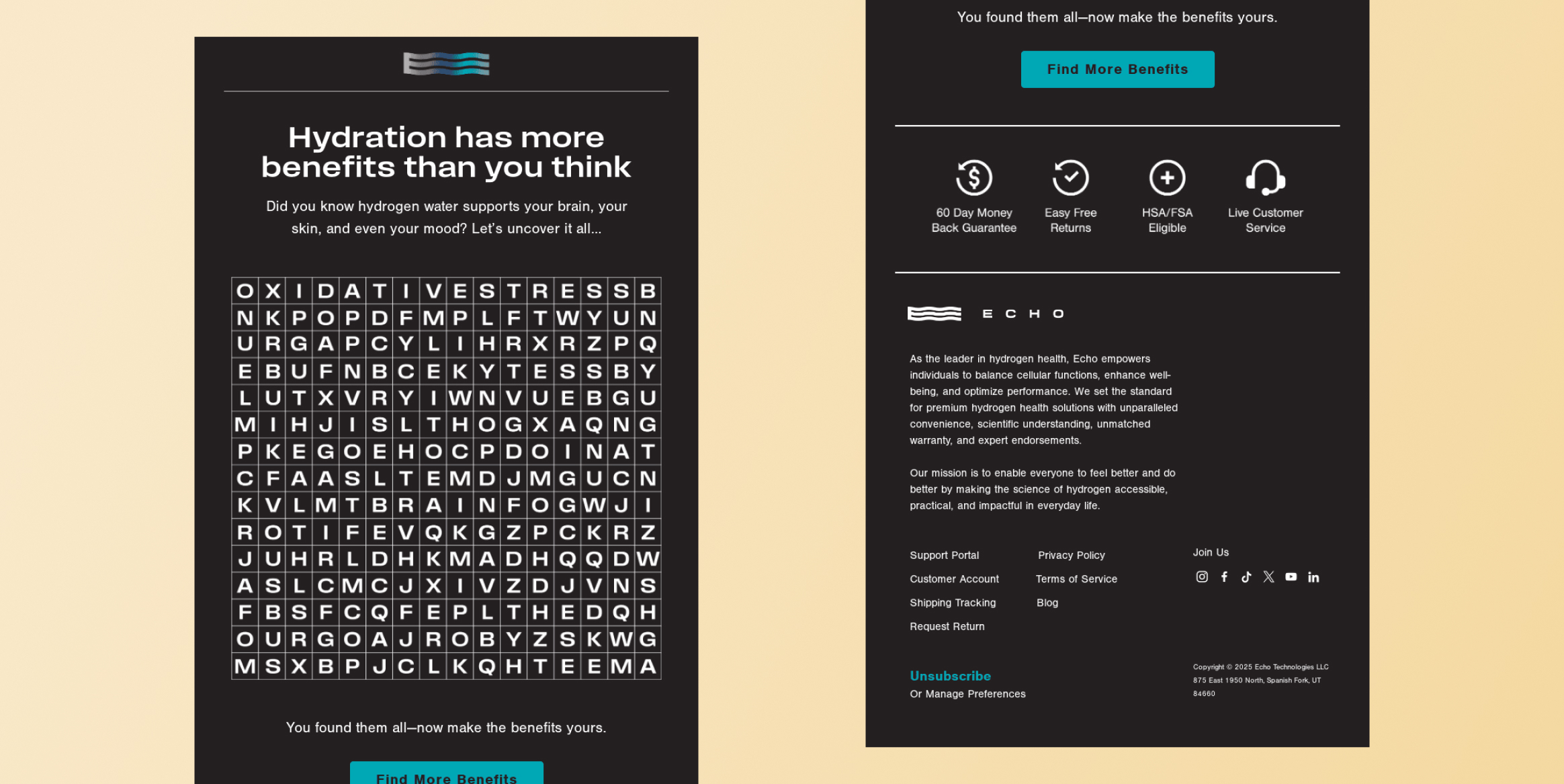
Gamified emails can work well for launches, loyalty campaigns, seasonal promotions, contests, and re-engagement efforts. However, the game should have a clear purpose. A short interaction tied to a reward, offer, or brand message is more useful than a complex game that distracts from the campaign objective. The experience should also remain optional and easy to understand.
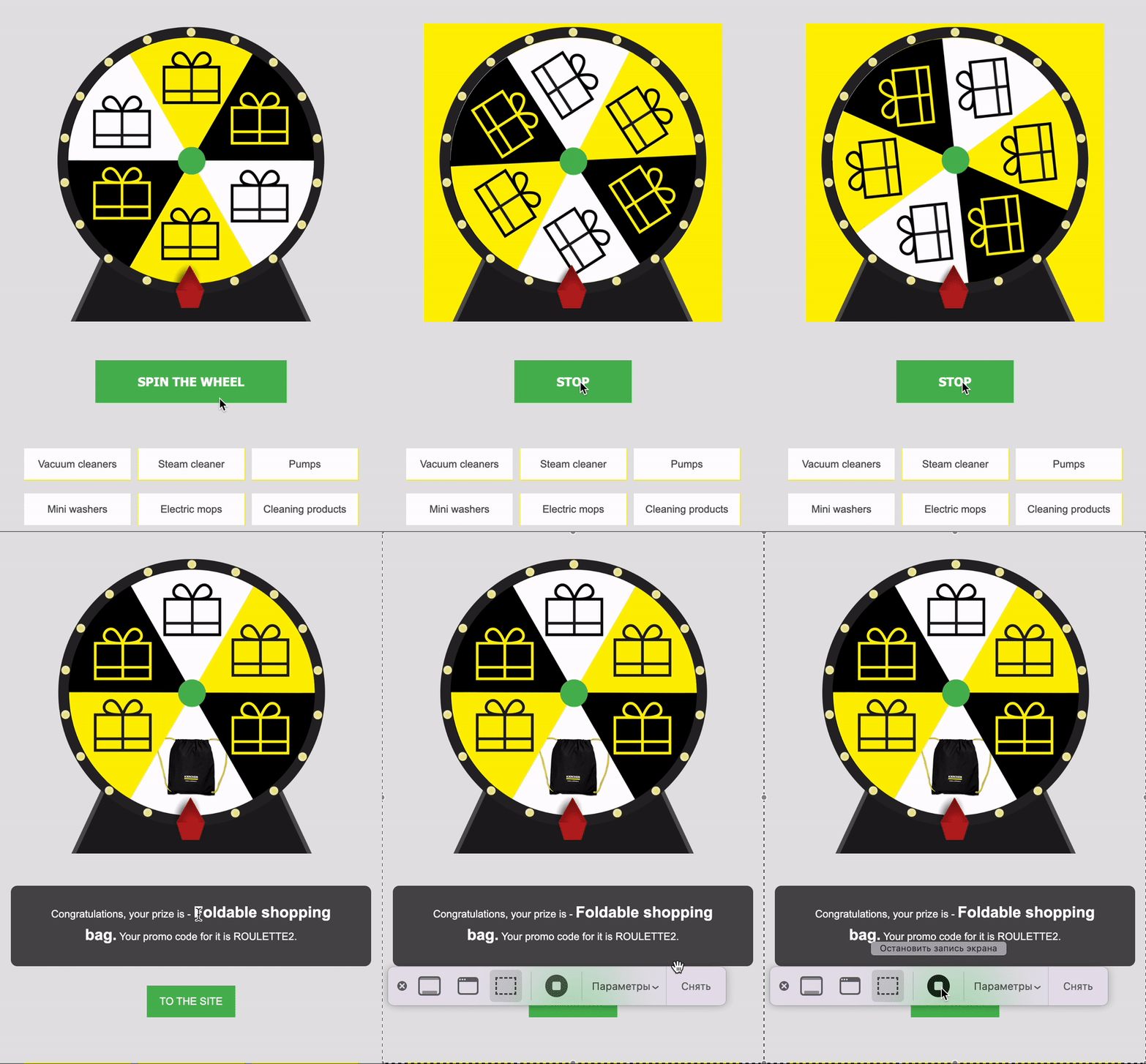
Another approach is reward-based gamification. Karcher used a spin-the-wheel interaction that allowed subscribers to play for discounts or prizes directly from the email. Unlike a game designed primarily for entertainment, this format connects the interaction with an immediate incentive. Spin-to-win mechanics can work well for loyalty, seasonal, and promotional campaigns, provided the reward and redemption process remain clear.
12. Live Order, Inventory, or Pricing Update
Interactive and dynamic email experiences can make transactional messages more useful by surfacing timely information. The Polaroid “Thanks for your order!” example shows how a post-purchase email can provide relevant order information, while receipt-style experiences can organize purchase details in a way that helps customers quickly understand their transaction.
These experiences are particularly valuable for retention because they continue the customer relationship after conversion. Dynamic order status, delivery information, inventory availability, or current pricing can give subscribers information they are likely to need without requiring another search. The broader opportunity is to turn transactional emails into useful customer touchpoints while keeping the primary information easy to find.
Also read: What Are Triggered Emails? A Guide for Marketers
How to Create an Interactive Email
Creating an interactive email starts with a clear customer goal and ends with testing whether the experience makes that goal easier to achieve. The process involves choosing the right interaction, accounting for email-client limitations, personalizing relevant content, and measuring how subscribers respond.
1. Define the Customer Action
Start by identifying the action you want subscribers to take. That might be browsing products, submitting feedback, confirming attendance, booking an appointment, or finding a relevant offer.
The interaction should make that action easier rather than introduce another step. For example, a poll can help collect quick feedback directly in the inbox, while a product carousel can let shoppers explore several options without first visiting a category page. Avoid adding interactive features solely for novelty. Each element should serve a specific customer or campaign goal.
2. Choose the Right Interactive Element
Match the format to the intended action. Carousels can showcase multiple products or images, while accordions can organize detailed information without making the email unnecessarily long. Polls, quizzes, and forms can collect customer input, and booking or RSVP components can simplify scheduling and event registration.
Consider how much effort the interaction requires from the subscriber. A one-question poll may generate more responses than a lengthy questionnaire. Similarly, an interactive product display should make discovery easier, not overwhelm the recipient with choices.
3. Decide Whether AMP Is Necessary
Next, determine whether the experience requires AMP for Email. Some basic interactive effects can be created with HTML and CSS, while richer experiences, such as dynamic forms, live information, and certain in-email actions, may require AMP.
AMP support varies across email clients, so evaluate whether the additional functionality justifies the production requirements for your audience. If you use AMP, make sure subscribers on unsupported clients can still complete the intended action through a fallback experience.
AMP email also comes with sender and authentication requirements. Make sure your sending domain is properly configured and confirm any AMP-specific registration requirements before building the campaign around functionality that may not be available to all recipients.
4. Build the Email Experience
Once you have selected the format, build the email using your email marketing platform or customer engagement platform. Platforms with prebuilt interactive components can simplify production by allowing marketers to add elements such as forms, carousels, or accordions without developing them from scratch.
Keep the experience focused and intuitive. Use clear calls to action, obvious visual cues, and a mobile-friendly layout. Subscribers should immediately understand what they can interact with and what will happen when they do.
5. Personalize the Content
Use relevant customer data to make the interaction more useful. Personalization can extend beyond inserting a subscriber’s name. Product recommendations, offers, questions, or content can reflect browsing behavior, purchase history, preferences, lifecycle stage, or other customer attributes.
For example, a retailer could populate an interactive product module with items related to a customer’s previous purchases. Responses collected through a poll, quiz, or preference selector can also become useful signals for later segmentation and follow-up campaigns. Personalize only when the available data meaningfully improves the experience.
6. Create a Fallback Version
Not every email client will display interactive elements in the same way. Create a static fallback that preserves the campaign’s core message and action.
If an embedded poll is unavailable, for example, the fallback could direct subscribers to a web-based survey. If a carousel cannot render, it could display selected products as static images and links. The fallback should remain a complete, usable email rather than feel like a reduced or broken version of the campaign. Do not make an interactive component the only way to access the campaign’s primary action.
7. Test Across Email Clients and Devices
Before launch, test both the interactive and fallback experiences across the email clients and devices your audience commonly uses. Check that interactive elements work as expected, fallback content appears correctly, and layouts remain usable on different screen sizes.
Also review accessibility, dark mode, links, load time, and the clarity of calls to action. Testing tools and real inbox tests can help identify rendering or functionality issues before the campaign reaches subscribers.
8. Launch and Optimize
After launch, measure whether interactivity helped subscribers complete the intended action. Track metrics tied to the campaign goal, such as poll responses, form completions, product interactions, bookings, click-through rates, or conversions.
Compare results with previous campaigns or a static control when possible. Use those insights to refine the format, content, targeting, and level of interaction in future campaigns.
Interactive Email Best Practices and Limitations
Interactive emails can make customer journeys more convenient, but their success depends on how thoughtfully the experience is designed. Keep the following practical considerations in mind before adding interactive elements to a campaign.
1. Keep the Interaction Purposeful
Every interactive element should support a specific customer or campaign goal. Use a poll to collect feedback, a carousel to help customers browse products, or a selector to simplify choices. Avoid adding features simply because they look engaging. One or two useful interactions are often more effective than an email crowded with unnecessary elements.
2. Make the Experience Easy to Understand
Subscribers should immediately know how to interact with the email. Use clear labels, familiar calls to action, and visual cues such as arrows or instructions where needed. Keep the primary call to action visible even when the interactive element is optional. Subscribers should not have to complete or figure out an interaction before they can take the campaign’s main action.
3. Prioritize Mobile and Accessibility
Design interactive emails for smaller screens and touch-based interactions. Keep content easy to scan and make controls large enough to use comfortably. Accessibility should also be considered from the start, with descriptive alt text, readable typography, sufficient contrast, and appropriate support for assistive technologies.
Keep interactive assets lightweight enough to load reliably on mobile connections. An interaction that takes too long to render can create more friction than the feature removes.
4. Protect Deliverability
Interactive functionality should not come at the expense of inbox placement. Maintain proper email authentication, use permission-based lists, and monitor bounces, spam complaints, and sender reputation.
5. Plan for Limited Client Support
Email-client support varies, so not every subscriber will experience the same level of interactivity. AMP emails can support forms, carousels, accordions, selectors, dynamic content, and other inbox interactions, but marketers must account for clients that do not support these features. Consider audience and client usage when deciding whether richer functionality is worthwhile.
6. Maintain a Functional Fallback
Always provide a static version that communicates the same core message and preserves the primary call to action. For example, an interactive product carousel could become a static product grid, while an embedded survey could link to a web form. The fallback should remain useful on unsupported clients and forwarded emails.
7. Avoid Excessive Interaction
More interactivity does not necessarily create more engagement. Too many moving parts can distract subscribers from the main action or make the email difficult to navigate. Keep the experience focused, short, and relevant to the customer goal. If an interactive feature does not make the experience easier or more useful, remove it.
How to Measure Interactive Email Performance
Measure interactive email performance by looking beyond engagement to determine whether the experience helps subscribers complete the intended action more easily. Compare interactive campaigns with relevant benchmarks or a standard email version to identify whether the added functionality reduces friction and improves outcomes.
1. Interaction Rate
Interaction rate shows how many recipients used the interactive element.
Formula: (Recipients who interacted ÷ Recipients who received the email) × 100
A low rate may indicate that the feature is difficult to find, unclear, or not relevant to the audience.
2. Completion or Submission Rate
For forms, quizzes, polls, or other multi-step interactions, measure how many users completed the action after starting it.
Formula: (Completed interactions ÷ Started interactions) × 100
A low completion rate can reveal unnecessary steps or an overly complex experience.
3. Click and Conversion Rate
Track whether interactivity leads to meaningful downstream actions, such as site visits, purchases, or sign-ups.
Click-through rate = (Unique clicks ÷ Delivered emails) × 100
Conversion rate = (Conversions attributed to the email ÷ Delivered emails) × 100
Compare these results with standard campaigns to assess whether interactivity improves outcomes.
4. Time to Action
Measure how quickly subscribers complete the intended action after opening or interacting with the email. A shorter time can indicate a lower-friction experience, provided the action remains meaningful.
5. Revenue or Customer Value
For revenue-generating campaigns, measure sales or customer value attributable to the email.
Revenue per recipient = Attributed revenue ÷ Delivered emails
Compare revenue or average order value with similar noninteractive campaigns.
6. Unsubscribe and Complaint Rate
Monitor negative signals to ensure interactivity is not creating frustration.
Unsubscribe rate = (Unsubscribes ÷ Delivered emails) × 100
Complaint rate = (Spam complaints ÷ Delivered emails) × 100
Rising rates may indicate that the experience is irrelevant, confusing, or poorly supported.
Create Interactive Email Experiences With CleverTap
CleverTap gives marketers the tools to build interactive emails and connect them with broader customer engagement strategies.
- AMP for email: CleverTap supports AMP-powered email experiences that let subscribers interact with content directly in supported inboxes, reducing the need to send them to a separate webpage.
- No-code and HTML email editors: Marketers can use no-code tools to create interactive campaigns more efficiently, while HTML editing options provide greater control when customized email experiences are required.
- Forms, quizzes, carousels, and dynamic content: Prebuilt interactive formats can help marketers collect feedback, guide product discovery, showcase multiple items, or deliver changing content within the inbox.
- Live pricing and shopping experiences: Interactive emails can support richer commerce experiences, allowing customers to explore products and access timely pricing or shopping information without immediately leaving the email.
- Customer profile and behavioral personalization: Use customer attributes and behavioral signals to tailor products, content, offers, and interactive elements to individual subscribers. Responses and interactions can also become signals for subsequent segmentation, personalization, and lifecycle messaging.
- Segmentation: Create audience groups based on characteristics, preferences, behaviors, or lifecycle stages, then deliver interactive experiences that are relevant to each segment.
- Triggered email campaigns: Send interactive emails in response to customer events, such as sign-ups, product views, purchases, or cart abandonment, so the message reaches subscribers when it is most relevant.
- Omnichannel Journeys: Use email interactions as part of broader customer journeys. A response, purchase signal, or other customer action can inform what message or channel follows, including email, push notifications, SMS, or other supported channels.
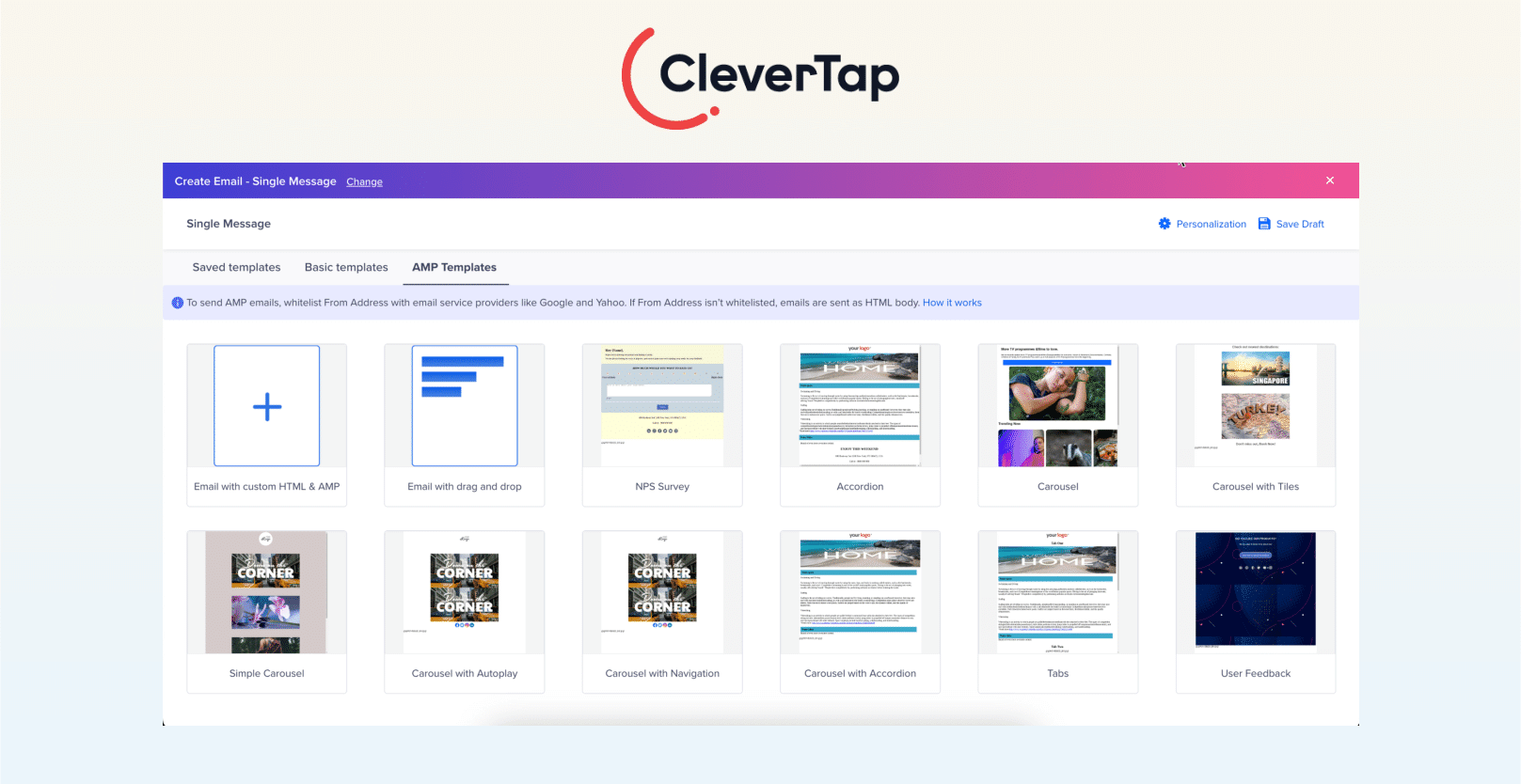
CleverTap also supports testing and email analytics, helping marketers evaluate engagement, conversions, and downstream behavior. These insights can show which interactive experiences perform best and inform future campaign decisions. By combining interactive email creation with personalization, segmentation, automation, and measurement, CleverTap helps marketers make inbox interactions part of a connected lifecycle strategy.
Use CleverTap to create personalized, interactive email experiences that reduce friction and drive meaningful customer action.
Build Interactive Emails That Drive Customer Engagement
Interactive emails can improve engagement and conversion when they make a useful customer action easier to complete. The most successful campaigns center each design around a useful subscriber action like product discovery, feedback, or booking and complement it with careful testing, robust fallback content, and data-driven measurement.
By prioritizing simplicity, mobile-friendly design, and accessibility, you can use elements like carousels, forms, and games to meet customer needs without adding friction. When executed thoughtfully, interactive emails turn the inbox into a high-impact channel and platforms like CleverTap make it practical to build and manage these engaging experiences.
Elevate Your Seasonal Email Campaigns
Don’t let your holiday campaigns get lost in overcrowded inboxes. Explore our complete collection of email blogss for Q4:
Drive pre-holiday engagement with Halloween Email Marketing Ideas.
Craft grateful messages with Thanksgiving Email Marketing Examples.
Maximize peak shopping days using Black Friday Email Marketing & Cyber Monday Emails.
End the year strong with Christmas Email Marketing Ideas & fresh December Email Newsletter Ideas.
Elevate Your Seasonal Email Campaigns
Don’t let your holiday campaigns get lost in overcrowded inboxes. Explore our complete collection of email blogs for Q4:
- Drive pre-holiday engagement with Halloween Email Marketing Ideas.
- Craft grateful messages with Thanksgiving Email Marketing Examples.
- Maximize peak shopping days using Black Friday Email Marketing & Cyber Monday Emails.
- End the year strong with Christmas Email Marketing Ideas & fresh December Email Newsletter Ideas.

Kiran Pius 
Leads Product Launches, Adoption, & Evangelism.Expert in cross-channel marketing strategies & platforms.
Free Customer Engagement Guides
Join our newsletter for actionable tips and proven strategies to grow your business and engage your customers.