















































Table of Contents
Categories
Most Popular

Email bounce rate measures the percentage of emails that fail to reach recipients.
Tracking your bounce rate is critical for email deliverability and overall revenue impact. A rising bounce rate signals poor list quality or technical issues that can erode your sender reputation.
By understanding and managing email bounce rates, you can protect deliverability and maximize email ROI. In this blog, we’ll discuss what email bounce rate is, how bounces work, industry benchmarks, and how to reduce it.
What Is Email Bounce Rate?
Email bounce rate is the percentage of sent emails that bounce back undelivered.
In email marketing, a “bounce” means the message was returned or rejected by the recipient’s mail server instead of landing in the inbox. A high bounce rate wastes your marketing spend (emails never reach customers) and reduces potential conversions via the email channel. It also alerts ISPs that you’re not following best practices, which may route future emails to spam folders rather than the inbox.
Monitoring bounce rate is fundamental: it flags invalid addresses or delivery barriers that need fixing.
Why Bounce Rate Matters for Inbox Placement, Not Just Delivery
Bounce rate is a critical signal for mailbox providers and a key driver of inbox placement. Spikes in bounces indicate poor email list hygiene or risky sending behavior, prompting ISPs to filter future emails more aggressively or block them altogether. Gmail explicitly advises senders to reduce volume when bounce rates rise, underscoring its role in reputation management.
Bounce rate directly influences sender reputation, tracked by tools like Google Postmaster and SenderScore. Elevated bounces damage IP and domain trust, causing more emails to land in spam, lowering opens and engagement, and in severe cases leading to temporary or long-term blocklisting.
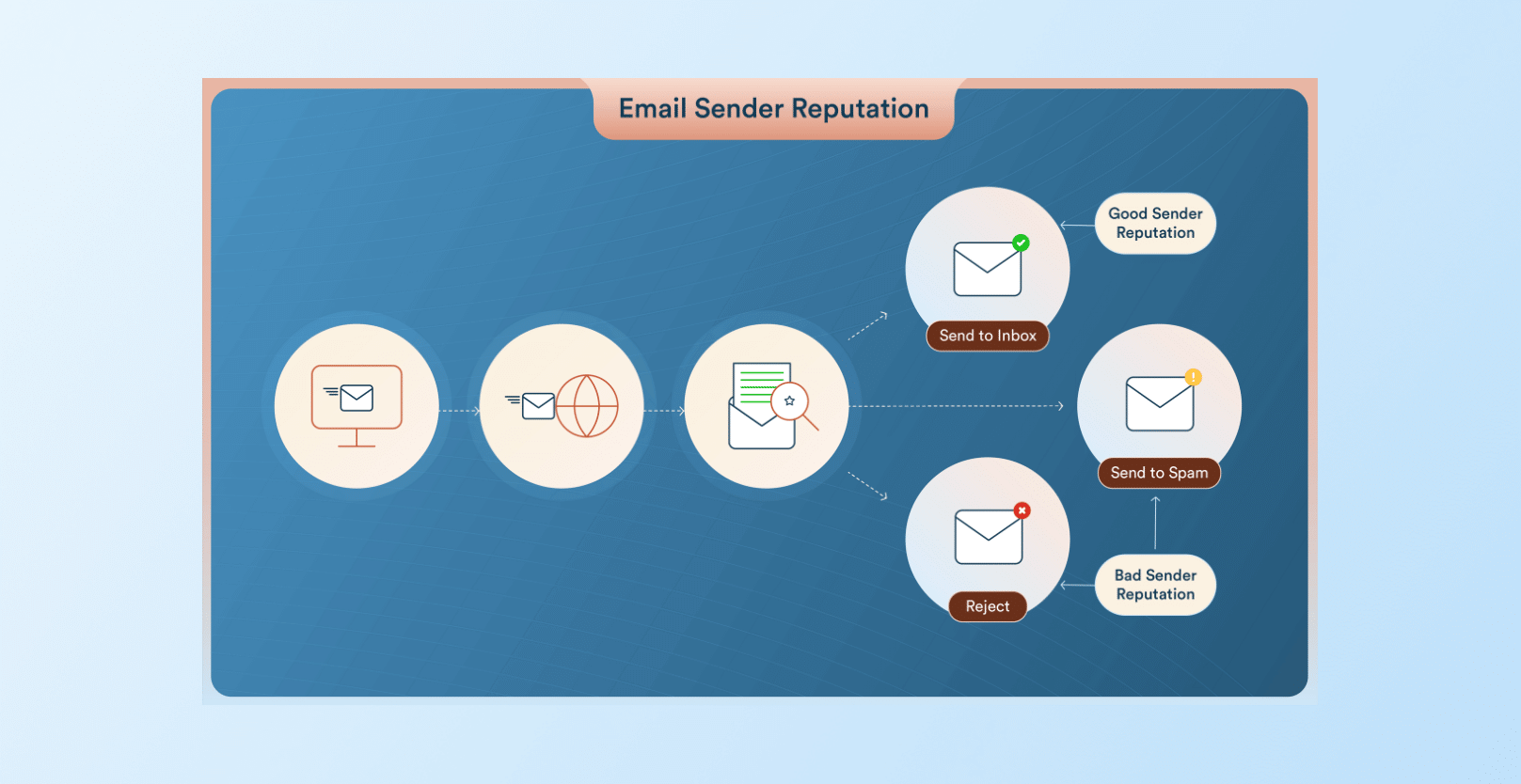
From a business perspective, every bounced email is a lost conversion opportunity, and the reputational impact compounds over time: hurting future campaigns, revenue, and customer lifetime value. Persistently high bounce rates can also erode brand trust and increase compliance risk, especially when driven by poor opt-in practices or purchased lists.
How Email Bounces Work (Soft vs. Hard Bounces Explained)
Emails that fail to deliver can be classified as hard bounces or soft bounces:
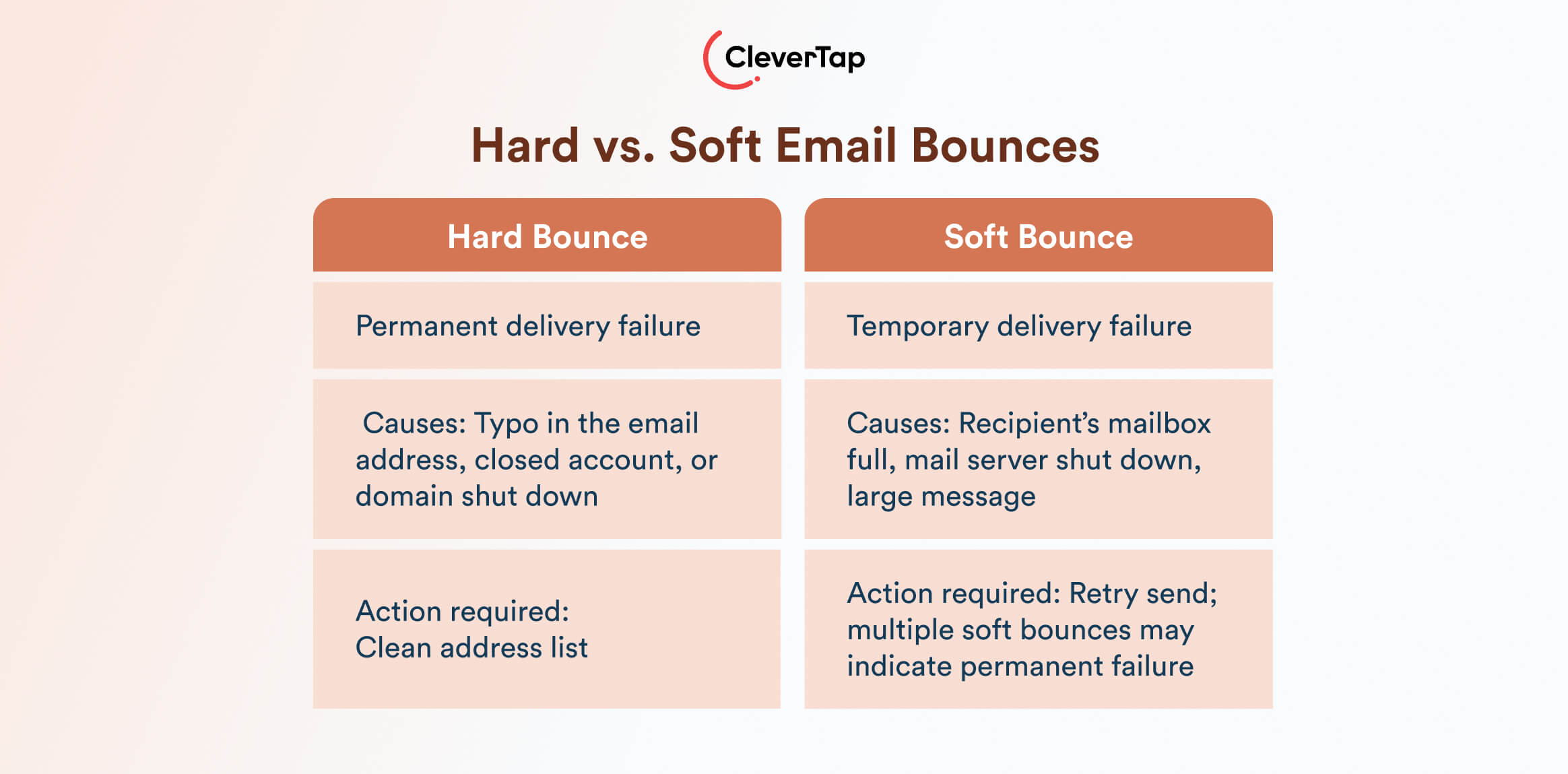
- Hard Bounce: A permanent delivery failure, typically because the recipient address is invalid or doesn’t exist. Common causes include a typo in the email address, a closed account, or the domain itself being down. Hard bounces indicate your address list needs cleaning.
- Soft Bounce: A temporary failure when the mail reaches the recipient server but cannot be delivered at that time. Causes include the recipient’s mailbox being full, the mail server being down, or the message being too large. Unlike hard bounces, soft bounces may succeed on retry. If an address soft bounces multiple times in a row, you eventually treat it as a permanent failure and remove it from future sends.
Email providers may classify temporary vs. permanent failures using SMTP codes: typically, a 4xx code means a soft (retryable) bounce and a 5xx code means a hard (permanent) bounce. For example, “550” often indicates an invalid address (hard bounce) while “421” or “451” can indicate a mailbox is busy (soft bounce).
In addition to this basic split, large ISPs use advanced bounce categorization. For instance:
- SMTP Error Codes: Technical error codes (4xx/5xx) signal the nature of the bounce. They reveal if the issue is temporary or permanent.
- Blocklist Bounces: If your IP or domain is on a blocklist, major providers will reject emails outright. Being on a blacklist means many emails will bounce until you remove yourself from the list.
- Throttling Bounces: Sometimes a recipient server will issue a “421 try later” if it’s receiving too many messages at once or suspects spam behavior. These deferrals are temporary. You can slow down sending and try again to avoid a permanent bounce.
Because bounce categories and codes are complex, many marketers rely on ESP reports to differentiate soft vs. hard bounce causes.
Email Bounce Rate Formula
The email bounce rate formula is straightforward:
Email Bounce Rate = (Total Bounced Emails ÷ Total Emails Sent) × 100.
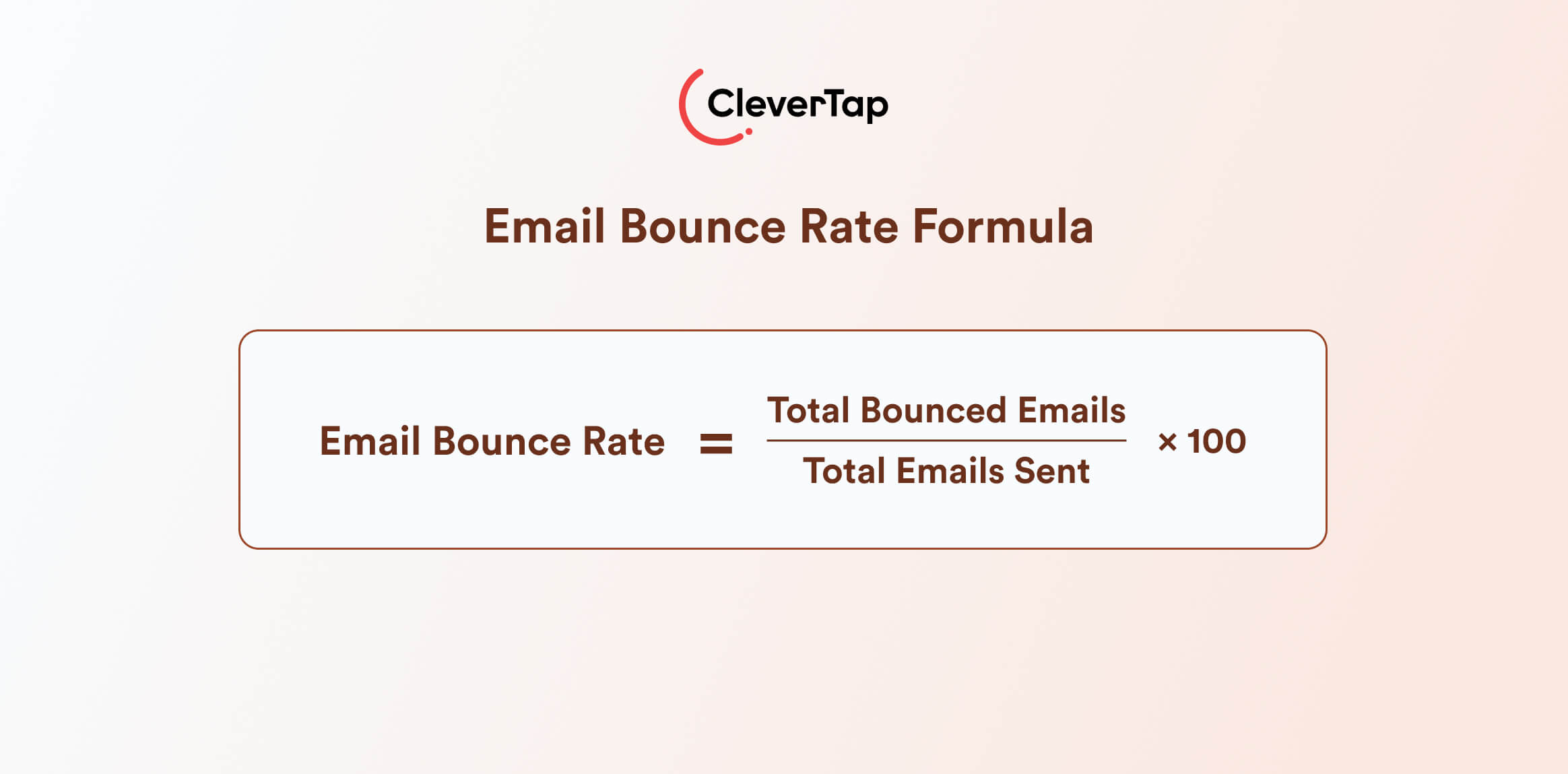
Here, “Total Bounced Emails” includes both hard and soft bounces from a campaign, and “Total Emails Sent” is the count of emails delivered to mail servers (sometimes reported as “sent”).
For example, suppose you send 5,000 emails in a campaign. If 200 of those come back as bounces, the calculation is: (200 ÷ 5,000) × 100 = 4% bounce rate. This means 4% of your total sends failed to reach recipients.
It’s important to apply this formula consistently when comparing campaigns or benchmarking against industry standards.
What Is a Good Email Bounce Rate? (Benchmarks by Industry)
Average Bounce Rate for Email Campaigns
Lower is always better, but typical benchmarks vary. A bounce rate under ~2% is generally considered safe, while rates above 5% are cause for concern. must prompt an immediate list clean-up.
While some bounces are inevitable, staying in the 0–2% range keeps you in a “green zone” for deliverability.
Email Bounce Rate Benchmark Table (Industry-Specific)
Email bounce rate benchmarks can differ significantly by industry due to list quality, engagement norms, and data age. Below is a summary of recent industry-specific averages gathered from marketing analytics reports:
| Industry | Bounce Rate |
| E-Commerce | 0.29% |
| Software | 0.93 |
| Business & Finance | 0.48% |
| Travel & Transportation | 0.51% |
| Retail | 0.31 |
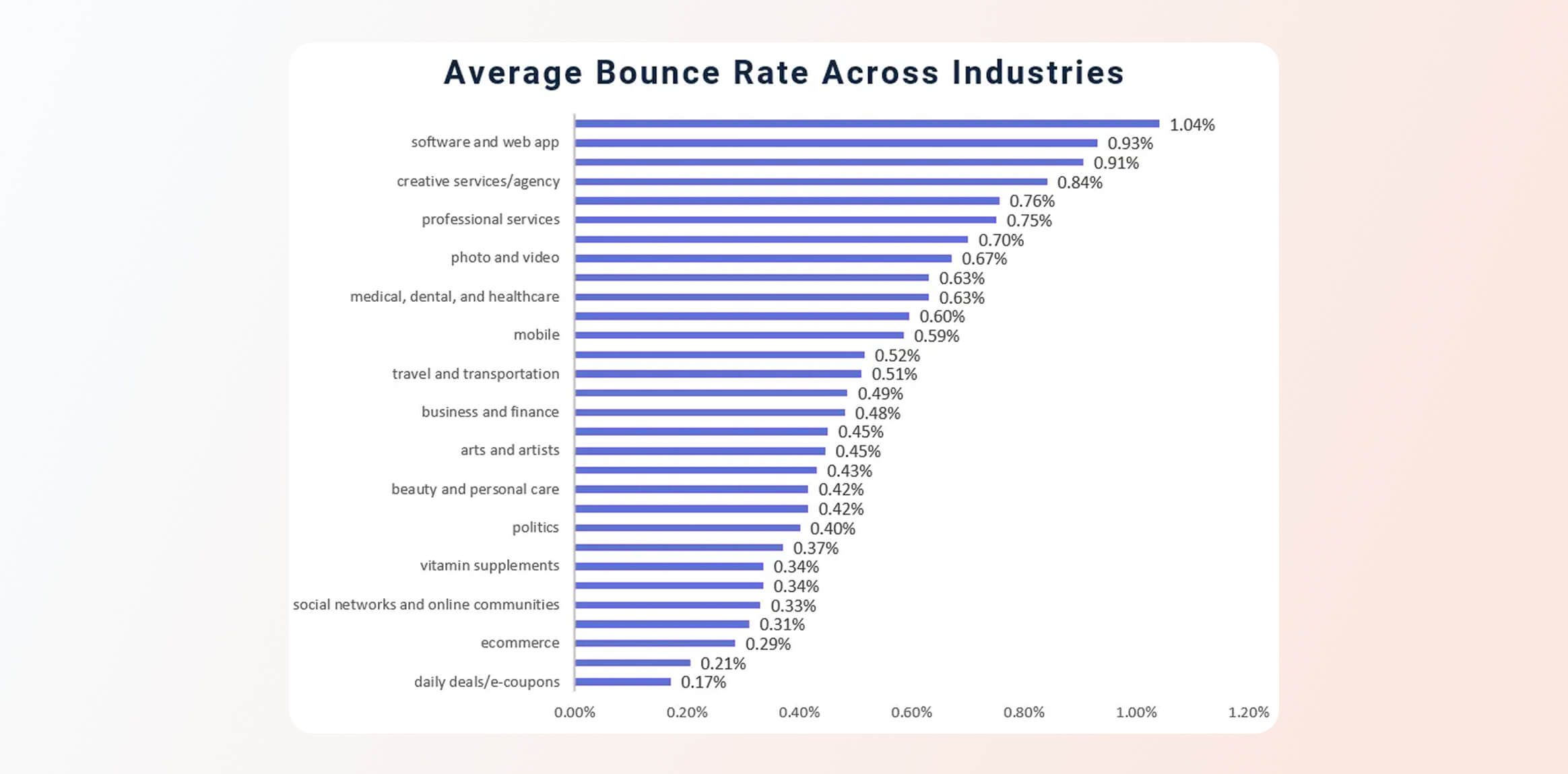
These are rough benchmarks. Lower-volume or highly engaged segments (like nonprofit donors) may see even lower bounce rates.
These benchmarks show that curated, re-engaged lists have the lowest bounce rates, while cold outreach and outdated lists (common in some SaaS/tech) see higher rates. Bounce rates depend more on list age, source, send frequency, and infrastructure warm-up than on industry alone, so expectations should be set by list freshness and opt-in quality.
Acceptable Email Bounce Rate: What ISPs Consider “Safe”
ISPs implicitly set thresholds for “safe” bounce rates. While there’s no universal published standard, the rule of thumb is:
- < 2%: Generally safe. Most ISPs consider bounce rates under ~2% as healthy.
- 2–5%: Caution zone. Some bounces here are normal, but trending toward list issues.
- > 5%: Red flag. Indicates serious list quality or sending problems. Immediate action is needed.
- > 10%: Very dangerous. Can trigger blocklisting and severe reputation damage.
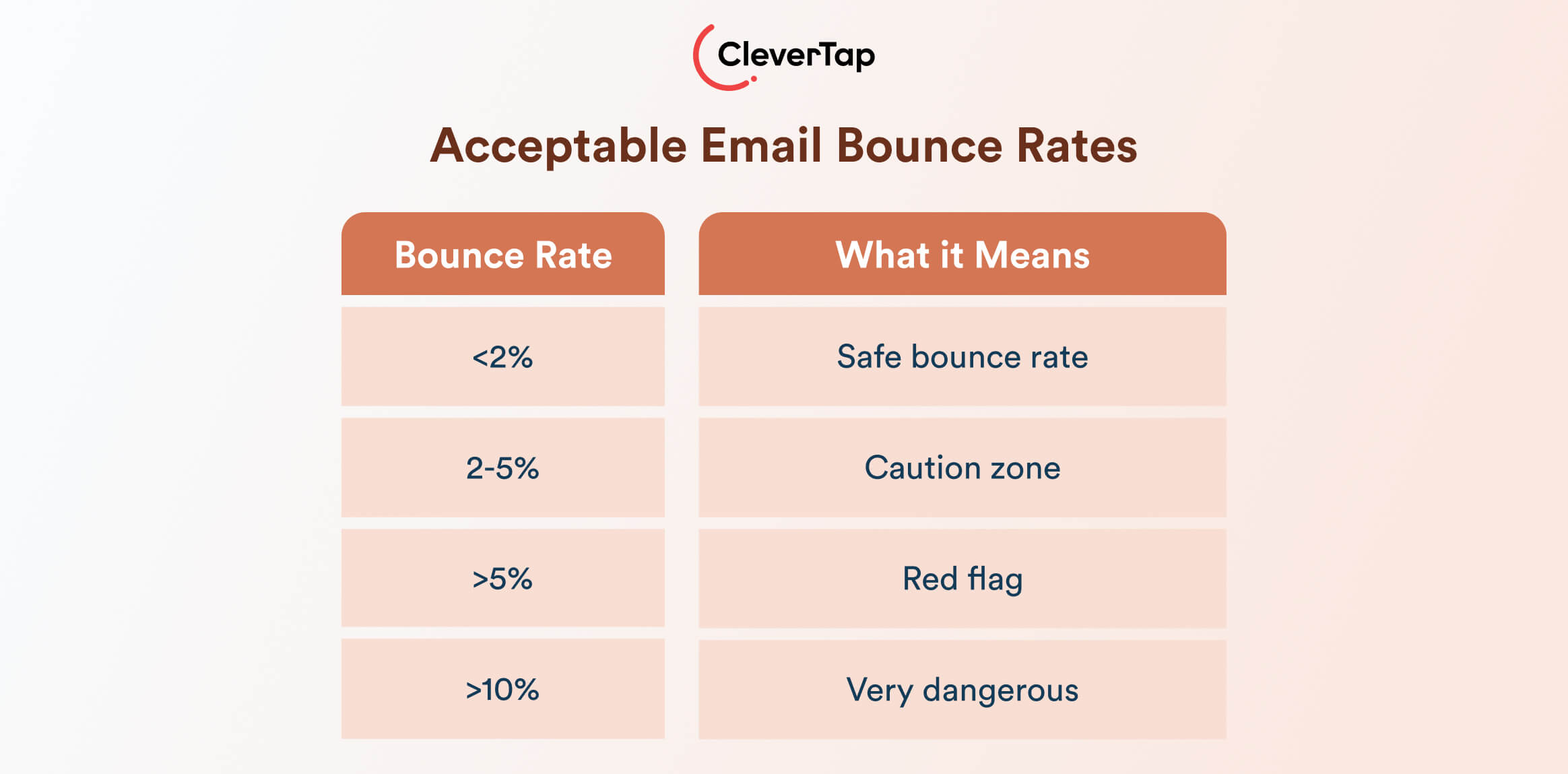
Keep in mind these are general guidelines. A very low bounce rate (<1%) is ideal but difficult to maintain at scale. Conversely, a slightly higher rate may be acceptable if well justified (e.g., newly acquired large list). The key is consistent monitoring. If bounce creeps up, fix it before you trip any ISP alarms.
What are the Causes of High Email Bounce Rate?
A high bounce rate can stem from several root causes. Diagnosing these is the first step toward lower bounce. The main categories are:
Data Hygiene Issues
- List Decay: Email lists degrade over time as addresses go stale when people change jobs or abandon accounts. Annual list decay is often ~20–25%, so without cleaning, bounces accumulate. Newly validated opt-in lists often see bounce rates below 1%, while older, uncleaned lists can reach 5–10% or more.
- Poor Acquisition Sources: Organic subscribers almost always have a lower bounce rate than purchased or scraped lists, as they often contain outdated or fake emails or spam traps.
- No Double Opt-In: When you allow single opt-in (email entered without confirmation), typos or malicious sign-ups slip in. Double opt-in is proven to improve list quality and reduce bounce by confirming each address.
Technical Problems
- SPF/DKIM/DMARC Issues: Missing or incorrect SPF, DKIM, or DMARC records can lead messages to be flagged or rejected by ISPs. For example, without a proper SPF/DKIM, your email might fail authentication and bounce with a policy error.
- Invalid Return Path or MX Settings: If your sending domain’s DNS isn’t set up correctly, bounce messages may not route, or target domains may reject you.
Reputation or Compliance Issues
- Blocklistings: If your sending IP or domain is blacklisted (e.g., Spamhaus, Barracuda), many providers will bounce your mail outright.
- Spam Traps: Sending to a spam trap (an address intended to catch unwanted email) will cause hard bounces or instant blocks. Hits on spam traps or high spam complaint rates can get you flagged, inflating bounce and hurting reputation.
- Greylisting: Some receivers temporarily reject unknown senders (soft bounce) with a “try again later” code to weed out spam. If your system doesn’t retry, these turn into bounce events.
ESP, IP, and Infrastructure Issues
- Sender Warmth: New IPs/domains have no reputation, so recipients often defer or drop mails from them. Without a proper warm-up plan, bounce rates can spike on new infrastructure.
- Shared IP Problems: On a shared ESP IP, your bounce issues could also be affected by other senders. Some ESPs, especially budget ones, share IPs across many clients, so you may suffer from their blocklisting too.
- Volume Spikes: Sudden surges of email, much higher than your usual volume, can trigger ISP limits or rate limits, causing deferrals/bounces.
For example, Booky, a restaurant discovery platform, used CleverTap to recover from a deliverability setback after an email blast cut open rates by 50%. By optimizing its email strategy on CleverTap, Booky improved open rates by 36%.

This diagnostic framework helps pinpoint why bounces are happening. The fix depends on the cause: cleaning data, adjusting technical setup, repairing reputation, or improving sending practices.
How to Reduce Email Bounce Rate (Step-by-Step Playbook)
Reducing bounce rate requires a systematic approach. Follow these steps to clean up your process and infrastructure:
Step 1: Clean Your List
Remove Hard Bounces: Immediately after each campaign, purge any address that hard-bounced. These are permanent failures (invalid or blocked) and should never be emailed again.
Validate Emails: Use an email verification tool to scan your list for typos, defunct domains, and spam traps. Many tools simulate SMTP to flag bad addresses. Use them at signup (pre-emptively) and periodically on your existing list.
Use List Cleaning Services: Services like ZeroBounce specialize in catch-all and spam trap detection. Regularly run large lists through these cleaners. Industry advice is to validate at least quarterly.
Segment Out Unengaged Contacts: If someone hasn’t opened or clicked in 1–2 years, consider removing them. Inactive addresses often “soft land” or have been repurposed and can bounce. It’s safer to lose a small possible opt-in than bounce repeatedly.
Cleaning your list may sound obvious, but the key is doing it systematically and regularly. Cleaning once is not enough, deliverability demands ongoing hygiene.
Step 2: Improve Data Collection
Require Double Opt-In: Switch to a confirmed opt-in (double opt-in) signup process. This ensures every address is verified by the owner before joining your list. Double opt-in reduces hard bounces by weeding out invalid or mistyped emails.
Collect Zero-Party Data: Use forms that collect more than just an email. Ask for first/last name, phone, or preferences. The more context you have, the more engaged subscribers tend to be. If possible, encourage users to bookmark or whitelist you during sign-up. This extra effort pays off in fewer bounces and complaints.
Confirm Captchas and Email Syntax: Simple front-end checks can reduce bad addresses from ever entering your database. Validate email format on input, and consider CAPTCHAs to deter bots that feed fake emails into your forms.
Step 3: Optimize Sending Infrastructure
Warm Up IP & Domain: If you have a new sending IP or even a new domain, start by sending low volumes and gradually ramp up over weeks. Most ESPs automate this with IP warm-up schedules, but it’s critical to pace increases. Proper warm-up builds trust with ISPs so they don’t greylist or bounce your traffic.
When Apna, a professional networking platform, launched its email program on CleverTap, it followed a structured domain warm-up approach to protect deliverability. By gradually scaling with trigger-based and personalized campaigns with our email personalization platform, Apna grew its email channel responsibly and achieved nearly 30× growth within a year.

Configure SPF, DKIM, DMARC: Ensure your domain has correct SPF and DKIM records authorizing your sending servers. Then publish a DMARC policy. These email authentication protocols signal to ISPs that you’re a legitimate sender. Misconfiguration here can lead to stealth bounces or spam-foldering. CleverTap’s deliverability tools include guidance on properly setting up SPF/DKIM/DMARC for this reason.
Use a Reputable ESP: Partner with an email service provider that enforces list-quality standards. Good ESPs proactively suppress known bounces/spam addresses, manage feedback loops, and discourage bought lists. They also often have shared or dedicated IP pools with good reputations. For high-volume senders, a dedicated IP can isolate your reputation.
Monitor DNS and Bounce Logs: Check your MX records and mail server configurations periodically. Look at your campaign error logs: if certain domains consistently bounce, investigate why. Also keep an eye on domain health scores and any alert from reputation monitors.
Step 4: Send Quality Content
Engagement-Based Segmentation: Target only interested, active subscribers. For example, separate highly engaged users from lapsed ones and tailor content accordingly. Engaged recipients are unlikely to report spam or bounce. Tailoring content reduces both spam complaints and inattentive subscribers letting their inbox fill up.
Sunset Unresponsive Subscribers: Implement a sunset policy: if users don’t open or click after a sequence of re-engagement attempts, pause or remove them from your regular sends. A clean, smaller list is far better than a large list that generates bounces.
Test Email Formats: Occasionally, bounces can be triggered by content filters. Ensure your emails aren’t triggering spam scanners (avoid spammy phrases, excessive images, hidden text). Pre-send tests can catch issues that might cause blocklisted bounce.
Step 5: Improve Frequency & Cadence
Regular Sending Schedule: Don’t let your IP/domain go cold. Send at least occasionally (e.g., monthly newsletter) to maintain reputation. Conversely, avoid sudden spikes in send volume.
Honor Inbox Provider Guidelines: Some ISPs (Gmail, Yahoo, Outlook) have published best practices. For example, Google’s Bulk Sender Guidelines recommend a one-click unsubscribe and unsubs below 0.3% for large senders. Exceeding these can indirectly increase bounce or blocks. Check and follow any ISP-specific rules.
Step 6: Monitor Deliverability Health Regularly
Track Key Metrics: Beyond email bounce rates, watch delivery rate, complaint rate, and open rates over time. Sudden shifts can alert you to a problem. Use tools like Google Postmaster Tools to monitor your domain’s reputation, spam rate, and bounce rate as seen by Gmail.
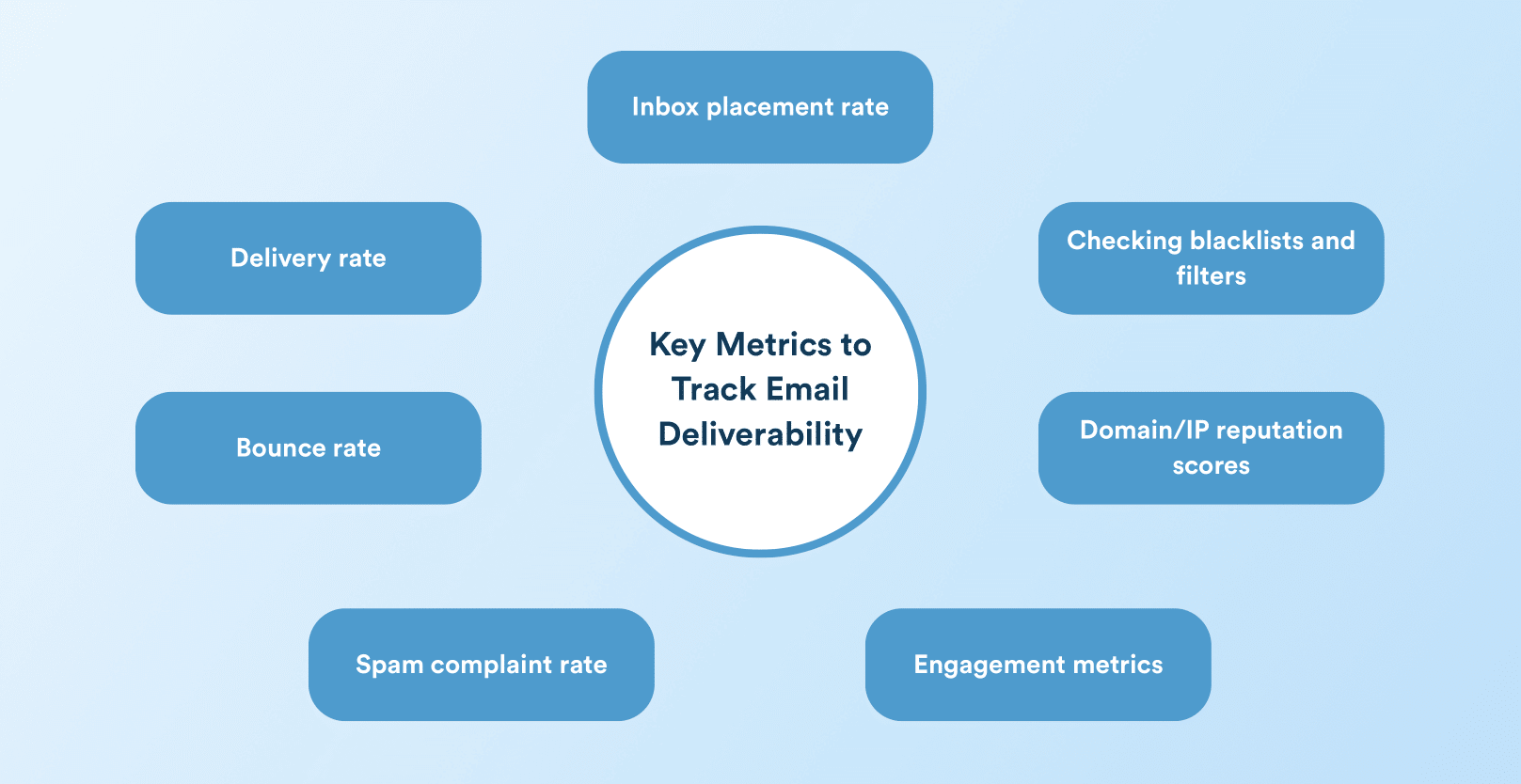
Use Inbox Placement Testing: Periodically test how your emails are landing using seed lists or third-party tools. This can reveal if high bounce from certain domains is happening or if inbox placement is slipping.
Automate Alerts: If your ESP supports it, set automated alerts for bounce spikes or blocklist events. Quick awareness lets you remediate before serious damage occurs.
Step 7: Avoid Known Bad Sources (Rentals, Purchased Lists)
Never Upload Purchased Lists: Buying email lists is a fast track to high bounce and legal trouble. Purchased lists include many invalid addresses and spam traps by design.
Block Spam-Prone Addresses: Filter out role-addresses (e.g., info@, support@) and known disposable domains from your list. These often bounce or have automated filters that block unknown senders.
Respect Subscription Preferences: Always allow unsubscribes and honor them instantly. Keeping users who wanted out only leads to spam complaints, which can prompt blocking and bounces from anti-spam measures.
How CleverTap Helps Track and Improve Email Bounce Rate
Modern email marketing platforms and deliverability tools provide robust tracking and automation to manage bounce rates:
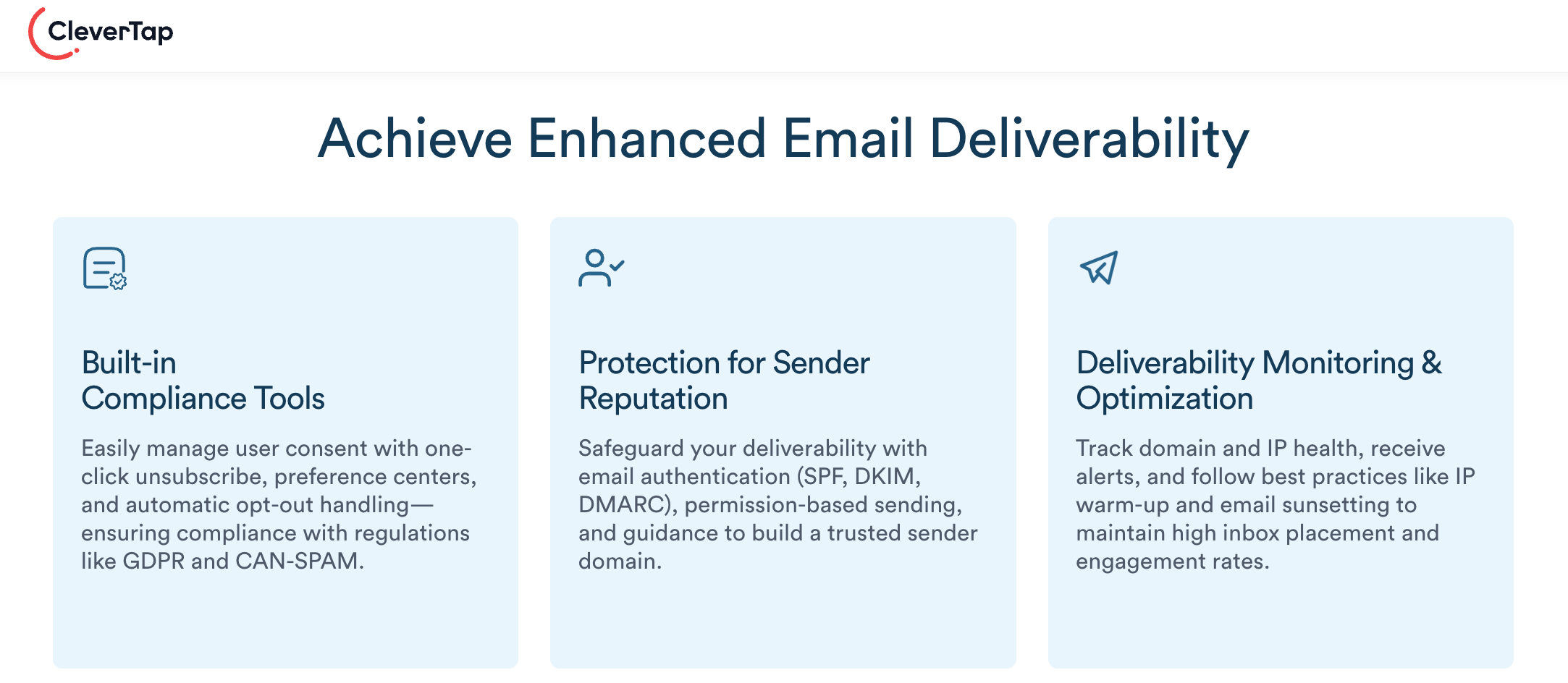
CleverTap’s email marketing platform provides built-in capabilities to help marketers monitor bounces accurately, maintain list hygiene, and protect sender reputation across email campaigns.
Bounce Tracking and Reporting
- Detailed Bounce Metrics: CleverTap tracks both soft and hard bounces and surfaces them across campaign stats, user profiles, exports, and reports, giving you clear visibility into delivery failures and overall email performance.
- Error Visibility: Campaign error reports break bounces down by type, such as soft bounce, hard bounce, spam, or unsubscribed, so teams can diagnose issues quickly.
- User Status Updates: When an email hard bounces, CleverTap automatically marks the user as unsubscribed, preventing further delivery attempts and reducing repeat failures that can damage reputation.
Integration with Email Service Providers
- Callback/Webhook Support: For ESPs like SendGrid, Postmark, and Mandrill, CleverTap supports callbacks and webhooks to receive real-time bounce, drop, and unsubscribe events. These integrations ensure that delivery failures are immediately reflected in CleverTap and user status is updated without delay.
- Event Notification: By enabling event notifications and configuring callback URLs, marketers can ensure all bounce-related events are consistently tracked and acted upon.
List Hygiene and Validation
CleverTap integrates with email validation partners to help identify invalid or risky addresses before they impact campaigns. These integrations, combined with best-practice list management, like regular cleanups and suppressing problematic domains, help reduce bounce rates and improve long-term deliverability.
Retry Logic for Soft Bounces
Temporary delivery failures are handled through ESP-level retry logic. Soft bounces are retried based on the provider’s retry rules, allowing transient issues, such as full inboxes or server downtime to resolve before an email is treated as undeliverable.
By combining detailed bounce visibility, real-time ESP feedback, validation integrations, and smart retry handling, CleverTap enables marketers to identify bounce issues early, address root causes, and consistently improve email deliverability and campaign performance.
Learn more about CleverTap’s email marketing platform and see how it can help you boost deliverability.
Frequently Asked Questions (FAQs) about Email Bounce Rate
Q1. What is an acceptable email bounce rate?
An acceptable email bounce rate is typically below 2%. Rates between 2–5% indicate potential list quality or sending issues, while anything above 5% is a red flag that can harm deliverability and sender reputation.
Q2. What is the main cause of a high email bounce rate?
The most common cause is poor list hygiene—invalid, outdated, or incorrectly entered email addresses. This often results from old lists, purchased data, or sign-ups without verification (no double opt-in).
Q3. What is the formula for email bounce rate?
Email bounce rate is calculated as:
(Total bounced emails ÷ Total emails sent) × 100.
Q4. What’s the difference between soft and hard bounces?
A hard bounce is a permanent failure caused by invalid or non-existent email addresses and should be removed immediately. A soft bounce is a temporary issue, such as a full inbox or server downtime, and may resolve on retry.
Q5. How do I reduce bounce rate fast?
Start by removing hard bounces immediately, validating your email list, and pausing sends to unengaged contacts. Enabling double opt-in, fixing SPF/DKIM/DMARC authentication, and slowing send volume on new IPs or domains can quickly bring bounce rates down.
Keeping Email Bounce Rates Low to Protect Deliverability
Email bounce rate is a critical signal of deliverability health, sender reputation, and long-term email ROI. By keeping lists clean, following compliant acquisition practices, and monitoring infrastructure and sending behavior, marketers can prevent minor bounce issues from turning into inbox placement or revenue losses.
The objective isn’t zero bounces, but consistently low rates that protect reputation and ensure more emails reach engaged inboxes.

Kiran Pius 
Leads Product Launches, Adoption, & Evangelism.Expert in cross-channel marketing strategies & platforms.
Free Customer Engagement Guides
Join our newsletter for actionable tips and proven strategies to grow your business and engage your customers.