












































Table of Contents
Categories
Most Popular


Launching email campaigns on a new domain without warming it up often sends promotional blasts to spam, costing marketers thousands during sales peaks. Learning how to warm up email domain helps ensure inbox placement, higher engagement, and a protected sender reputation.
Domain warm-up matters because it builds trust with Gmail, Outlook, and other providers by ramping volume gradually, preventing bounces and complaints that kill deliverability.
This guide covers how to warm up email domain step-by-step: technical setups, volume ramps, benchmarks, recovery plans, and how CleverTap automation can help.
What Is an Email Domain Warm-up?
Email domain warm-up systematically establishes a positive sender reputation for new or inactive domains by gradually increasing email volume over weeks. This process convinces mailbox providers like Gmail and Outlook that your domain sends wanted, engaging content rather than spam. Understanding how to warm up email domain correctly starts with knowing what the process actually involves.
What Is a Warm Email?
A warm email targets recipients you’ve previously engaged with through opens, clicks, purchases, or opt-ins, leveraging that familiarity to drive interaction. Unlike cold emails to strangers, these messages capitalize on existing interest, delivering higher open rates, clicks, and conversions.
Domain Warm-Up vs. Email Address Warm-Up
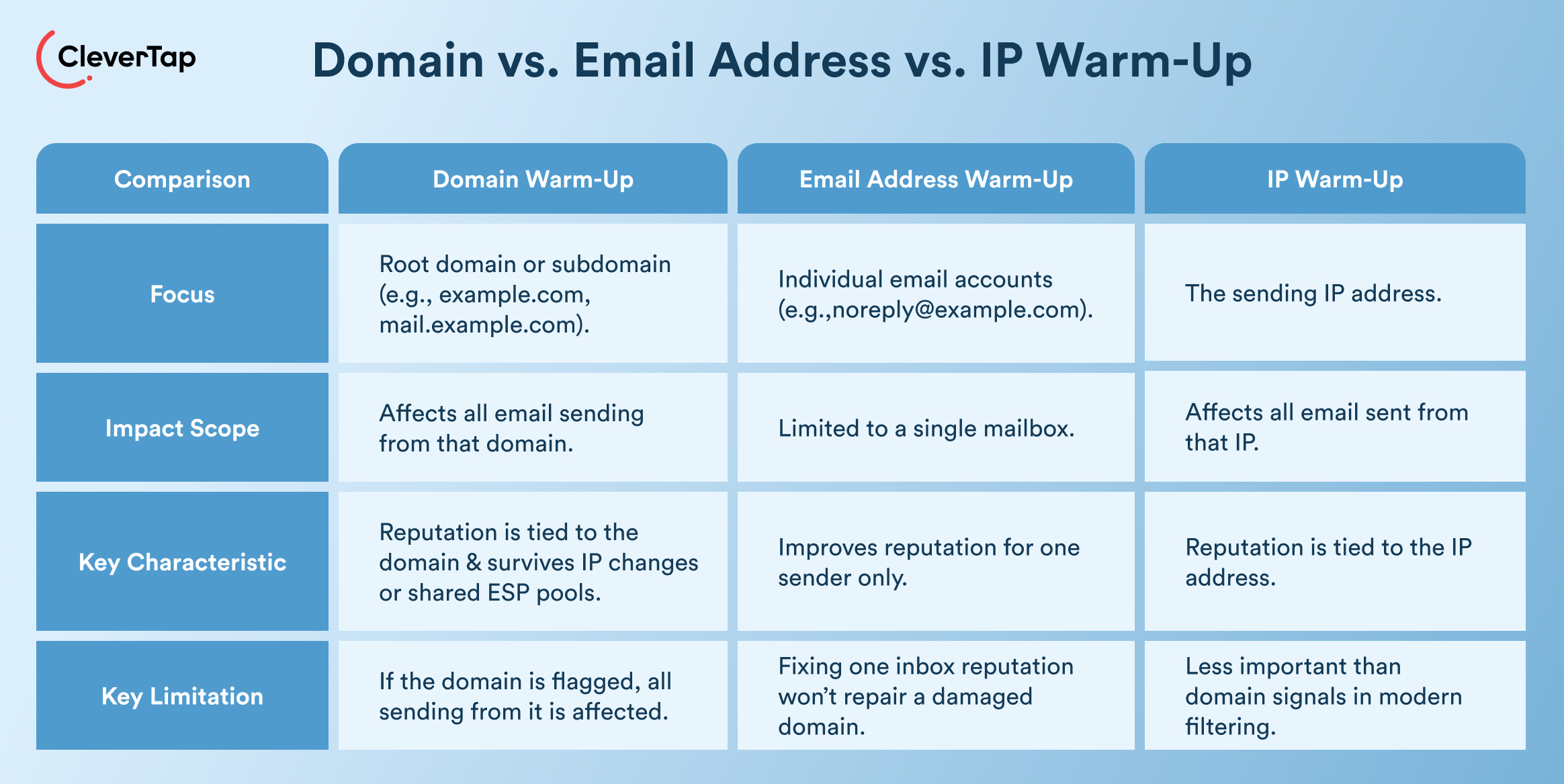
Domain warm-up focuses on the root domain (e.g., example.com) or subdomain (e.g., mail.example.com), affecting all sending from that domain. Email address warm-up targets individual accounts like noreply@, limiting impact to single mailboxes while the broader domain reputation remains intact. For retention marketers, this distinction matters—fixing one inbox’s reputation won’t rescue a flagged root domain.
Domain Warm-Up vs. IP Warm-Up
Domain warm-up builds a reputation tied to your DNS records, even if IP addresses change or you use shared pools from ESPs. IP warm-up applies to dedicated or rotating IPs, crucial when switching providers but secondary to domain signals in modern filtering.
How Mailbox Providers Evaluate Sender Reputation
Providers analyze authentication (SPF/DKIM/DMARC), volume patterns, bounces (<2%), complaints (<0.1%), and engagement (opens 25–45%, replies). According to Google’s Sender Guidelines, Gmail prioritizes domain history over IP signals, rewarding consistent positive engagement from active segments to grant inbox placement.
Why Brands Must Know How to Warm Up Email Domain
Brands that skip domain warm-up expose campaigns to immediate throttling or spam placement, especially during high-stakes periods like product launches or seasonal sales. Warming up emails helps teams establish credible sending patterns that secure long-term inbox access.
How Volume Spikes Trigger Spam Filters
One of the key reasons to learn how to warm up email domain is that volume spikes trigger spam filters immediately. Sudden high-volume sends from new domains signal spam to providers like Gmail, which caps unknown senders at low thresholds before applying bulk filters. For example, for brands, jumping from 0 to 50,000 emails during, let’s say, a Black Friday campaign, can trigger IP blocks or domain deprioritization, halting revenue flows.
Mailbox algorithms detect unnatural ramps; doubling volume daily exceeds safe limits, leading to high spam rates until reputation recovers.
Engagement Signals and Their Impact
Positive signals like opens, clicks, and replies tell providers your content delivers value, gradually unlocking higher volumes. Low engagement on initial sends compounds filtering, dropping future performance. Strong signals from engaged segments create a flywheel effect, improving placement for all traffic.
Risks of Launching Campaigns Without Warm-Up
Unwarmed domains risk permanent reputation damage, as mentioned above, creating lasting spam-trap hits and throttling even transactional emails. 64.6% of brands report direct revenue hits from inbox issues. Recovery takes weeks, delaying scaling and eroding CLV. ESP migrations risk significant list attrition and deliverability issues if warm-up is skipped, leading to poor inbox placement. Marketers also face blacklistings, forcing subdomain pivots or provider switches.
How to Warm Up Email Domain: Before You Start, Use This Technical Setup Checklist
New domains need ironclad authentication and isolation before sending a single email. Skipping this setup leaves even gradual ramps vulnerable to spam filters. When learning how to warm up an email domain, providers prioritize verified signals over volume patterns.
Configure SPF
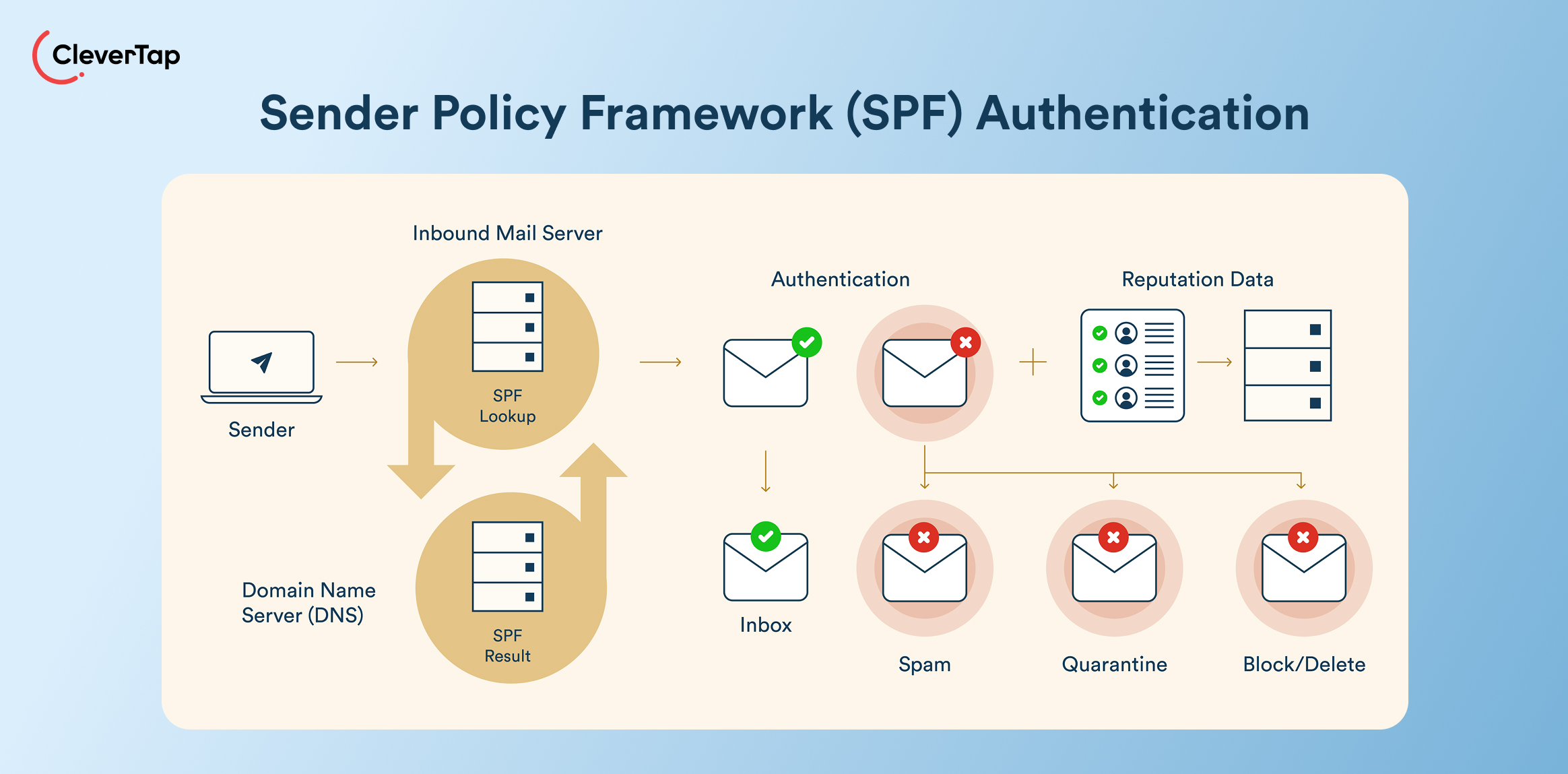
SPF (Sender Policy Framework) lists authorized mail servers in your DNS TXT record, preventing spoofing. Marketers warming up a new email domain must include all ESPs (e.g., “v=spf1 include:clevertap.com -all”) to pass initial checks and avoid bounces from the first send.
Enable DKIM
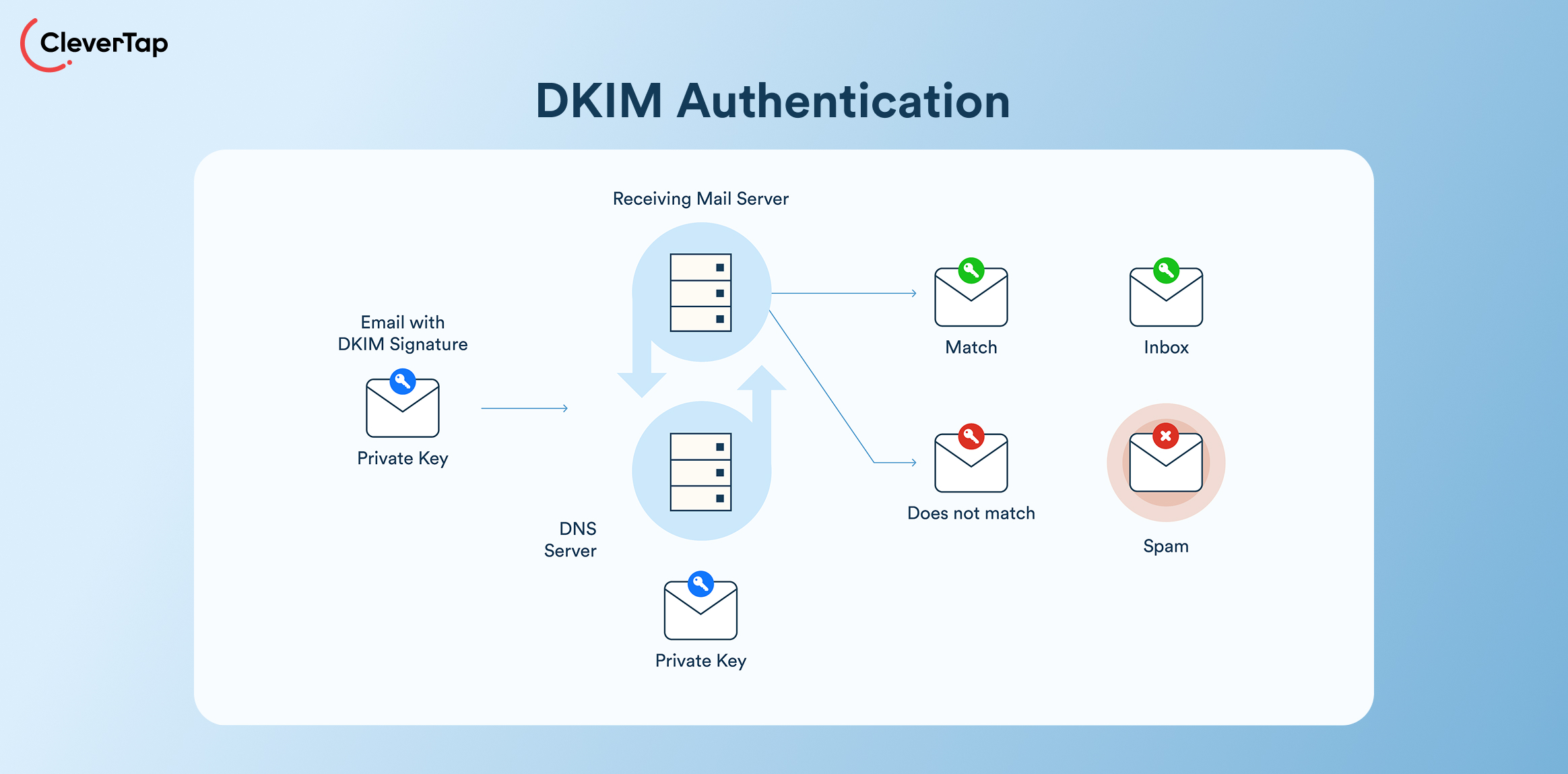
DKIM adds cryptographic signatures to emails, verifying message integrity via public keys in DNS. Generate selector-specific records from your ESP (an essential step when warming up a new email domain), ensuring promotional blasts sign correctly to build trust with Outlook and Yahoo.
Implement DMARC
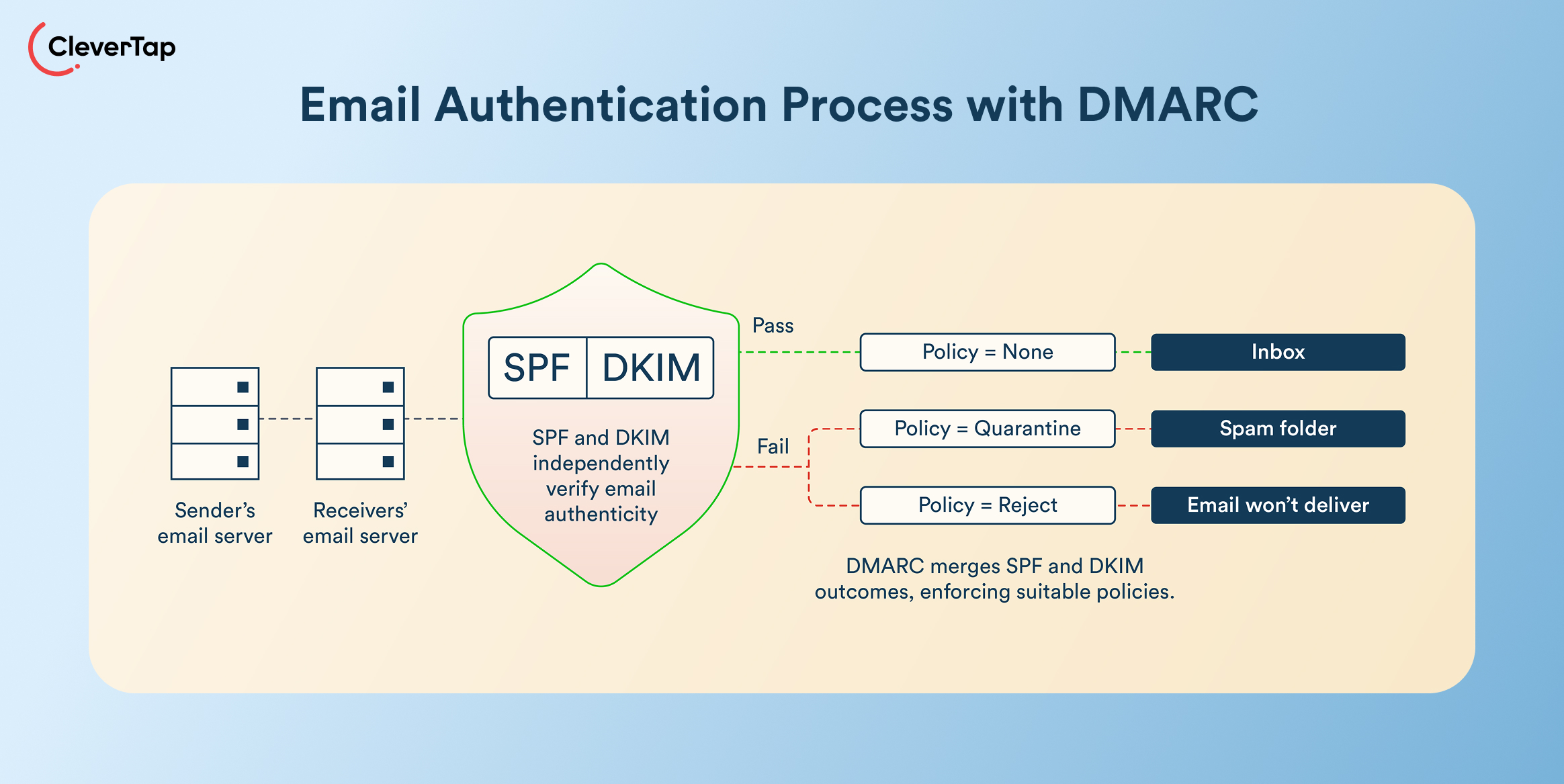
DMARC builds on SPF/DKIM by defining failure policies (p=none for monitoring, p=quarantine later). Senders use rua=mailto:dmarc@yourdomain.com to track alignment issues before scaling campaigns, making it a critical checkpoint in any domain warm-up process.
Set Up a Dedicated Sending Subdomain
Create mail.yourdomain.com for marketing emails, preserving the root domain reputation for transactional sends. Companies switching ESPs often protect “brand.com” while warming up a new email domain via subdomains, isolating high-volume promos from critical receipts.
Separate Transactional and Promotional Traffic
Route order confirmations through trans.yourdomain.com and campaigns via promo.yourdomain.com. This prevents spikes in promotional email volume from affecting critical transactional messages. Such separation is foundational to warming up a new email domain without cross-contaminating sender reputation.
Align Tracking Domains
Match link shorteners and pixels to your sending subdomain (e.g., links.mail.yourdomain.com). Misalignment flags phishing risk and undermines the warm-up process. Aligning tracking domains fully helps maintain strong open rates during email domain warm-up.
Step-by-Step: How to Warm Up Email Domain
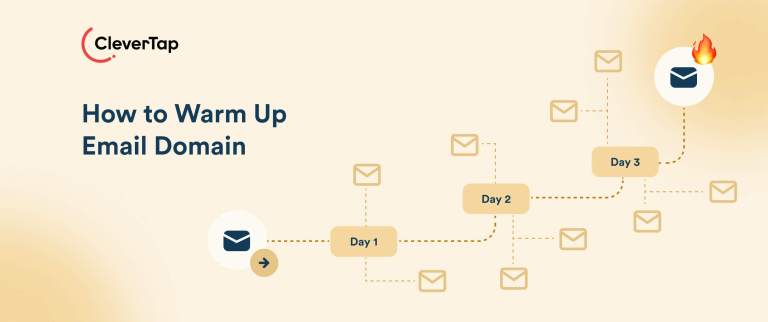
Follow this proven sequence to establish sender reputation safely. Retention marketers using these steps target the 85–95% inbox placement range that properly warmed domains typically achieve within four weeks.
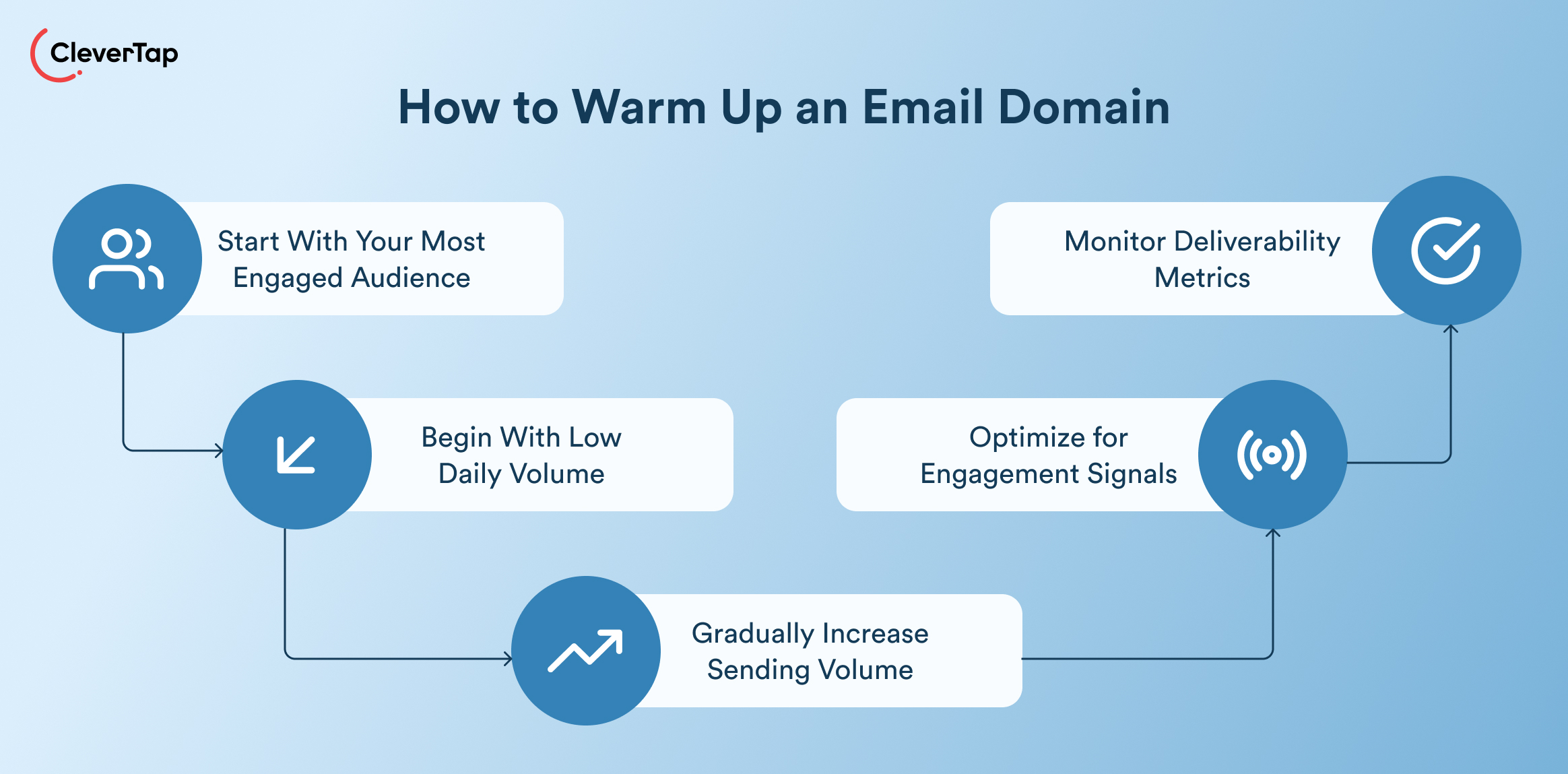
Step 1: Start With Your Most Engaged Audience
Target subscribers with opens/clicks in the last 30 days, purchases in 90 days, or zero unsubscribes, typically 20–30% of your list.
This builds positive reputation signals. Engaged users deliver opens (25%+), clicks, and replies that signal quality to Gmail and Outlook, creating a foundation for scaling. Prioritizing VIPs and high-engagement segments over full lists accelerates warm-up.
Step 2: Begin With Low Daily Volume
Start conservative to mimic organic growth. Warm 50–100 emails/day initially, focusing on engaged segments to establish baseline trust.
| Week | Daily Volume | Audience |
| 1 | 50–100 | Most engaged (recent opens/clicks) |
| 2 | 200–500 | Engaged + recent purchases |
| 3 | 1,000–2,000 | Engaged + 90-day actives |
| 4 | 5,000–10,000 | Full engaged list |
Step 3: Gradually Increase Sending Volume
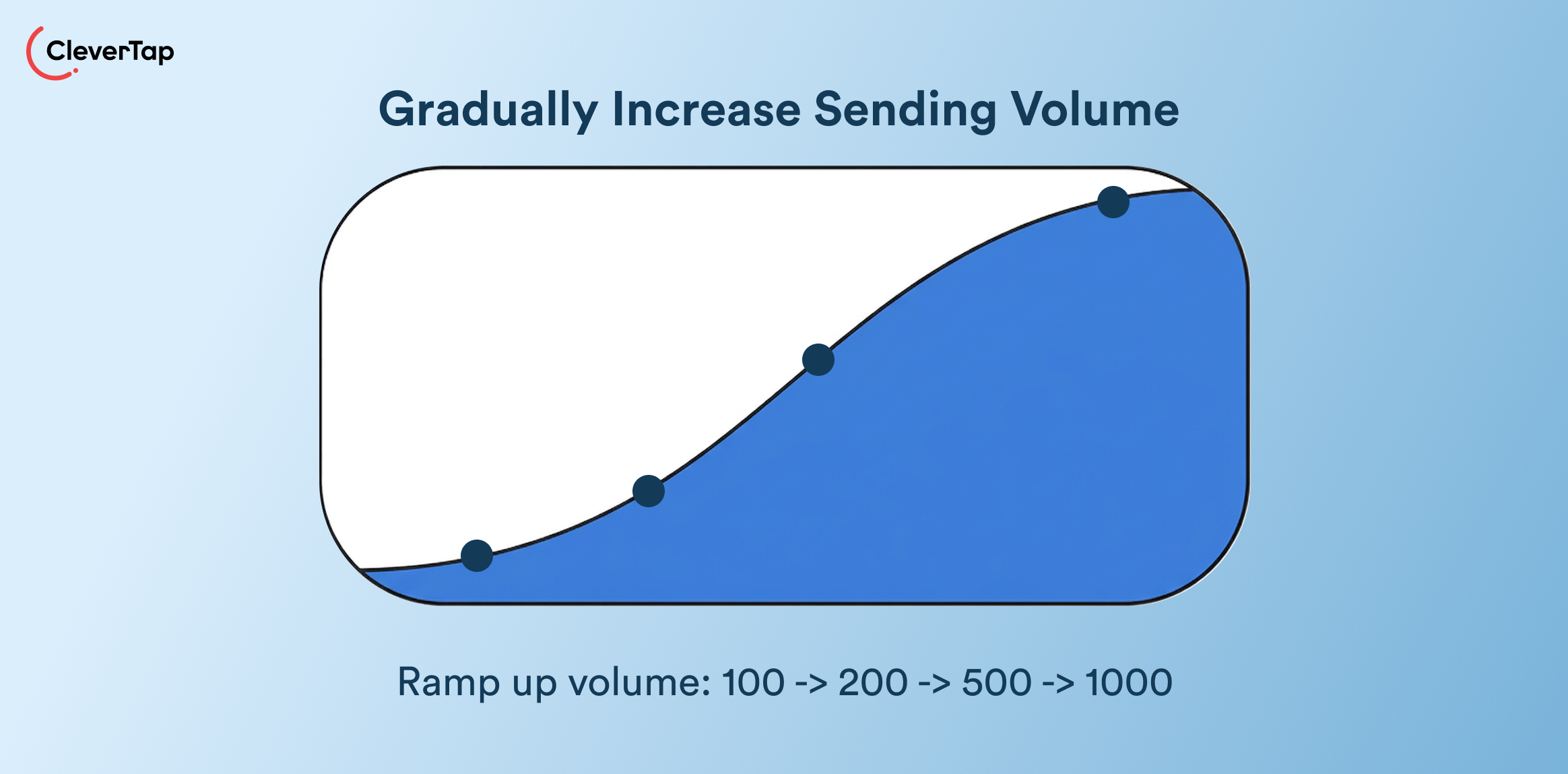
- Weekly Ramp-Up Strategy: Double volume weekly while maintaining 20%+ opens, e.g., 100 → 200 → 500 → 1,000. Scale to 50K/day by week 6, and follow this pattern to avoid triggering spam filters.
- Avoid Sudden Spikes: Never exceed 50% day-over-day growth. For example, Black Friday prep requires 8-week ramps for seasonal D2C volumes. Monitor complaints daily.
Step 4: Optimize for Engagement Signals
- Personalization: Use first names, past purchases, and behavioral triggers. Messages with specific, user-relevant subject lines. such as referencing recent activity or preferences, often drive stronger engagement than generic sends because they signal relevance to both the recipient and the mailbox provider.
- Value-first messaging: Lead with tips or exclusive offers, not hard sells. Running educational subject lines consistently outperforms generic promotional sends in open rates; content that solves a problem earns clicks and builds domain trust faster.
- Avoid spam triggers: No all caps, excessive punctuation, or “free” in subjects. List hygiene keeps email bounce under 2%.
- Encourage replies: End with questions like “What’s your top retention challenge?” to generate positive engagement signals.
Step 5: Monitor Deliverability Metrics
Track these benchmarks daily via ESP dashboards. It is possible to maintain inbox placement by acting on early warnings.
| Metric | Healthy Range |
| Open Rate | 18-35% |
| CTR | 2-6% |
| Bounce Rate | <2% |
| Spam Complaint Rate | <0.1% |
| Unsubscribe Rate | <0.5% |
How Long Does It Take to Warm Up an Email Domain?
Timelines vary by list size and industry, but most marketers complete warm-up in 2–6 weeks.
- Typical timeline (2–4 Weeks): Low- to mid-volume senders (under 50K emails/week) build a stable reputation in 2–4 weeks with gradual ramping. Brands targeting 90%+ inbox placement by week 4 get there by sending to engaged segments first and maintaining consistent volume growth throughout.
- High-volume senders (4–6 Weeks): Brands scaling to 100K+ daily need 4–6 weeks, as providers scrutinize larger sending patterns more closely. Extend to 8 weeks during seasonal peaks to avoid throttling at critical revenue moments.
Factors That Affect Timeline
Several variables determine how fast your domain warms up. List quality has the biggest impact, while inactive contacts slow progress and raise complaint risk. Engagement rates above 20% open signal quality faster, while authentication gaps add monitoring time before scaling is safe. Clean, well-segmented lists can cut 1–2 weeks off the overall timeline.
Signs Your Domain Is Fully Warmed
Look for stable 90–95% inbox placement, opens holding at 25% or more, complaints consistently under 0.1%, and no blocks or flags in Google Postmaster Tools. You can confirm full warm-up by running full-volume test sends without deliverability drops across consecutive sends.
What to Send During Domain Warm-Up
The content you send during warm-up matters as much as the volume. Mailbox providers evaluate whether recipients open, click, and reply—so early sends must earn engagement, not just fill inboxes.
- Educational content: Onboarding tips, product guides, and how-to walkthroughs tied to subscriber interests drive opens and time-on-email. Keep subject lines specific: “Three ways to use your new dashboard” consistently outperforms “Welcome to our platform.”
- Account updates: Balance summaries, usage reports, and subscription confirmations carry the lowest complaint risk and highest inherent open rates of any content type, making them reliable reputation builders from day one. Route these through your dedicated transactional subdomain to keep signals clean.
- Loyalty communications: Points reminders, tier updates, and reward nudges target your most engaged subscribers by definition. Personalize around each recipient’s actual balance or recent activity; generic loyalty emails underperform and waste the engagement opportunity.
- Soft engagement campaigns: Curated recommendations and product discovery emails invite browsing rather than demanding a purchase, generating clicks without the risk of hard-sell sends. Best deployed in weeks two and three, anchored to behavioral signals like recent browse activity.
- Feedback requests: Short NPS surveys and preference check-ins generate direct replies, one of the strongest positive signals available to mailbox providers. Target subscribers who have already opened two or more emails during warm-up to maximize response rates.
Special Considerations for Regulated Industries
Regulated sectors face stricter scrutiny from providers due to fraud risks and compliance needs, making trust signals especially important during warm-up.
- Fintech, banking, and insurance: Lead with high-value content—transaction alerts, balance notifications, renewal notices—sent to verified, opted-in users. Process opt-out requests within 10 business days per CAN-SPAM, maintain strict opt-in documentation, and include regulatory disclaimers from the first send. Plan for a 4–6 week warm-up timeline.
- Healthcare: HIPAA requires verified patient consent before any email contact. Limit warm-up sends to appointment reminders and care updates for verified opt-ins only, and keep promotional content completely separate to avoid compliance flags.
Prioritize account updates and alerts over promotional sends in the early warm-up phase. Monitor DMARC reports weekly and pause high-volume sends if complaint rates exceed 0.05%.
Manual vs. Automated Email Warm-Up Tools
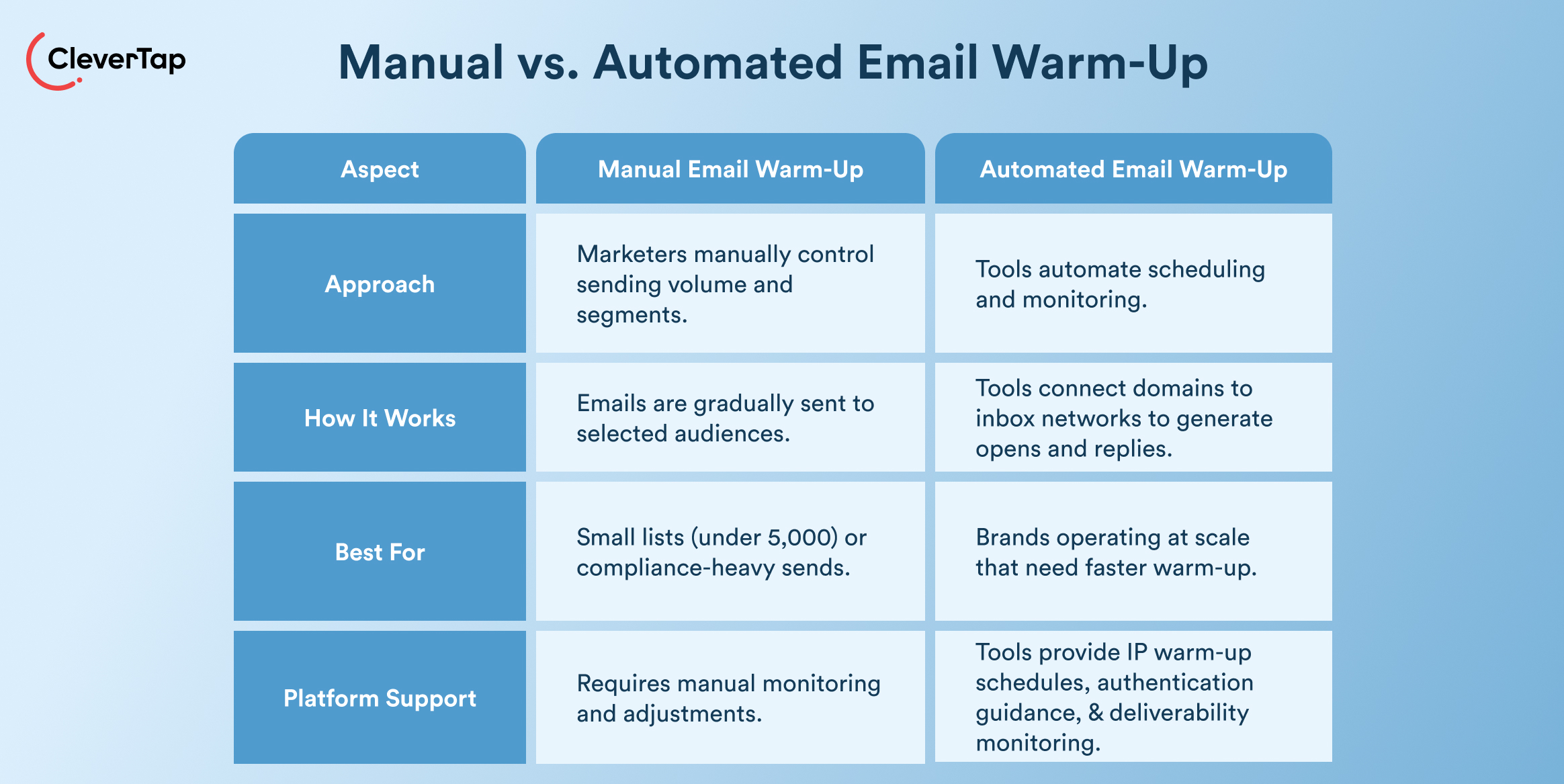
Manual warm-up offers control but demands significant time investment, while automated tools accelerate the process with structured scheduling and real-time monitoring. For brands operating at scale, CleverTap’s Advanced Email Add-on combines self-service IP warm-up, sender authentication guidance, and deliverability monitoring—purpose-built for high-volume senders.
How Automated Tools Work
Standalone warm-up tools connect your domain to networks of real inboxes, exchanging simulated conversations that generate opens, replies, and marks-as-important to build early reputation signals.
CleverTap takes a platform-native approach, providing a documented IP warm-up schedule, SPF/DKIM/DMARC setup guidance, and integrated reputation monitoring via Google Postmaster Tools and blocklist checkers to accelerate inbox placement.
Booky, a restaurant discovery app, used CleverTap’s IP warm-up and configuration support alongside monthly deliverability reports to repair damaged domain health, resulting in a 36% increase in open rates.
When a Manual Warm-Up Is Better
Manual warm-up works best for small lists (under 5,000 subscribers), or compliance-heavy fintech sends, where marketers need direct control over segment selection and messaging to manage regulatory risk. When full oversight of content and cadence is non-negotiable, manual gives you that precision.
That said, CleverTap’s self-service IP warm-up simplifies scaling without relying on third-party inbox pools, making a hybrid approach the preferred choice for D2C retention teams managing product launch timelines.
What to Do If Your Domain Gets Flagged
Domain flags halt campaigns instantly, but a structured recovery can restore email deliverability within 2–4 weeks. Act fast to limit damage and rebuild systematically.
Pause High-Volume Sends
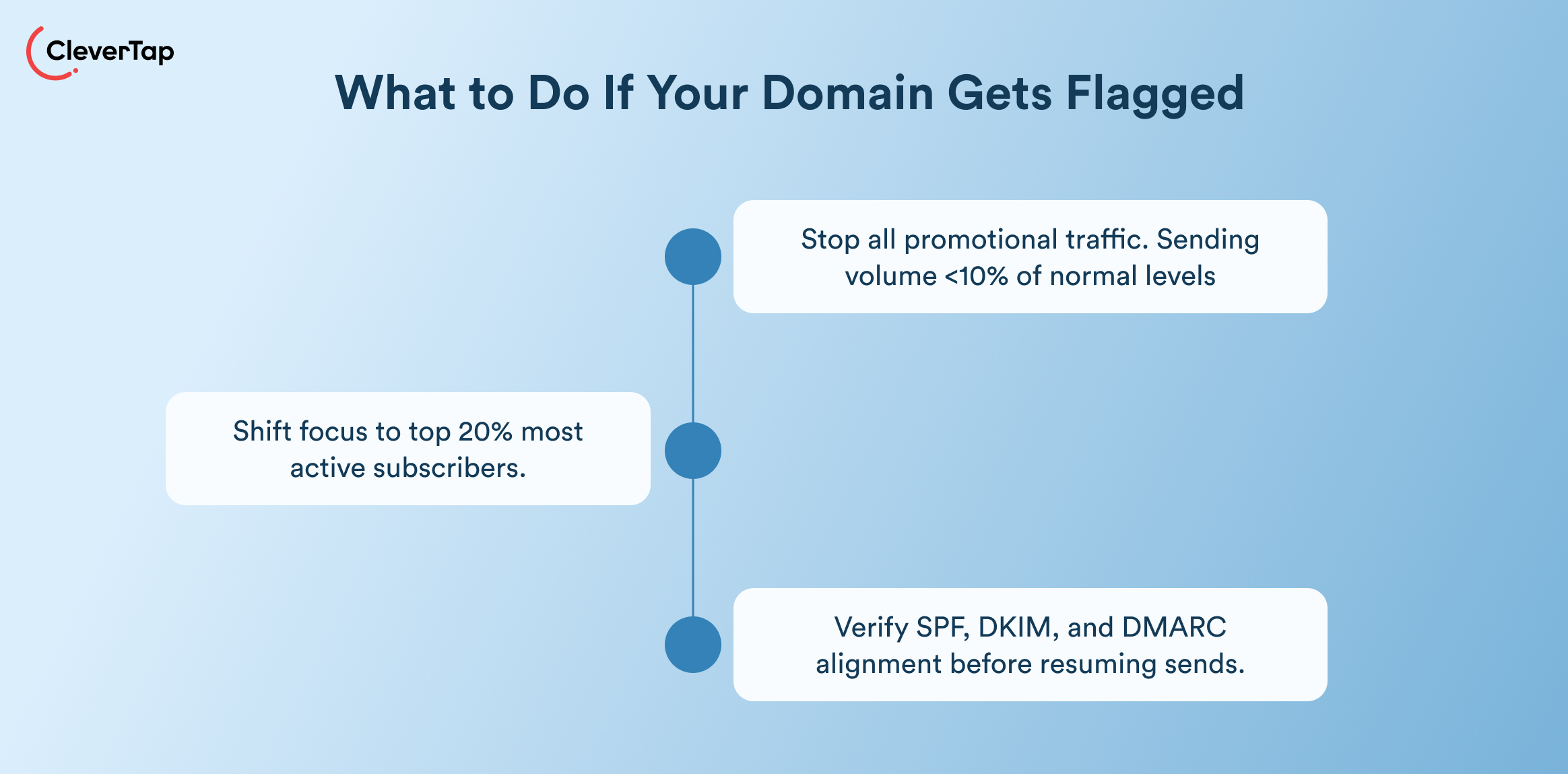
Stop all promotional traffic immediately; continue only transactional emails to customers. Drop sending volume to under 10% of normal levels as a starting point, to halt complaint accumulation and signal cleanup intent to mailbox providers.
Re-Segment to Engaged Users
Shift focus to your top 20% most active subscribers, recent opens and purchases, and zero-complaint history. Brands recover faster by sending value-first content exclusively to this group, generating positive engagement signals that gradually outweigh the negatives and trigger the flag.
Audit Authentication
Verify SPF, DKIM, and DMARC alignment using MXToolbox, fixing any misconfigurations before resuming sends. Authentication gaps are among the most common causes of deliverability blocks; check that tracking domains match sending subdomains and that all DNS records are correctly published across every ESP in use.
Gradual Recovery Plan
Treat recovery like a fresh warm-up, structured, incremental, and engagement-gated:
- Week 1: Resume at 25% of original volume, sending to engaged segments only
- Week 2: Double volume only if opens exceed 20% and complaints stay below 0.1%
- Ongoing: Monitor Google Postmaster Tools daily, appeal any blacklist listings with documented proof of fixes, and maintain compliance language throughout, particularly important for regulated senders, where trust signals carry extra weight with providers.
How CleverTap Helps
CleverTap’s Advanced Email Add-on takes the complexity out of domain warm-up with a structured, self-service process built to gradually establish sender reputation with Gmail, Yahoo, and Outlook.
After onboarding, teams receive a step-by-step IP warm-up guide and access to tools that manage the process from start to finish:
- Guided warm-up steps: A detailed guide covers identifying the right audience, verifying email lists, and creating campaigns for each day of the ramp.
- Segmentation and targeting: Start with your most engaged users and expand gradually to broader segments as reputation builds.
- Campaign creation and scheduling: Create, clone, and schedule warm-up campaigns directly within the platform, adjusting volumes day by day.
- Monitoring and adjustments: Track opens and clicks after each send, with CleverTap’s onboarding team available to step in if deliverability issues arise.
Booky, a restaurant discovery and lifestyle app based in the Philippines, experienced the impact firsthand. After an erroneous email blast caused their open rates to drop by 50% and damaged their domain health, Booky turned to CleverTap for help. Through deliverability consultations, monthly reports, IP warm-up, and configuration support, alongside Google Postmaster guidance, CleverTap helped Booky revamp its domain health and IP reputation. The result: a 36% increase in open rates.
Ready to build a sending program that scales without risking inbox placement? Request a CleverTap demo to get started.
Monitoring & Protecting Your Domain Reputation
Ongoing vigilance helps improve email deliverability. CleverTap integrates reputation tracking with real-time alerts, list cleaning, and Postmaster data to support strong inbox placement over time.
Google Postmaster Tools
Sign up at postmaster.google.com to track domain spam rates, IP reputation, and delivery errors for Gmail, which holds approximately 30% of the global email client market share. Teams should monitor for complaint rates exceeding 0.1%, using CleverTap’s campaign dashboards to correlate deliverability signals with campaign performance in real time.
Microsoft SNDS
Microsoft Smart Network Data Services (SNDS) reports Outlook and Hotmail spam trap hits and sends data across 250M+ mailboxes. Check weekly for forward and reject rates. CleverTap’s integrated bounce tracking automatically suppresses hard-bounced addresses, keeping bounce rates under the 2% safe threshold.
Blacklist Monitoring
Scan daily via MXToolbox or multi-check tools for Barracuda and Spamhaus listings. Early detection is critical; the longer a domain stays listed, the more reputation damage compounds. Act on any listing immediately by pausing sends, re-segmenting to engaged users, and submitting delisting requests with documented proof of fixes.
Frequently Asked Questions (FAQs) About How to Warm Up an Email Domain
Q1. How long does it take to warm up an email domain?
Most senders complete warm-up in two to four weeks. High-volume senders targeting 100,000+ daily emails need four to six weeks, and brands preparing for seasonal peaks should allow eight. Clean, well-segmented lists with engagement above 20% can shorten the timeline by one to two weeks.
Q2. What happens if I skip domain warm-up?
Providers treat sudden high-volume sends from unknown domains as spam, triggering throttling, bulk filtering, or blocks. Reputation damage can affect even transactional emails, and recovery typically takes two to four weeks—creating real revenue loss for brands mid-launch or mid-season.
Q3. Can I warm up a subdomain separately from my root domain?
Yes, and it’s strongly recommended. A dedicated subdomain like mail.yourdomain.com isolates marketing reputation from your root domain, protecting transactional emails from promotional volume spikes. Treat it as a new domain: start low, target engaged segments, and ramp gradually.
Q4. What is a safe daily volume to start with?
Begin with 50–100 emails per day in week one, targeting subscribers with recent opens or clicks. Double volume weekly as long as open rates stay above 20% and complaints remain below 0.1%. Never exceed 50% day-over-day growth—sudden spikes reliably trigger filters even on established domains.
Q5. How do I know when warm-up is complete?
Look for stable 90–95% inbox placement, opens consistently at 25% or above, and complaints below 0.1% across multiple consecutive full-volume sends. Verify using Google Postmaster Tools and run two to three full-volume test sends before proceeding with high-stakes campaigns.
Build Your Sender Reputation the Right Way
Knowing how to warm up email domain gives your campaigns a deliverability advantage from day one. Warming up emails protects inbox placement, sustains engagement, and ensures your messages reach subscribers when it matters most. Skip it, and even your best campaigns risk landing in spam.
For teams managing this at scale, CleverTap automates the complexity so you can focus on growth.
Ready to protect your sender reputation from day one? Request a demo to get started.

Agnishwar Banerjee 
Leads content and digital marketing.Expert in SaaS sales, marketing and GTM strategies.
Free Customer Engagement Guides
Join our newsletter for actionable tips and proven strategies to grow your business and engage your customers.