
















































Table of Contents
Categories
Most Popular

Email bounces are a silent growth killer for marketers, eroding campaign performance without any alerts. A bounced email occurs when the recipient’s mail server rejects the message and returns it to the sender, blocking inbox delivery.
Sustained rates above 2% trigger throttling or blocks from providers like Gmail and Yahoo, signaling poor hygiene. In e-commerce, where transactional emails account for 40% of revenue, even small bounce-rate spikes kill cart recovery and sales. Sender reputation drops, pushing emails to spam and slashing open rates.
To help you combat bounced emails, we have curated a guide that provides a complete framework to reduce bounces, restore email deliverability, and boost revenue.
What Is a Bounced Email?
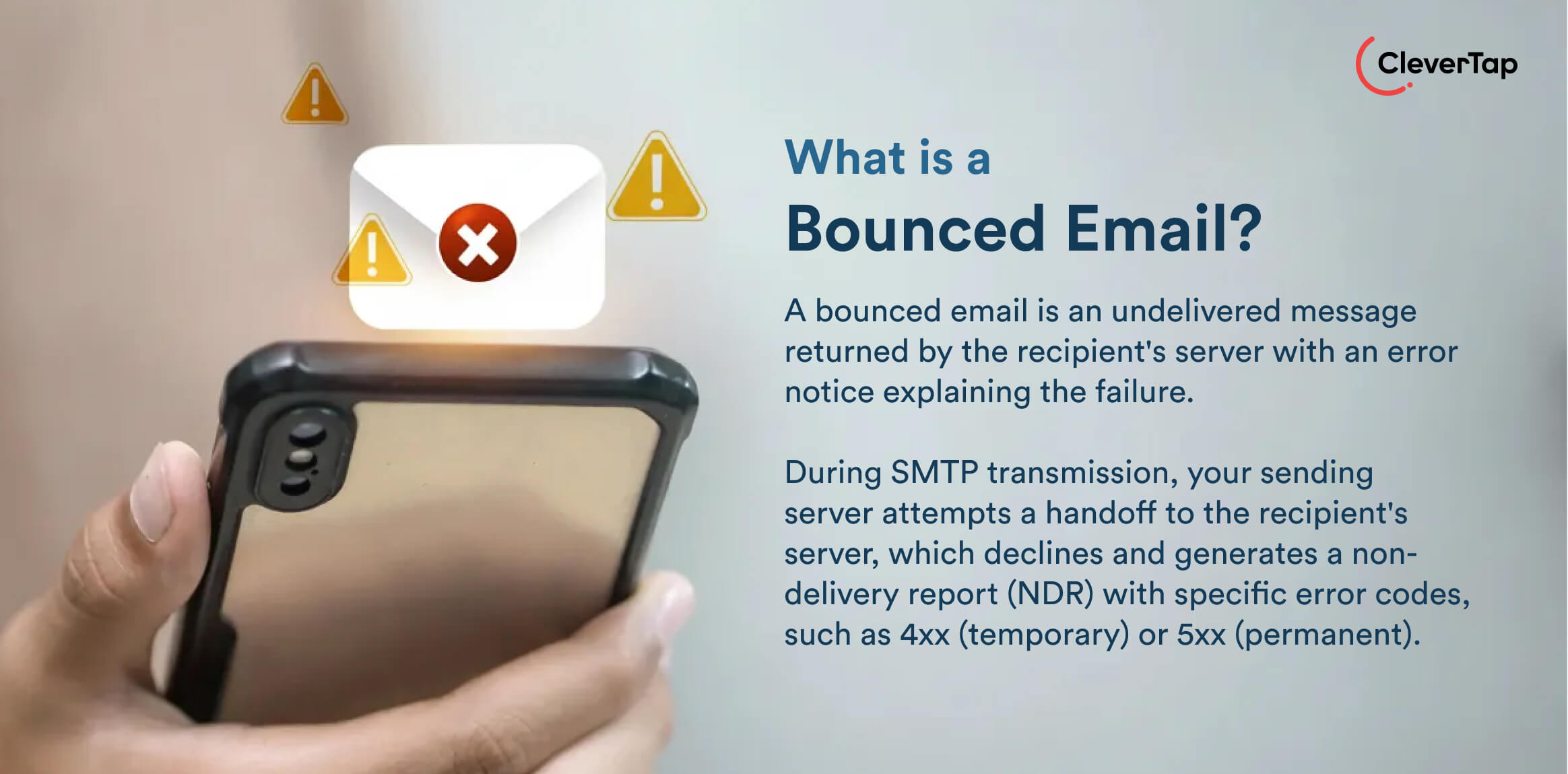
A bounced email is an undelivered message returned by the recipient’s server with an error notice explaining the failure. During SMTP transmission, your sending server attempts a handoff to the recipient’s server, which declines and generates a non-delivery report (NDR) with specific error codes, such as 4xx (temporary) or 5xx (permanent).
This differs from spam filtering, where emails arrive but land in junk or silent drops, with no notification. Bounces provide actionable error details, unlike untracked non-deliveries, making them critical for hygiene. You should track them to avoid inflating metrics or damaging your reputation.
Types of Email Bounces
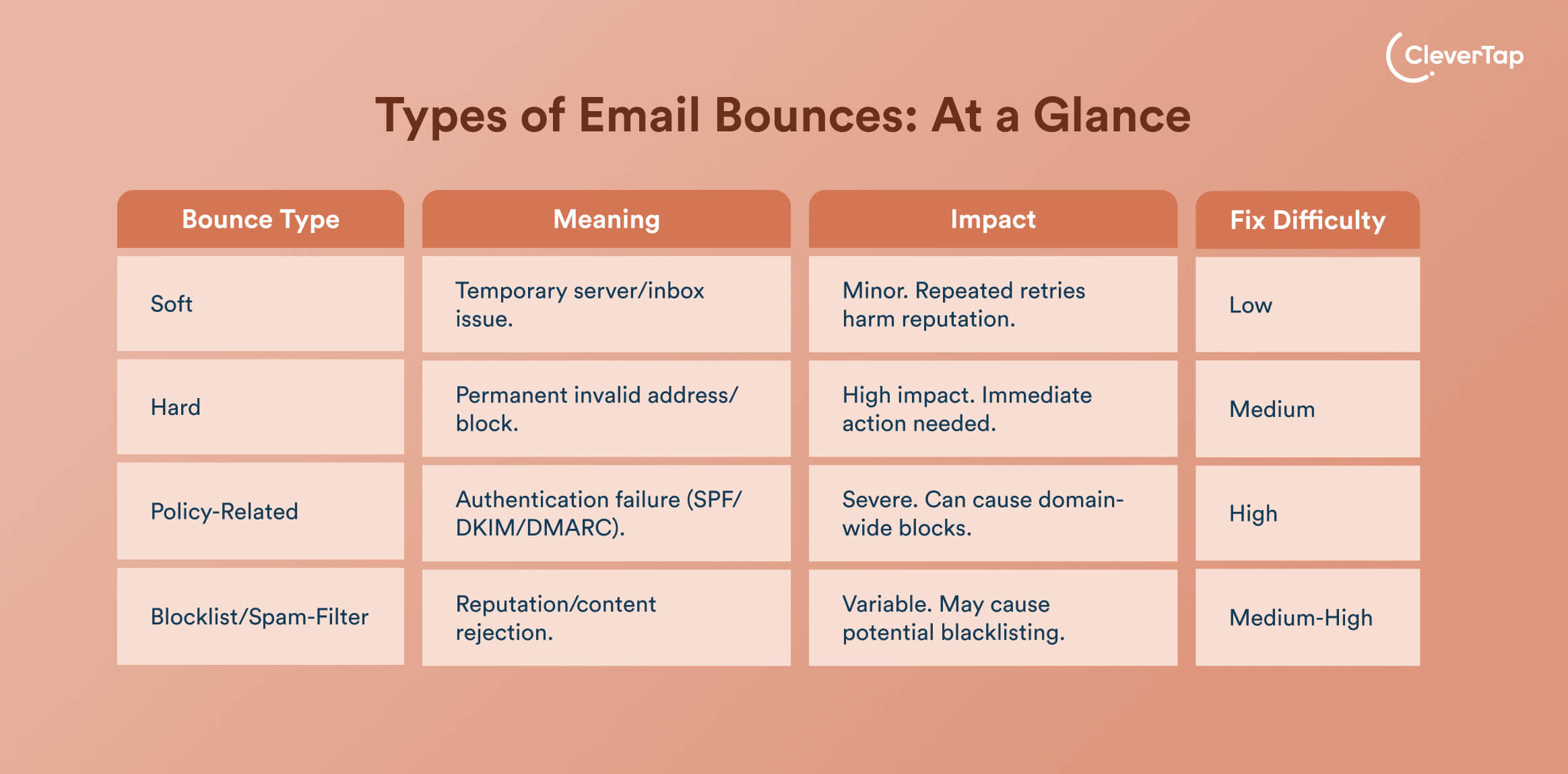
Email bounces fall into distinct categories based on their cause and permanence, each carrying unique risks to your reputation and deliverability.
1. Soft Bounce
A soft bounce is a type of bounced email that results from temporary delivery issues, in which the recipient’s server delays the message rather than permanently rejecting it. Common triggers for soft-bounced emails include full inboxes, server overloads, or oversized attachments, which allow most email service providers (ESPs) to retry them. Soft bounces turn into hard bounces after repeated failures, prompting automatic suppression to protect reputation.
2. Hard Bounce
A hard bounce signals permanent failure, typically invalid or nonexistent email addresses, domain shutdowns, or outright server blocks. ESPs immediately suppress these contacts, as retries waste resources and inflate bounce rates. High volumes of hard bounces quickly damage sender reputation, as providers interpret them as poor list hygiene and respond with throttling or blacklisting.
3. Policy-Related Bounce
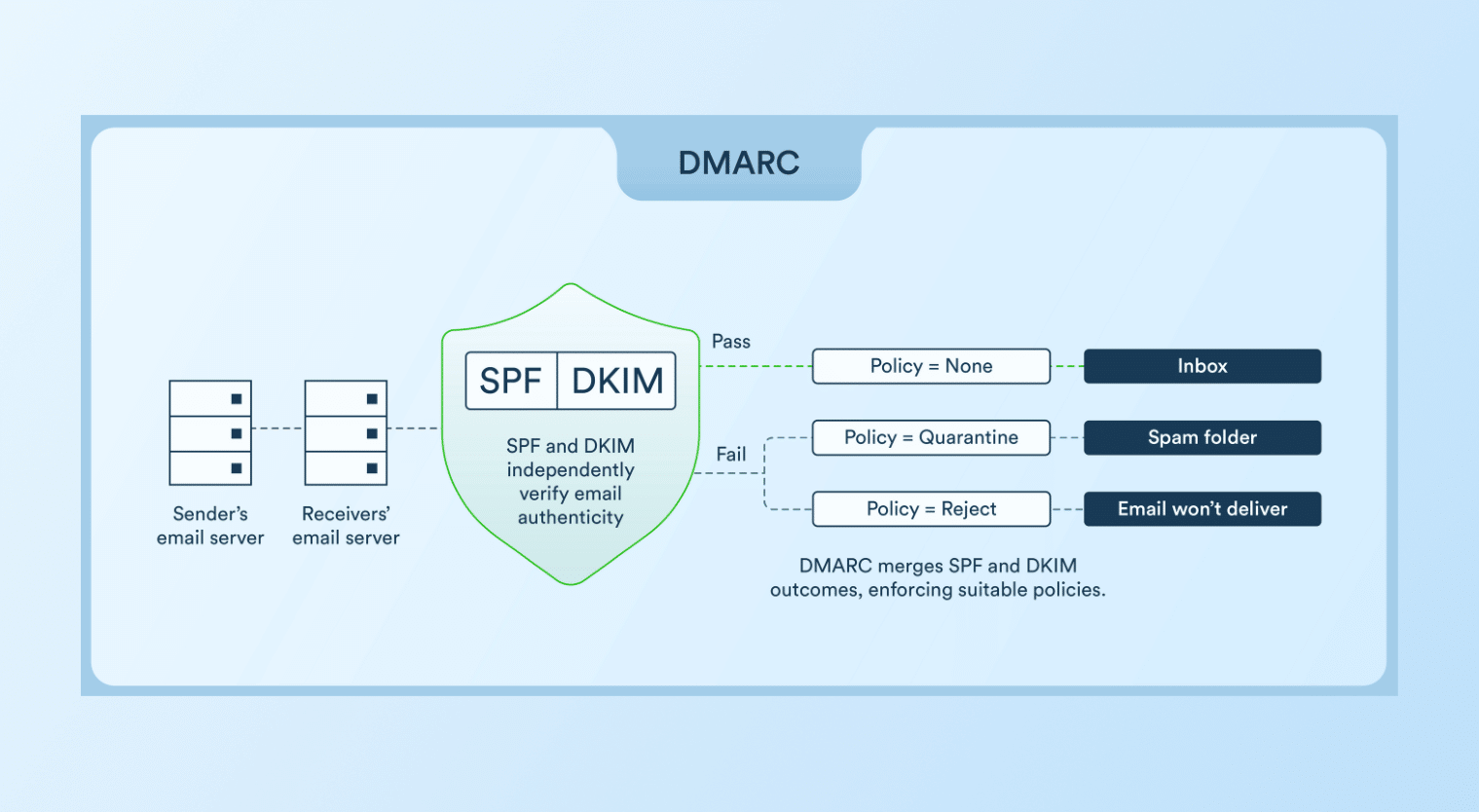
These types of bounced emails occur when your email authentication doesn’t pass a recipient’s strict domain rules.
- SPF (Sender Policy Framework) Failure occurs if the IP sending your email isn’t listed as authorized in their SPF record.
- DKIM (DomainKeys Identified Mail) Mismatch flags messages with broken or mismatched digital signatures that fail integrity verification.
- DMARC (Domain-based Message Authentication, Reporting & Conformance) Enforcement outright blocks or quarantines emails if neither SPF nor DKIM properly aligns with your From domain.
4. Blocklist/Spam-Filter Bounces
Blocklist bounces occur when your IP address, domain, or content is flagged on blacklists like Spamhaus, resulting in instant rejections. Spam filters trigger bounces by scanning for red flags, such as spammy keywords, too many images, or shady links, and severity determines whether it’s a soft or hard bounce.
Join email experts from Spamhaus and CleverTap and get practical strategies for keeping your email campaigns off blocklists.
Why Emails Bounce: 20+ Common Reasons for Bounced Emails Explained
Bounces stem from recipient, sender, authentication, content, and infrastructure problems, and pinpointing the exact trigger helps you find fixes that protect deliverability and revenue. We have listed 20+ reasons why emails bounce.
Recipient-Related Issues
1. Invalid Address: Typos during sign-ups, abandoned personal accounts, or mistyped domains turn potential contacts into nonexistent emails, causing immediate hard bounces that hurt your email metrics.
2. Full Inbox: Recipients fill out their mailbox storage from unread emails or prolonged inactivity, prompting servers to issue soft bounces as a temporary hold until the mailbox is cleaned.
3. Domain No Longer Active: When companies shut down or domains expire, all addresses become invalid overnight, delivering permanent hard bounces across entire segments.
4. Disposable Emails: Users grab short-lived addresses from TempMail or similar services, but they expire within hours or days, spiking hard bounces and inflating rates.
5. Spam Traps (Recycled Old Addresses): Some mailbox providers turn long-abandoned inboxes into spam traps to catch senders with poor list hygiene.
Sender-Related Issues
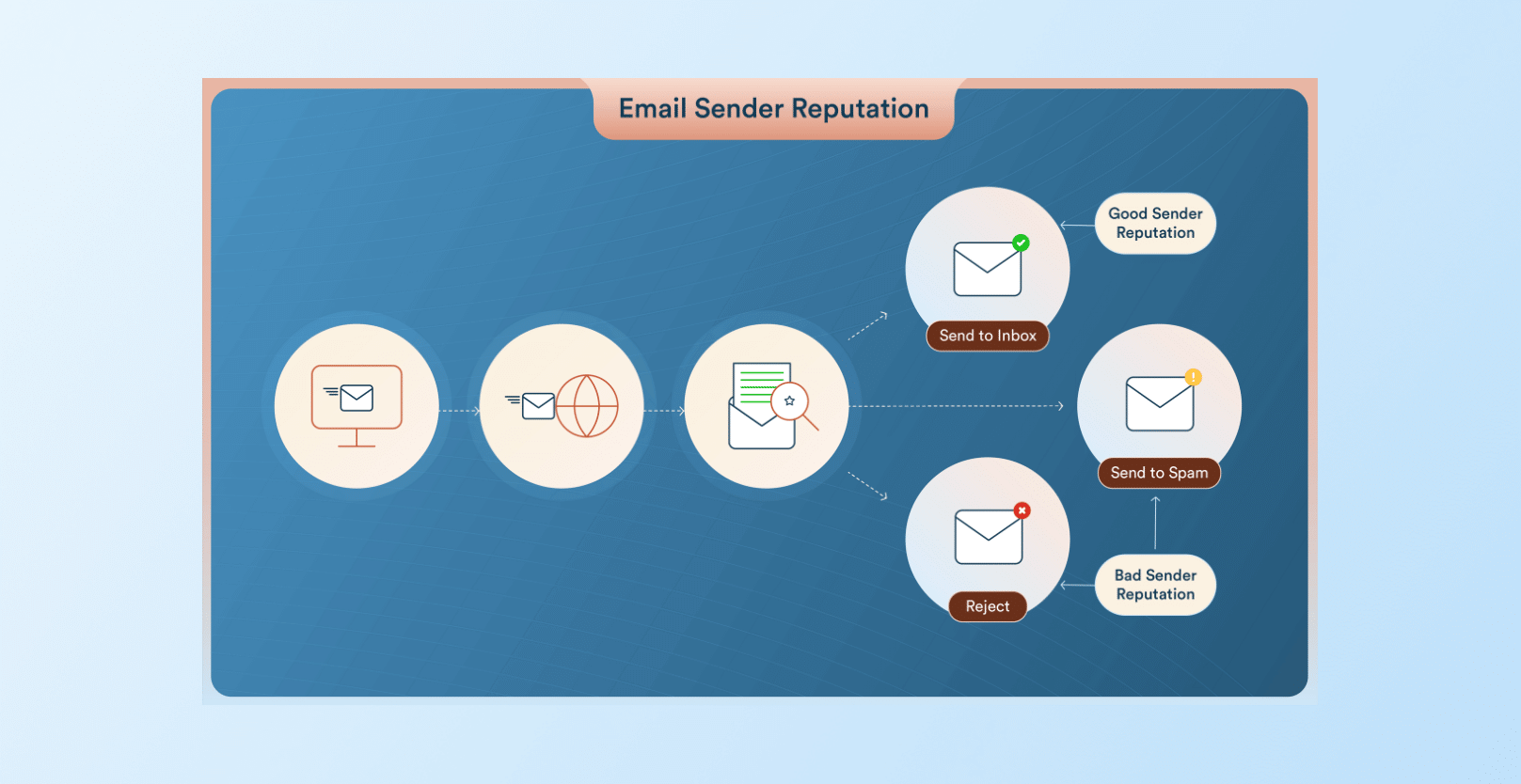
6. Poor Sender Reputation: Gmail and other providers blacklist IPs or domains showing patterns of spam complaints, high bounces, or low engagement.
7. Sending Too Fast (Rate Limiting): Blasting large volumes rapidly overwhelms recipient servers, activating throttling limits. Email providers like Yahoo restrict new senders to 2,000 emails per day, bouncing anything beyond to protect their infrastructure.
8. No Domain Warmup: Launching new or dormant domains and sending huge amounts of emails flags them as risky to providers. They cap the email volume until you prove legitimacy through gradual ramps over 2-4 weeks of consistent, low-bounce activity.
For example, when Apna, a professional networking platform, launched its email program on CleverTap, the team implemented a carefully planned domain warm-up strategy to ensure smooth delivery. By starting with trigger-based campaigns and personalized messaging in a phased rollout with our email personalization platform, Apna scaled its email channel responsibly and drove nearly 30X growth within a year.

Authentication Failures
9. SPF Misconfiguration: One of the reasons email bounces is that the SPF records don’t include your sending IP or mail server, failing authorization checks, which is especially common with multiple ESPs, subdomains, or forwarding setups that aren’t properly listed in DNS.
10. Missing DKIM: DKIM provides cryptographic signatures proving message integrity and origin; without them, strict providers like Google reject emails outright.
11. DMARC Reject Policy: DMARC policies set to “reject” or “quarantine” immediately drop emails that fail SPF or DKIM alignment with the From domain, creating an ironclad defense against spoofing or phishing.
Content & Spam Triggers
12. High Image-to-Text Ratio: Emails that contain a high amount of images but very little text can trip spam filters. Email providers like Outlook flag emails with more than 60% images as suspicious, often bouncing them or diverting them to the junk folder.
13. URL Shorteners: Links from Bitly or TinyURL raise red flags due to cloaking risks, with filters that reject emails that hide their destinations behind opaque shorteners instead of full, transparent URLs.
14. Spammy Keywords: There are words like “free money,” “guaranteed,” or “urgent” when used in the subject lines or bodies that activate content scanners, triggering bounces from aggressive filters treating them as phishing attempts.
15. Message Too Large: Attachments or embeds exceeding 25-50MB limits (Gmail caps at 25MB) cause outright rejections, as servers refuse oversized payloads.
16. Forbidden Attachment Types: Certain file types (like .exe, .js, or macro-enabled Office files) are blocked outright by providers such as Gmail and Outlook because they are commonly used to distribute malware. Including these extensions can cause the gateway to reject or bounce the message.
17. Low Engagement Flags: When subscribers consistently ignore, delete, or never open your emails, mailbox providers treat your emails as low value. Over time, this negative engagement can push more of your emails to spam or trigger bulk filtering and bounces as providers protect inbox quality.
Infrastructure & Provider Issues
18. ESP Downtime: When your ESP experiences an outage or performance degradation, messages may fail during SMTP handoff.
19. Blocked IP Ranges: Some mailbox providers or corporate gateways block entire IP address ranges based on past abuse or regional policies, causing your emails to be rejected even if your IP has a clean history.
20. Greylisting (“Try Again Later”): With greylisting, the recipient server temporarily rejects messages from unknown senders and asks them to try again later. Reputable ESPs will usually retry, but if administrators misconfigure or limit retries, those temporary deferrals can turn into bounces.
21. DNS Timeout: If the recipient’s DNS server is slow or unresponsive during the lookup phase, the receiving system may time out the connection and return a transient failure.
Bounce Message Examples
Bounce-back email messages often look cryptic at first glance, but they follow predictable patterns you can decode. Below are common bounced email message examples for soft, hard, and policy-related bounces, along with what they actually mean.
Soft Bounce Message Examples
Soft bounces usually return 4xx status codes and language that suggests a temporary problem rather than a permanent failure.
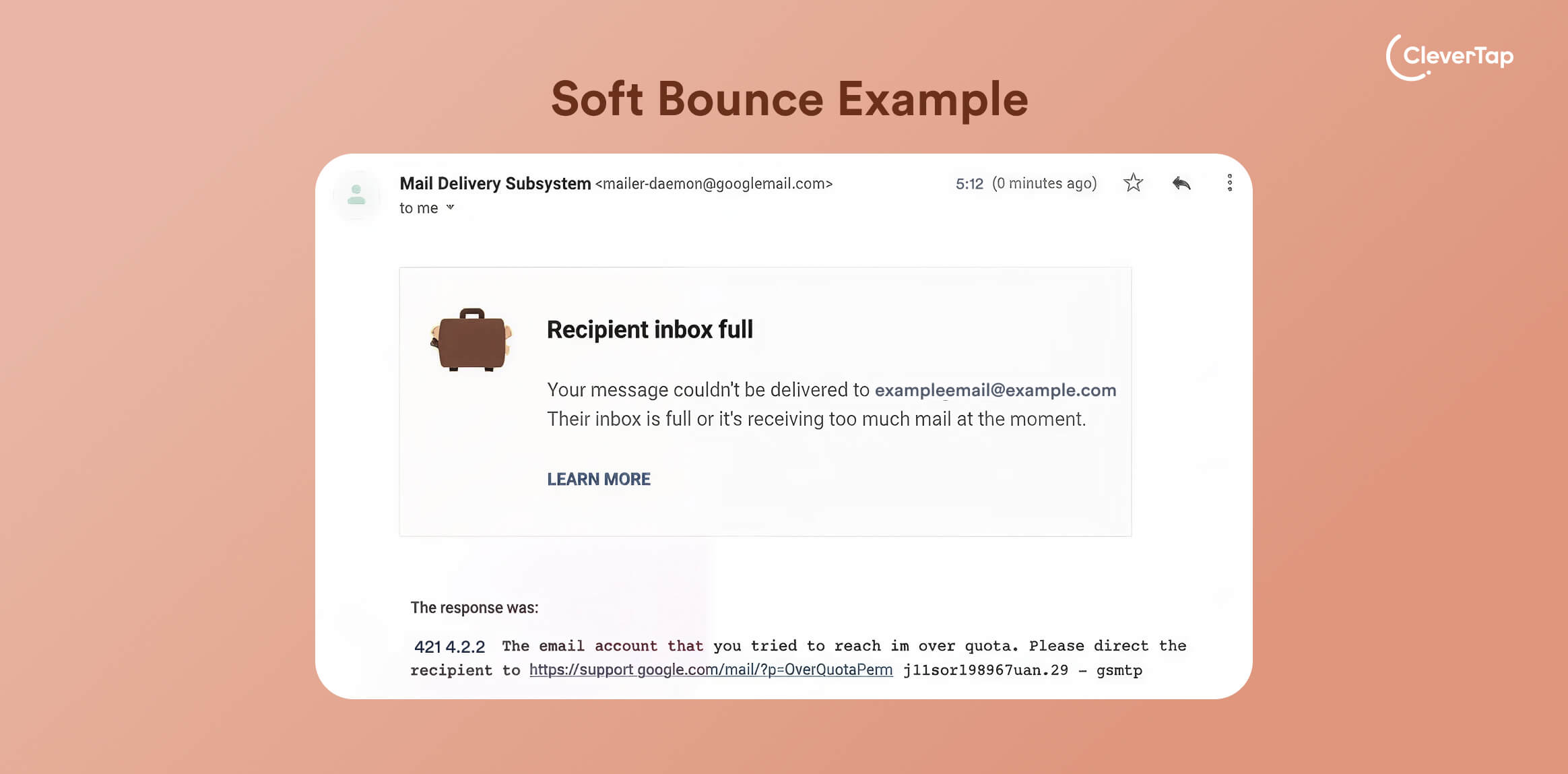
1. Mailbox Full
The recipient’s inbox has run out of space, so the server is temporarily refusing new mail until storage is freed.
Example: 421 4.2.2 Mailbox full
2. Temporary Failure
The email is delayed because the recipient’s mail server is having a temporary issue (overload, maintenance, or a transient network problem) and is asking your server to retry.
Example: 451 4.3.0 Temporary server error. Please try again later.
Hard Bounce Message Examples
Hard bounces are usually marked with 5xx status codes and indicate a permanent delivery failure.
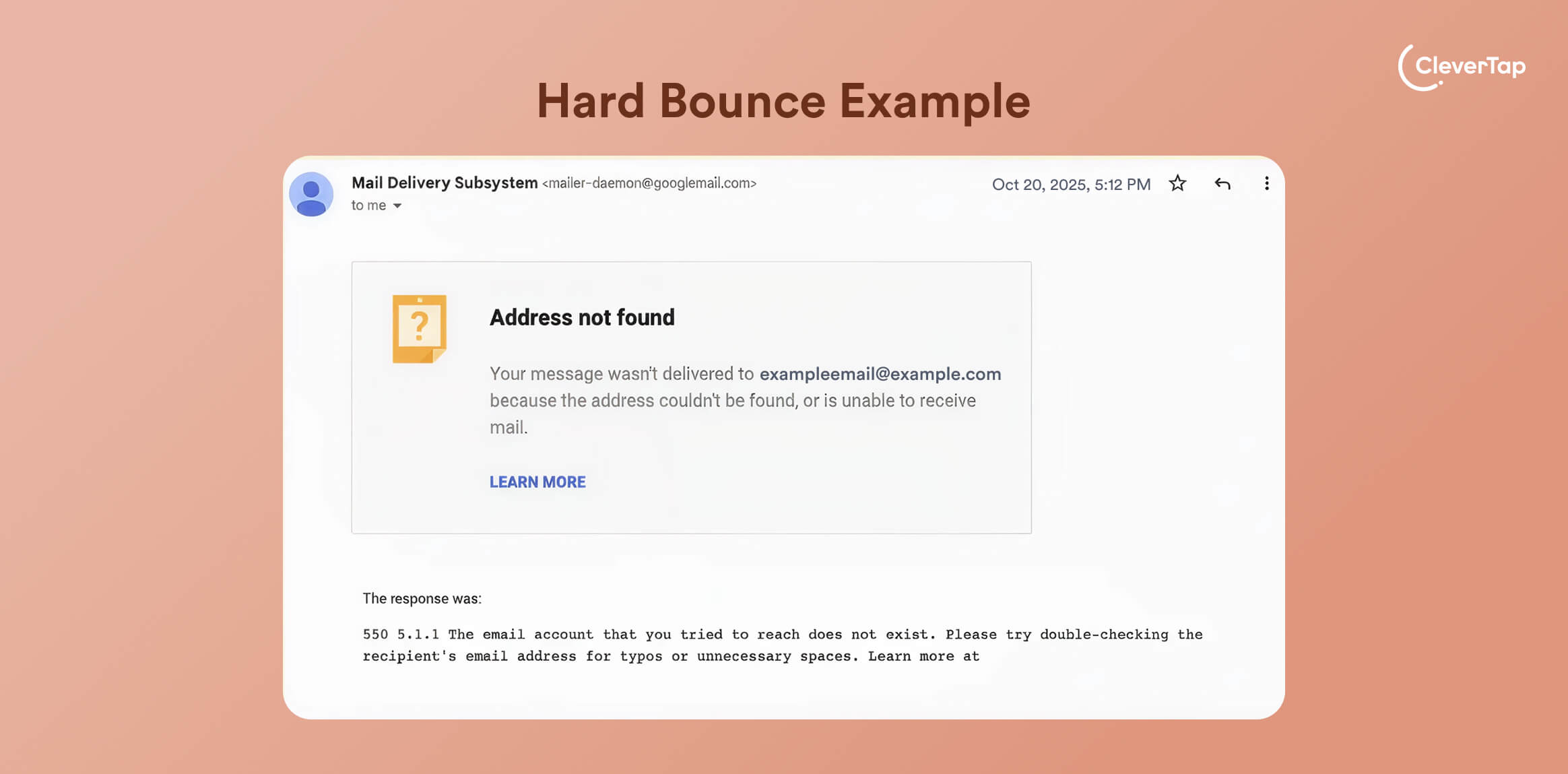
3. User Unknown
The mailbox doesn’t exist, often due to typos, job changes, or deleted accounts, so the address should be removed from your list.
Example: 550 5.1.1 User unknown
4. Invalid Email Address
The receiving server is confirming that the address is syntactically wrong or no longer valid, which will always result in a hard bounce.
Example: 550 5.1.0 Invalid email address
Policy Block Message Examples
Policy-related bounces happen when authentication or security checks fail, even if the address itself is valid.
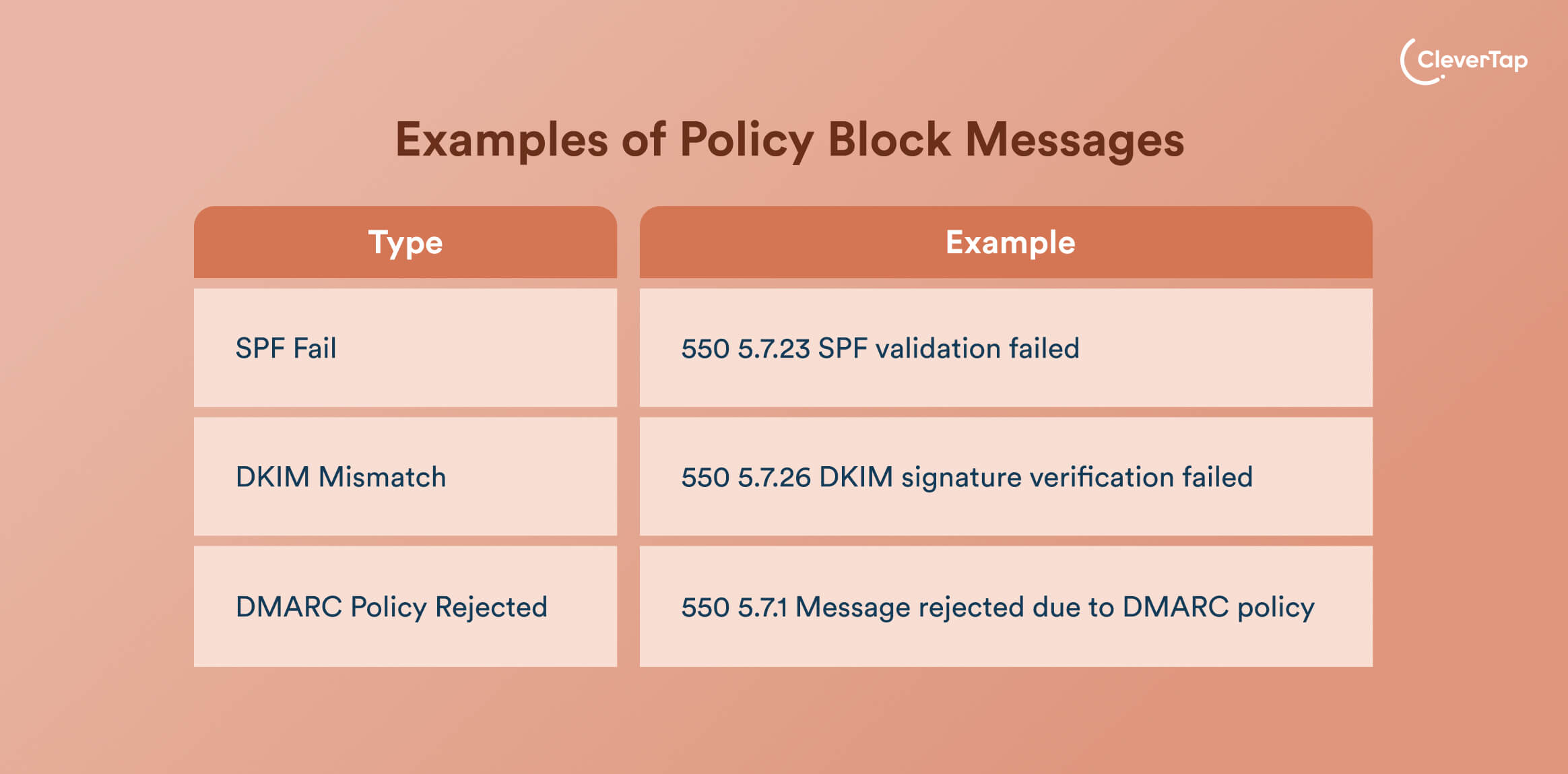
5. SPF Fail
The sending IP isn’t authorized in the domain’s SPF record, so the recipient’s server is blocking it on policy grounds.
Example: 550 5.7.23 SPF validation failed
6. DKIM Mismatch
The DKIM signature on the email didn’t match the domain’s public key, so the server rejected it as potentially spoofed or altered.
Example: 550 5.7.26 DKIM signature verification failed
7. DMARC Policy Rejected
The domain’s DMARC policy requires alignment, and the message fails SPF and/or DKIM checks, so the server follows the domain’s instruction to reject or quarantine the email.
Example: 550 5.7.1 Message rejected due to DMARC policy
What Each Bounce Code Means (4xx vs. 5xx)
Bounce codes follow a simple pattern: the first digit tells you whether to retry or give up. Codes starting with 4xx indicate a temporary issue (soft bounce), while 5xx codes indicate a permanent failure (hard bounce).
- 4xx: These are temporary failures where errors indicate the message is valid, but something in the chain is temporarily unavailable, such as a full mailbox, greylisting, or a momentary server problem. Your ESP should retry automatically, as the email may go through on a subsequent attempt.
- 5xx: These are permanent failures where the errors indicate the message cannot be delivered as sent, commonly due to invalid recipients, blocked senders, or strict policy/authentication failures. Resending without fixing the root cause will keep generating hard bounces, so these addresses usually need to be corrected or suppressed.
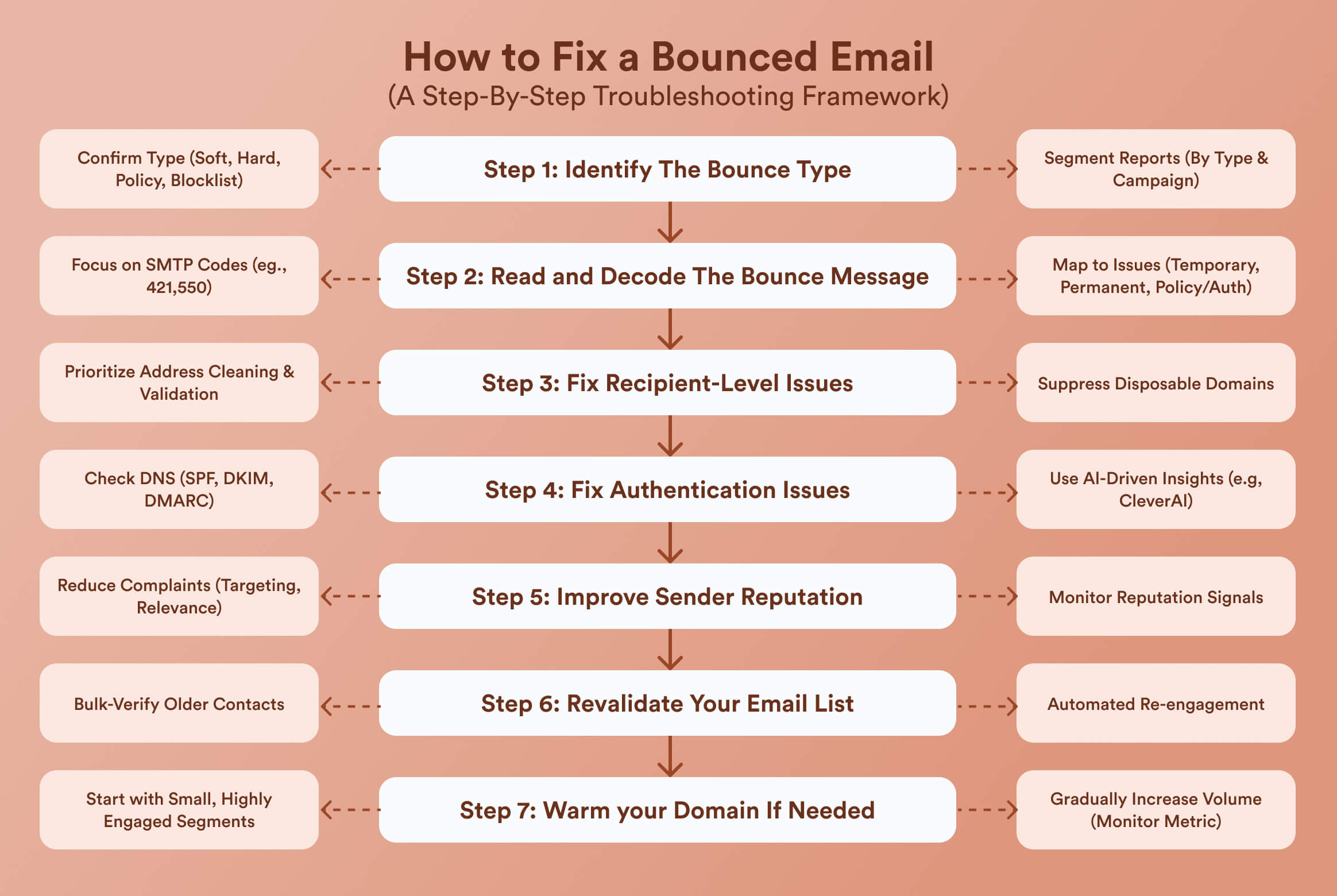
How to Fix a Bounced Email (A Step-By-Step Troubleshooting Framework)
Fixing bounced emails is all about following a repeatable diagnostic workflow. Let’s take a look at this 7-step framework.
Step 1: Identify The Bounce Type
Start by confirming whether you are dealing with a soft, hard, policy, or blocklist-related bounce. The easiest way is to look at the status code and category assigned by your ESP or the customer engagement platform.
Then, segment your reports by bounce type and campaign. This helps you see whether the problem isolates to a specific list, template, or sending domain.
Step 2: Read and Decode The Bounce Message
Open the actual bounced email message or NDR for a sample of failed sends.
Focus on the SMTP codes (e.g., 421, 550, 5.7.1) and the corresponding human-readable explanations, such as “Mailbox full,” “User unknown,” or “Message rejected due to DMARC policy.”
Map these codes to your earlier sections of temporary errors (mailbox full, rate limiting), permanent failures (invalid recipient), or policy/authentication issues (SPF, DKIM, DMARC). This decoding step tells you whether to fix addresses, infrastructure, or content first.
Step 3: Fix Recipient-Level Issues
If most of your bounced emails are due to recipient-related issues, you should start by prioritizing address cleaning and validation. Remove obvious invalids (user unknown, invalid email address), suppress disposable domains, and review segments tied to closed businesses or expired corporate domains.
Step 4: Fix Authentication Issues
If your bounced email message references SPF, DKIM, or DMARC failures, look into your DNS and sending-domain configuration. You need to ensure that all active sending IPs and providers are listed in your SPF record, DKIM keys are correctly published and rotated, and your DMARC policy aligns with your current readiness.
Platforms that use AI-driven insights, such as CleverAI, can flag authentication failures early by analyzing bounce logs and alerting you before your sender reputation drops.
Step 5: Improve Sender Reputation
If bounce codes point to sender reputation or spam issues, you need to shift your focus to how mailbox providers perceive your domain and IP. Start by reducing complaint drivers by narrowing your targeting, improving relevance, and honoring unsubscribes instantly.
CleverTap’s email delivery analytics can help you monitor reputation signals over time, like engagement drops, spam-complaint spikes, or rising soft-bounce rates, so you can pinpoint which campaigns, segments, or templates are dragging down performance before they trigger widespread filtering.
Step 6: Revalidate Your Email List
If your bounces are spread across many campaigns and segments, your email list may simply be stale. Use a reputable email validation service to bulk-verify older contacts and remove invalid, disposable, abuse, and dormant addresses.
If your email program runs through CleverTap, automated re-engagement can clean inactive segments over time.
Step 7: Warm your Domain If Needed
When most issues stem from a new or recently reactivated domain, a structured warm-up plan is essential. You should start with small, highly engaged segments, then gradually increase daily volume while monitoring bounces, opens, and complaints.
Discover tried and tested best practices to improve email deliverability.
How to Prevent Emails From Bouncing
Fixing bounces once is helpful; preventing them from coming back is what really protects your growth.
Implement Proper Authentication (SPF, DKIM, DMARC, BIMI): Set up SPF and DKIM for every sending domain, then publish a DMARC policy (start with p=none, and tighten to quarantine or reject as you stabilize). This reduces policy-related bounces and ensures compliance with Gmail/Yahoo bulk-sender norms. Once those pass consistently, add BIMI so supported inboxes can show your verified logo, which also helps build trust and engagement.
Maintain List Hygiene: Clean your list regularly with validation tools and internal rules, removing invalid, disposable, spam-trap, and abuse addresses. ZeroBounce’s 2025 report shows that at least 28% of a typical list decays annually.
Use Double Opt-In: Enable double opt-in on key forms so new subscribers confirm via email before joining your main list. This filters out fake, mistyped, and bot sign-ups and typically improves engagement.
Segment by Engagement Levels: Segment your recipients by recent behavior, like opens, clicks, and purchases, and prioritize sending to your most engaged audiences.
Slowly Ramp Up Sending Volume: For new or reactivated domains/IPs, warm up gradually instead of sending to your full list on day one. Start with small, engaged cohorts and increase volume over the weeks, while tracking bounces and complaints, and slowing or pausing if negative signals appear. For example, Booky, which helps people find restaurants, used CleverTap to improve their open rates by 36%. Their rates had dropped by 50% due to a mistake in an email blast they had sent out.

Use a Reputable ESP or Dedicated IP: Choose an ESP with solid deliverability features and transparent bounce handling, and consider a dedicated IP or subdomain for high-volume or regulated programs like fintech and large e-commerce.
Avoid Spam Triggers: Keep content filter-friendly. You can use a balanced image-to-text ratio, clear and honest subject lines, and minimal spammy phrasing combined with an aggressive cadence. Avoid risky attachments and heavy use of URL shorteners, and provide easy unsubscribes so users opt out instead of marking spam.
Tools to Diagnose and Reduce Bounced Emails
With the help of a focused toolkit, you can make it easier to find why emails bounce and fix issues before they snowball into an avalanche.
- SPF Checker: SPF lookup tools (for example, MXToolbox and EasyDMARC) verify your SPF record, highlight syntax errors, and confirm all legitimate sending services are authorized.
- DMARC Analyzer: DMARC dashboards (such as Valimail, MailerCheck, and EasyDMARC) turn raw reports into readable insights on which sources fail SPF/DKIM and trigger DMARC-related bounces.
- Email Validators: Validation platforms like ZeroBounce remove invalid, disposable, abuse, and spam-trap addresses from your list to cut hard bounces before you hit send.
- Domain Reputation Checkers: Reputation and blacklist monitors track your IP/domain health and alert you if you appear on blocklists or fail key checks that impact deliverability.
- Inbox Placement Tools: Seed-based inbox testing shows whether emails land in the inbox, spam, or promotions across providers, so you can course-correct ahead of major campaigns.
A platform like CleverTap can then pull these signals together, analyze bounce patterns across campaigns, flag anomalies such as sudden spikes in hard bounces or DMARC errors, and use AI-driven insights to suggest concrete corrective actions inside your existing workflows.
Frequently Asked Questions (FAQs) about Bounced Emails
Q1. Does a bounced email mean it wasn’t delivered?
Yes, a bounced email means that the message never reached the recipient’s inbox. Your sending server receives the rejection during SMTP handoff, before any user interaction. Mailbox providers generate these non-delivery reports (NDRs) immediately upon failure, ensuring senders know delivery failed outright.
Q2. What does it mean if an email bounces?
If an email bounces, it indicates a delivery failure caused by either a temporary issue (soft bounce) or a permanent problem (hard bounce). Soft bounces may resolve on retry, while hard bounces, such as nonexistent email addresses, require removing or correcting the address to prevent ongoing deliverability damage.
Q3. Why did my email bounce back?
An email can bounce back for several reasons, including invalid or mistyped email addresses, full inboxes, inactive domains, poor sender reputation, sending too fast, or failed email authentication (SPF, DKIM, or DMARC). Spam filters or blocklists may also reject emails if content or reputation signals look suspicious.
Q4. What is the difference between bounce and drop?
A bounce occurs when the recipient’s mail server actively rejects the email and sends a non-delivery report back to the sender. A drop happens when the sending platform stops the email before it’s sent, usually because the address is suppressed, invalid, unsubscribed, or previously hard-bounced. Drops protect the sender reputation, while bounces signal an external rejection.
Q5. Can you resend a bounced email?
You should only resend a bounced email if it was a soft bounce caused by a temporary issue, such as a full inbox or server delay. Hard-bounced emails should not be resent unless the underlying issue, like an incorrect address or authentication failure, is fixed. Repeatedly resending to hard-bounced addresses can quickly harm your sender reputation.
How CleverTap Helps Reduce Email Bounces
CleverTap’s email marketing platform helps marketers detect, reduce, and prevent email bounces before they impact deliverability or revenue.
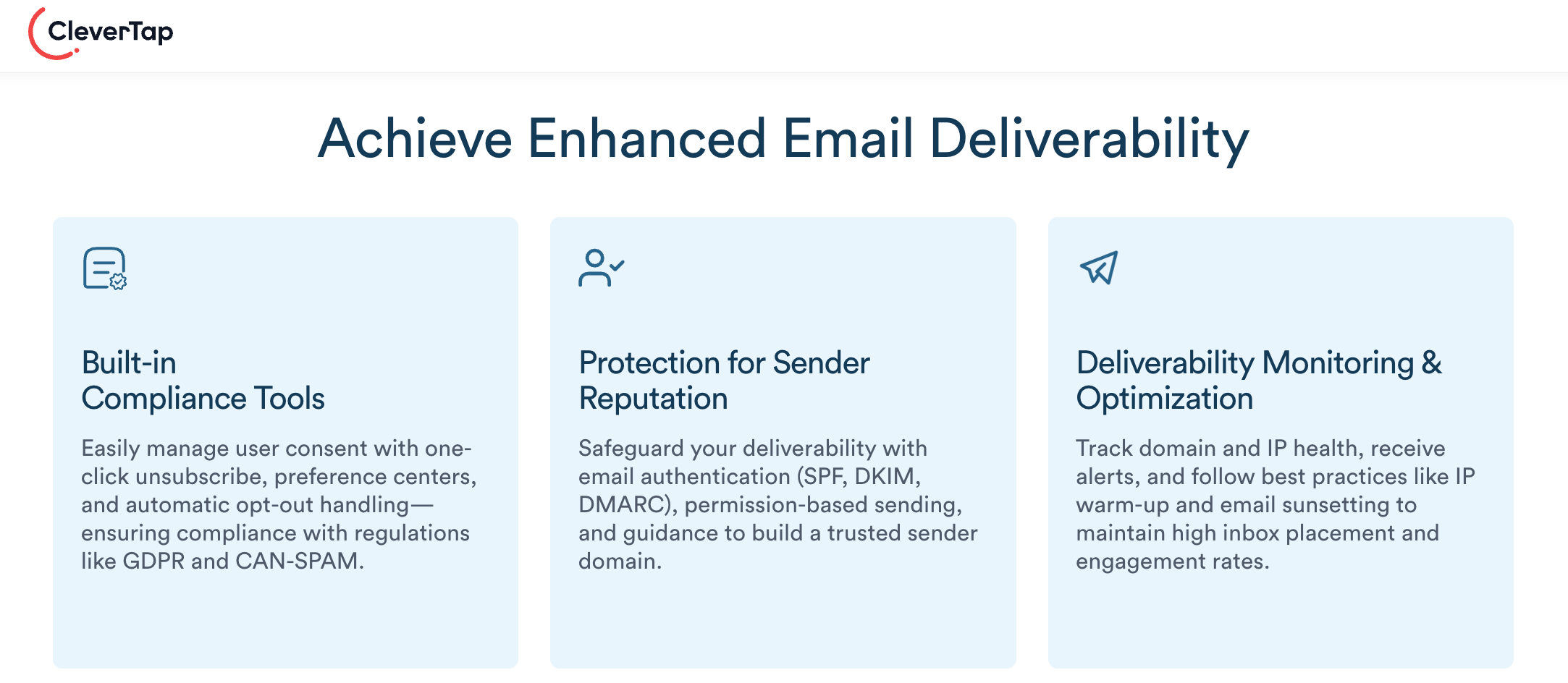
The platform automatically classifies bounces into soft, hard, policy-related, and blocklist-driven categories, giving teams instant visibility into why emails fail. Built-in delivery analytics highlight abnormal bounce spikes tied to authentication issues (SPF, DKIM, DMARC), list quality problems, or sender reputation—so issues are fixed before providers impose throttling or blocks.
CleverTap also protects sender reputation through automated suppression of invalid and repeatedly bounced addresses, engagement-based segmentation, and controlled volume ramp-ups for new or recovering domains. AI-driven insights connect bounce data with engagement trends, helping teams identify risky campaigns, cold segments, or misconfigured journeys early.
Learn how CleverTap can be your email deliverability partner.
Most teams treat bounced emails as a hygiene chore, but the strongest ones treat them as a strategic signal. Bounce patterns reveal which acquisition channels bring in bad data, which journeys are misconfigured, and where your brand is bumping up against mailbox-provider limits.

Kiran Pius 
Leads Product Launches, Adoption, & Evangelism.Expert in cross-channel marketing strategies & platforms.
Free Customer Engagement Guides
Join our newsletter for actionable tips and proven strategies to grow your business and engage your customers.