
































Table of Contents
Categories
Most Popular


Consumers have come to expect personalized experiences. 71% of customers say they expect personalized interactions, and 76% feel frustrated when they don’t receive them. Businesses are seeing the upside too: 65% of e-commerce sites report higher conversion rates after adopting personalization, and over 89% of marketers say it delivers a positive ROI.
That gap between customer expectations and business opportunity is exactly where website personalization comes in. In this guide, we break down what personalization means, how to choose the right tactics, and share 14 practical website personalization examples that you can adapt. For each example, we cover what it is, who it’s best for, why it works, and when it might not be the right fit.
What Is Website Personalization?
Website personalization means dynamically tailoring a site’s content, layout, and offers to each visitor based on their individual data, preferences, or behavior. The website recognizes something about the user (location, past actions, profile, etc.) and shows a version of the page optimized for them.
For example, when Amazon greets you by name or shows a “Customers who bought this also bought” widget based on your browsing history, that is a great example of website personalization at work. Personalization makes each visitor’s experience feel bespoke rather than one-size-fits-all. The goal is to serve relevant content that matches the user’s context, and thereby increases clicks and conversions.
Framework: How to Choose the Right Website Personalization Approach for Your Business
Not every personalization tactic suits every site or audience. Choosing the right approach depends on factors like funnel stage, data availability, and your team’s maturity.
Match Personalization to the Funnel Stage
Effective personalization aligns with the customer’s journey stage.
- At the awareness stage, when users are visiting your site for the first time, personalization should rely on light, non-intrusive signals such as geolocation, device type, or referral source. This could be as simple as tailoring headlines or banners (for example, greeting visitors by city or referencing the campaign they came from).
- In the consideration stage, personalization can become more behavior-driven. Returning visitors might see products related to what they previously viewed, content recommendations based on browsing history, or dynamic CTAs tailored to their interests or industry.
- At the retention stage, after a purchase or sign-up, the focus shifts to loyalty and lifetime value. Here, personalization can include customized account messages, tailored re-engagement offers, refill reminders, and milestone-based rewards, such as birthday discounts.
Choose Personalization Based on the Data You Have
The type of website personalization examples you can implement depends heavily on the data available to you.
- Behavioral data, such as past clicks, page views, or purchases, powers many recommendations and dynamic content experiences. For example, suggesting related products based on previously viewed items is a classic form of behavioral personalization.
- Contextual data focuses on the visitor’s current situation rather than their history. Signals like location, device, time of day, or referral source can be used to adapt the experience in real time.
- Predictive personalization goes a step further by using machine learning to anticipate what a user is likely to want next. By analyzing historical behavior patterns, AI models can predict relevant products, content, or offers and surface them proactively.
Behavioral data works best for direct recommendations, contextual data for situational adjustments, and predictive models for more dynamic, AI-driven experiences.
Choose Personalization Based on Your Team’s Maturity
Personalization capabilities typically evolve in stages as teams gain experience and infrastructure.
At the early stage, brands rely on simple, rule-based tactics, such as showing the same welcome banner to all returning visitors. A common first step is customer segmentation, where users are grouped by attributes such as location, campaign source, or device, and each segment receives a slightly tailored experience.
As teams mature, they move toward micro-segmentation and eventually use 1:1 personalization tools, where content varies at the individual level. This often involves managing multiple rules, real-time data inputs, or machine-learning models to deliver personalized landing pages, product recommendations, or user journeys.
For example, some frameworks define an “initial” stage with a single message for all users, followed by a “segmented” stage in which a single algorithm serves each group. Advanced teams may run multiple models simultaneously, adapting experiences by context, intent, and behavior, to achieve true hyper-personalization.
By considering where your user is in the funnel, what data you have, and your technical readiness, you can select the most effective personalization tactics.
Also learn about mobile app personalization with strategies and examples to draw inspiration from.
14 Best Website Personalization Examples (With Use Cases)
Below are 14 proven website personalization examples drawn from real brands to spark ideas you can adapt.
Most Common Website Personalization Examples
1. Location-Based Homepage Messaging
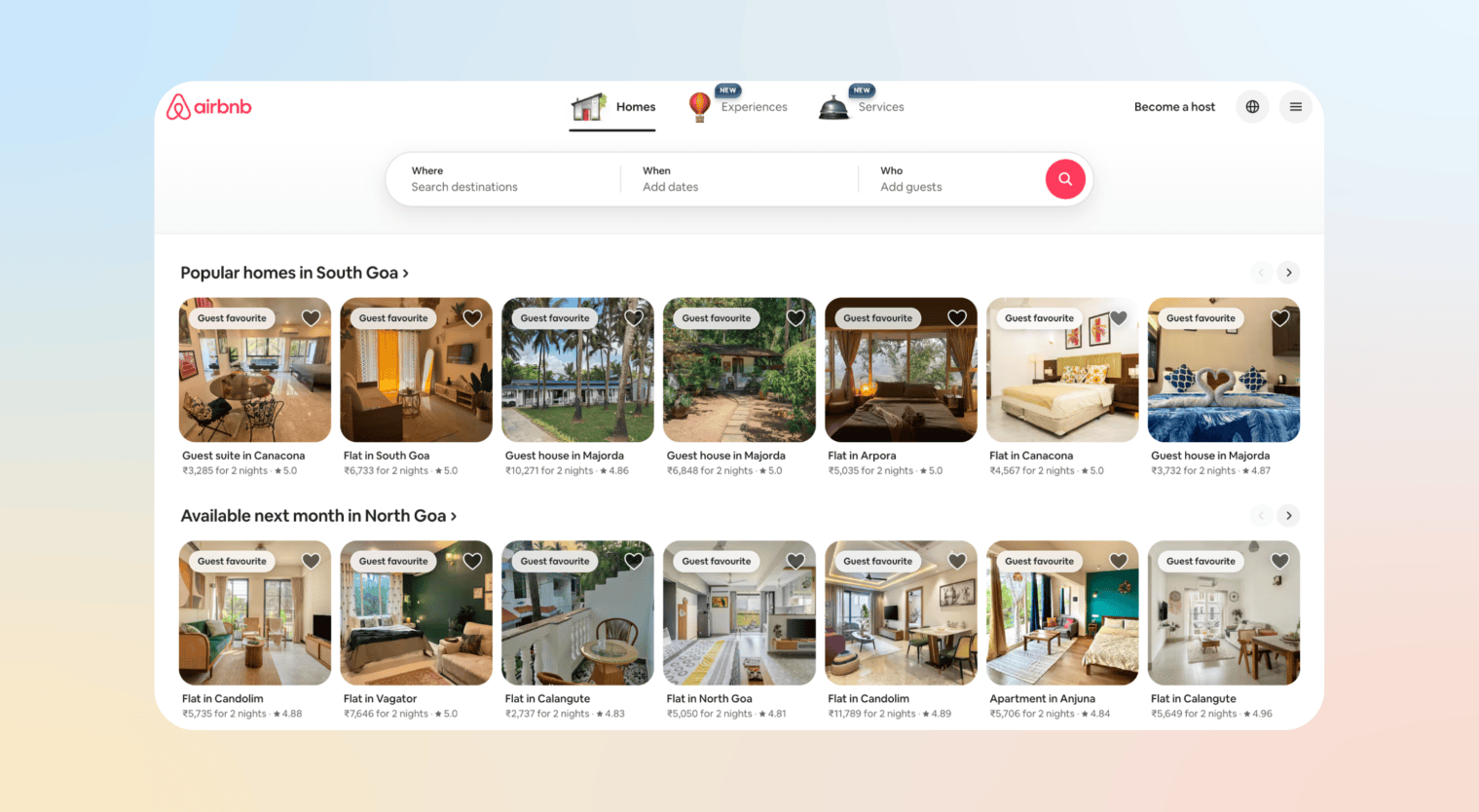
Homepages and banners adapt based on a visitor’s geolocation, automatically detecting their IP address to display relevant currency, pricing, and shipping info. A UK visitor sees GBP and UK shipping; a US visitor sees USD and US rates.
This works for any global site with regional segments, but especially for multinationals and local businesses running national campaigns. The payoff is immediate relevance: 72% of consumers only engage with personalized messaging, and a location-aware experience builds trust while eliminating currency and logistics confusion.
Airbnb does this well. Its homepage surfaces nearby destinations, local experiences, and local currency by default, removing friction and accelerating engagement instead of forcing users to navigate a generic global catalog.
Learn more about location-based marketing and geofencing marketing strategies to build your own.
2. Personalized Hero Banners
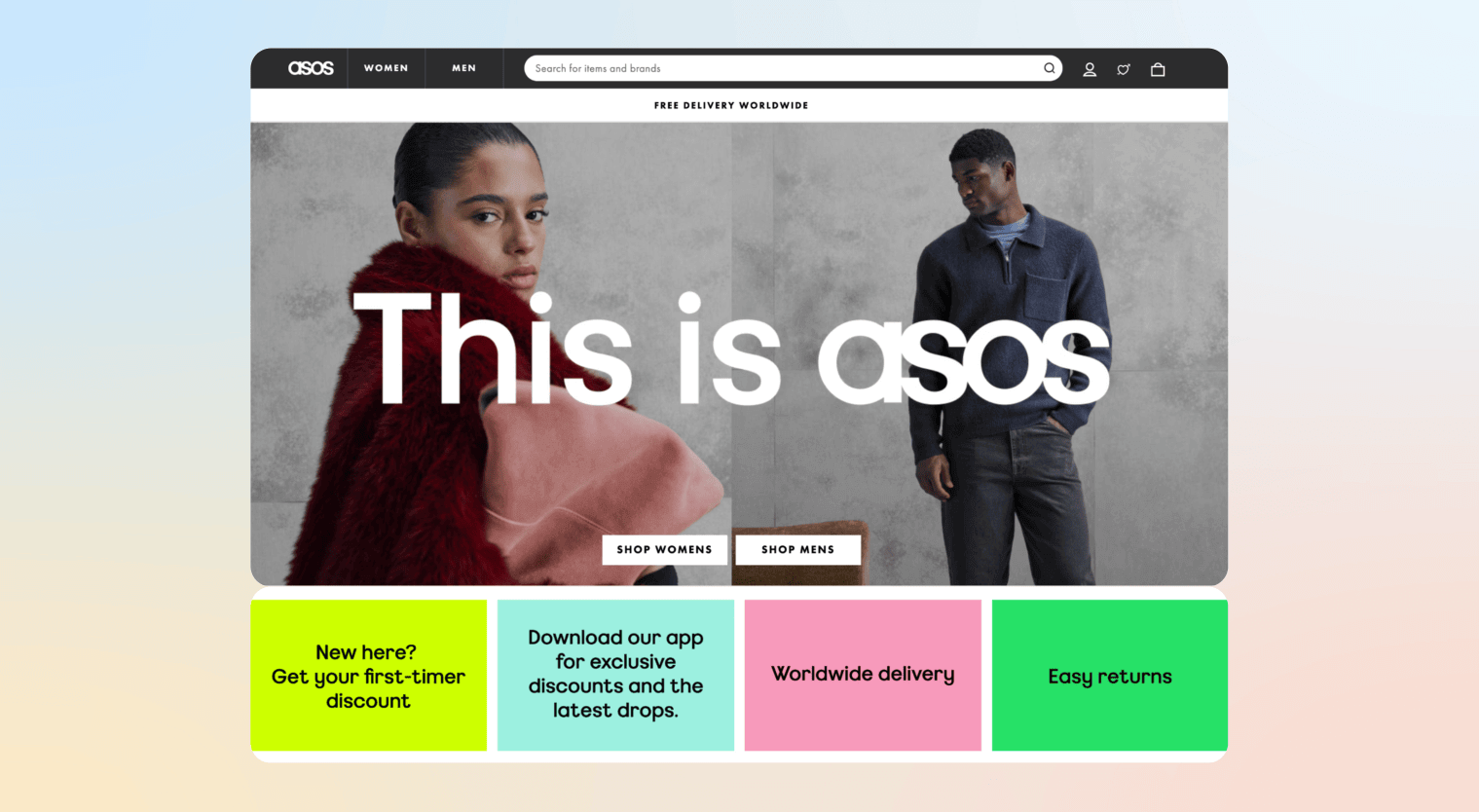
Hero images and headlines swap dynamically based on visitor attributes. A newsletter site might show first-time visitors a “Start Here” banner while returning subscribers see new content highlights. Retailers often vary hero banners by demographic segment or traffic source, showing organic visitors a general offer and paid campaign visitors a specific deal. CTAs can shift, toggling between “Download” and “Sign Up” based on the referral source.
ASOS puts this into practice by tailoring its homepage for first-time visitors, surfacing trending products and popular categories rather than a generic storefront. This lowers the barrier to entry, encourages deeper browsing, and drives sign-ups.
3. Dynamic CTAs by Visitor Type
The call-to-action (CTA) buttons or signup prompts change based on visitor profile or intent. For instance, e-commerce sites might swap a “Buy Now” button for first-timers with “Use code WELCOME for 10% off.” This works for sites with distinct visitor segments and is especially useful for multi-product retailers.
Different user groups have different next best actions. Customizing the CTA ensures you ask for the “right” action. This alignment significantly increases conversion as personalized CTAs convert over 202% better than generic ones.
Amazon adjusts its CTAs based on shopper context. New or signed-out users typically see “Add to Cart” or “Buy Now,” while Prime members see value-driven CTAs like “Buy with Prime” or “Free delivery by tomorrow.” Returning customers may also see prompts such as “Buy again,” based on past purchases.
Learn how to build an e-commerce personalization strategy and the best e-commerce personalization tools that can help you build it.
4. Returning Visitor Messaging
Returning visitors receive messaging that acknowledges their history, such as “Welcome back! Check out our latest offers” or “Last time you looked at Hiking Boots, here’s an updated lineup,” delivered via pop-ups, banners, or in-page modules. Sites detect repeat visits through cookies or login state.
Recognizing returning users makes them feel valued and cuts the path to conversion short. “Because you liked X” modules alone can drive a 14% lift in clicks.
Netflix’s homepage skips the introduction and leads with “Continue Watching” and “Because you watched X” rows, picking up exactly where the user left off.
5. Personalized Product Recommendations
Product pages, category pages, and sidebars surface items based on visitor behavior or profile, think “Customers also bought” or “Recommended for you,” rather than static bestseller lists. Amazon built its dominance partly on this, with recommendations driven by past clicks and purchases woven throughout the experience.
The impact is significant: personalized recommendations can account for up to 31% of total e-commerce revenue, with AI-driven suggestions boosting both average order value and conversion by surfacing what a user is statistically likely to want next.
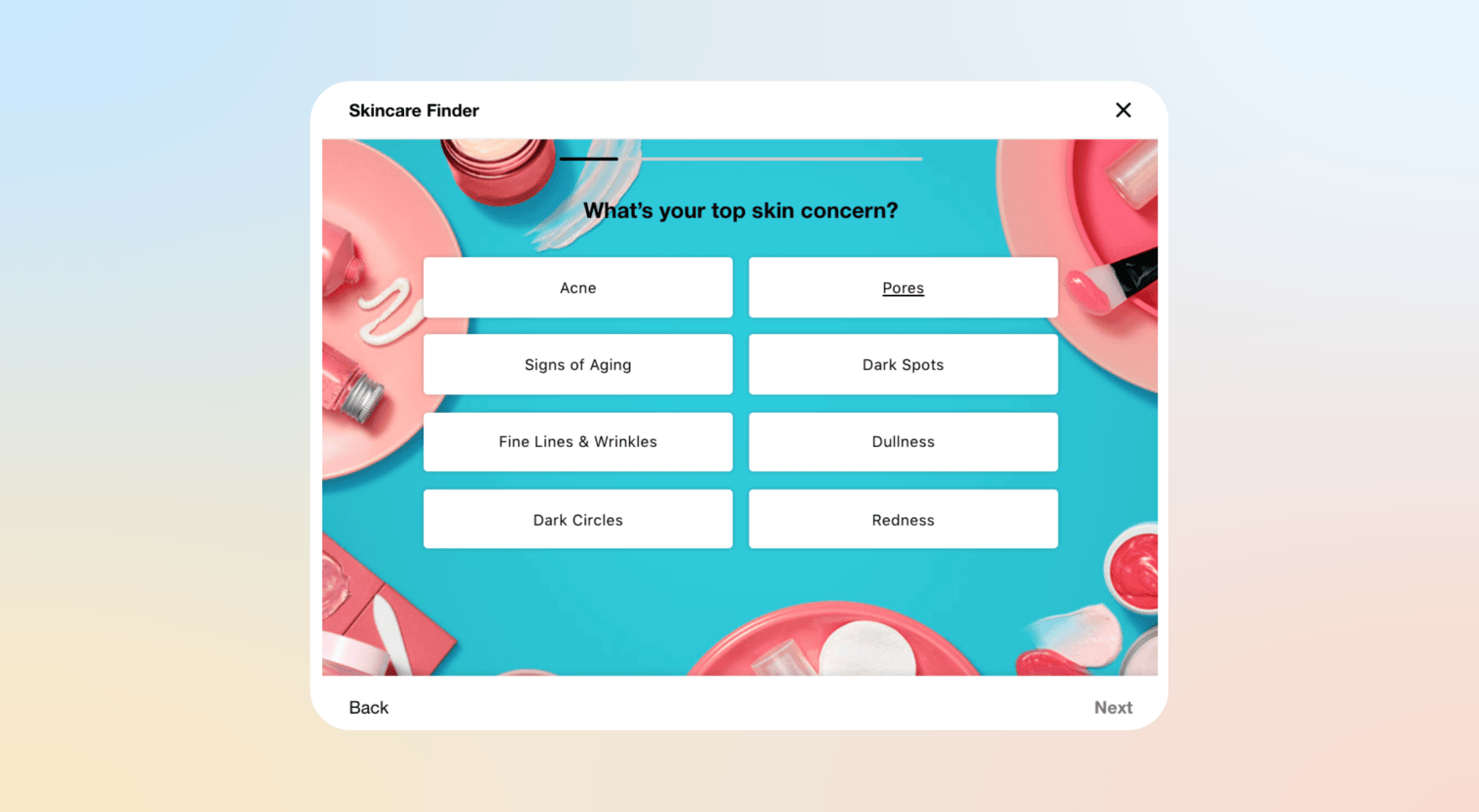
Sephora’s Skincare Finder is a strong example, asking shoppers about their skin type, concerns, and goals, then narrowing the catalog to products most likely to work for them. This removes guesswork, builds purchase confidence, and makes discovery feel curated rather than overwhelming.
Behavior-Driven Website Personalization Examples
6. Browsing-Based Content Blocks
Dynamically inserting content blocks on pages based on what the visitor has browsed earlier in the session. For instance, if a user just looked at several hiking backpacks, the homepage or category page might feature a “Top Picks for Hiking” section. A news site might show extra articles related to the topics the reader clicked.
It uses the user’s real-time signals to surface relevant content and meet intent: the user just showed interest in X, so you give more of X. Tools can automatically change the page in real time, e.g., swapping images or links as the user clicks around.
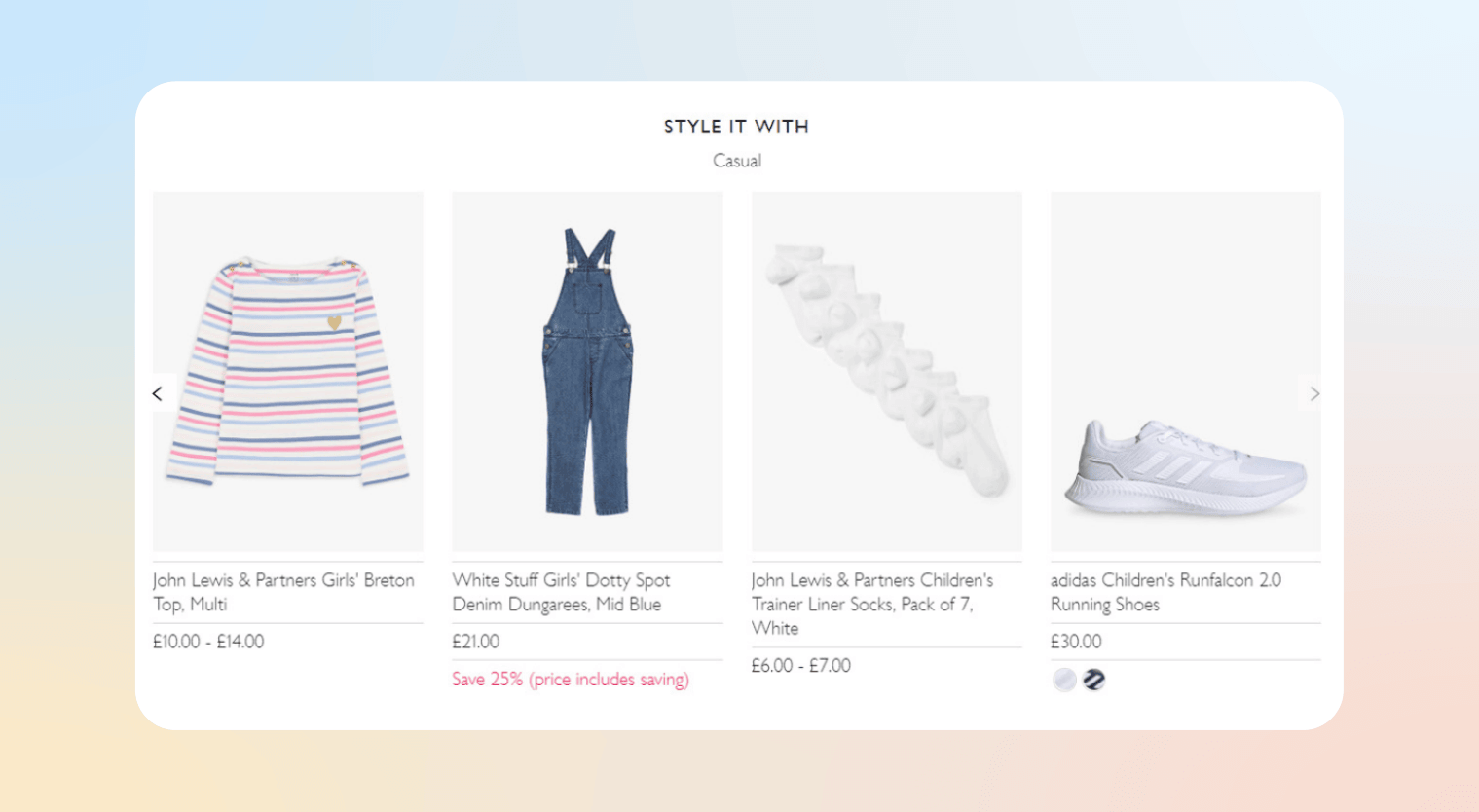
John Lewis displays occasion-based outfit recommendations, like “Casual,” “Creative Work,” or “Evening, ”when a customer browses a specific garment. These content blocks changed depending on what the user viewed. This relevance boost keeps users on-site longer and guides them toward conversion.
7. Abandonment-Based Messaging
Abandonment-based personalization activates when a visitor leaves before completing a key action, such as adding items to a cart, starting a signup, or initiating a booking.
On-site, this can appear as an exit-intent pop-up (“Still interested in these items?”) or a dynamic reminder banner when the user returns. Off-site, it can extend to retargeting messages with omnichannel personalization (such as email or push notifications), provided the user has opted in.
For example, if a traveler begins booking a flight but exits before payment, the website can dynamically display their saved itinerary on their next visit, highlight price changes, or surface a limited-time incentive. These visitors show high intent, so timely, behavior-based nudges can significantly improve conversions.
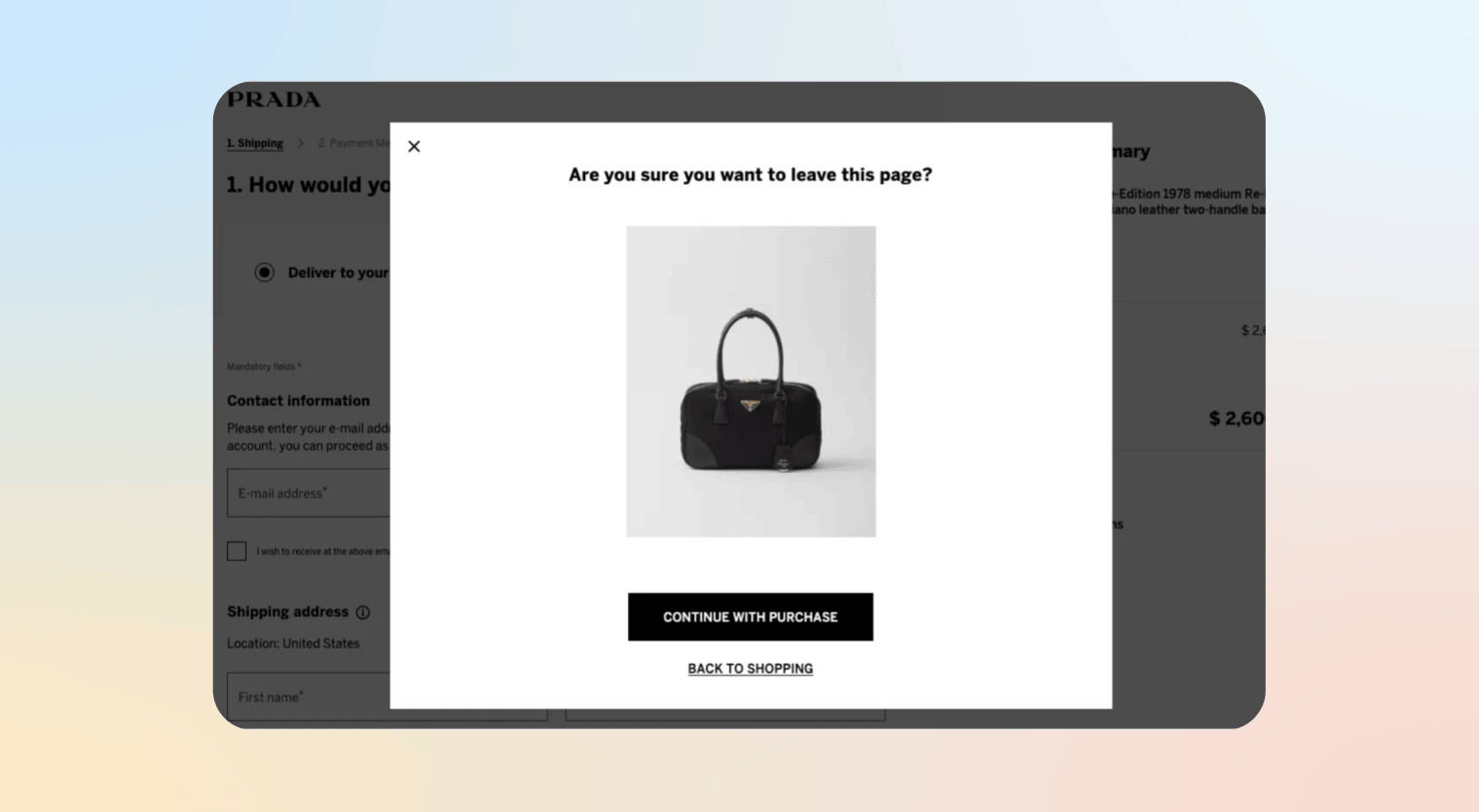
Prada’s website detects when you move your mouse toward the checkout page’s exit and displays a pop-up showing the items in your cart, with a gentle “Still interested?” prompt. This real-time intervention can re-engage a wavering customer before they actually disappear.
8. Industry-Specific Landing Pages
Creating targeted landing pages tailored to specific industries or customer segments. Unlike a one-size-fits-all home page, each page is customized in copy and visuals for that audience. For example, a fintech company might have separate homepages for “Small Business Owners” and “Individual Investors,” each highlighting relevant products.
It signals “this is for you” from the start. Visitors self-identify with their industry or segment, so when they arrive on a page speaking their language (industry jargon, typical use-case images), they engage more. Personalization is strongest when content aligns with visitor intent and context.
9. Personalized Navigation Menus
Navigation menus adapt based on visitor profile or behavior. A returning customer might see “My Orders” front and center, while a new visitor gets a standard menu. Even subtler shifts, like surfacing a “New Arrivals” tab tailored to whichever section a shopper has browsed, count as personalized navigation.
The result is a simpler, lower-friction interface that feels like the site knows its user, surfacing what matters and hiding what doesn’t.
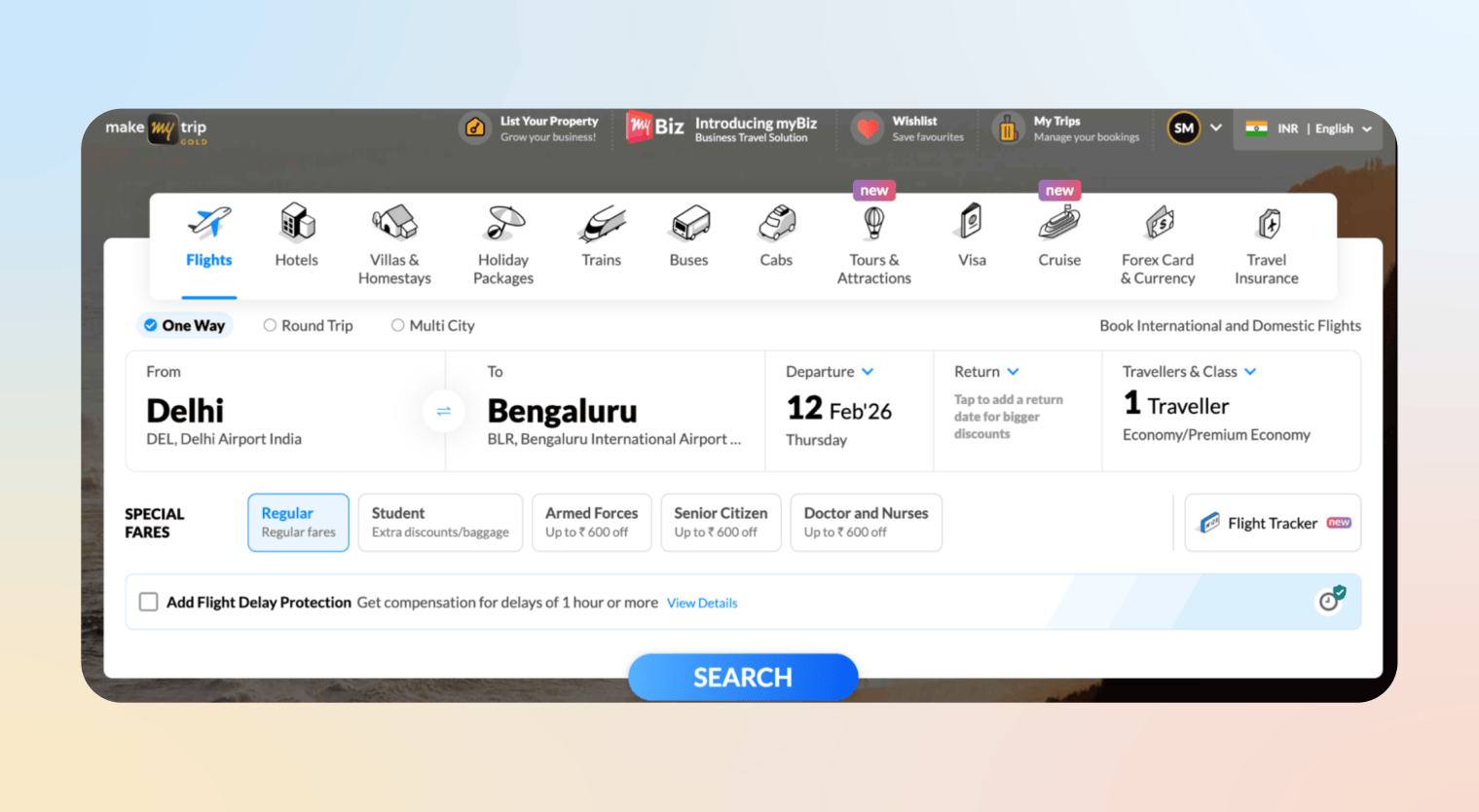
MakeMyTrip does this well for logged-in users, prominently displaying “My Trips” and “Wishlist” alongside saved flight preferences like destination, dates, and flight type, letting travelers pick up where they left off without repeating searches.
Advanced & AI-Powered Website Personalization Examples
10. Predictive Product Ranking
Predictive ranking uses machine learning to reorder product listings in real time based on what each visitor is most likely to click or buy. Rather than a fixed sort order, it draws on browsing history, purchase patterns, and segment data to surface the most relevant items first. If users who browse wireless headphones often buy noise-canceling cases, the algorithm learns to push those cases higher for similar visitors.
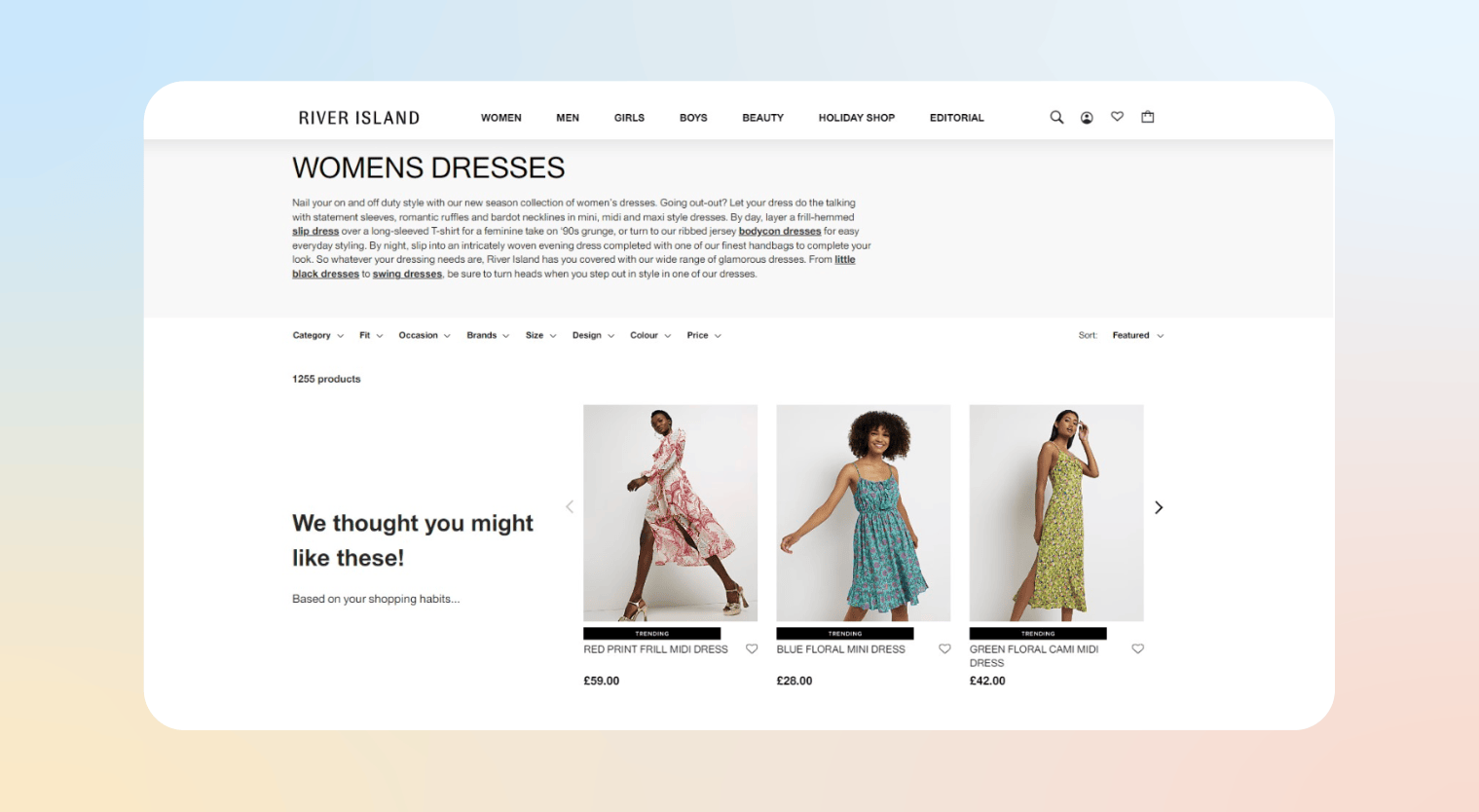
River Island applies this across product listing pages, product detail pages, and emails, dynamically reordering items based on individual behavior so each shopper sees the most relevant products at the right moment in their journey.
11. Personalized Search Results
Personalized search results adjust on-site search rankings in real time based on a user’s profile, preferences, and past behavior. Instead of showing the same results to everyone, search adapts to individual intent, for example, prioritizing organic coffee for a shopper who regularly buys organic products, or surfacing hotels within a traveler’s usual budget range.
These examples of personalization work well because search signals high intent, and tailoring results reduces friction by quickly surfacing what matters most to the user.
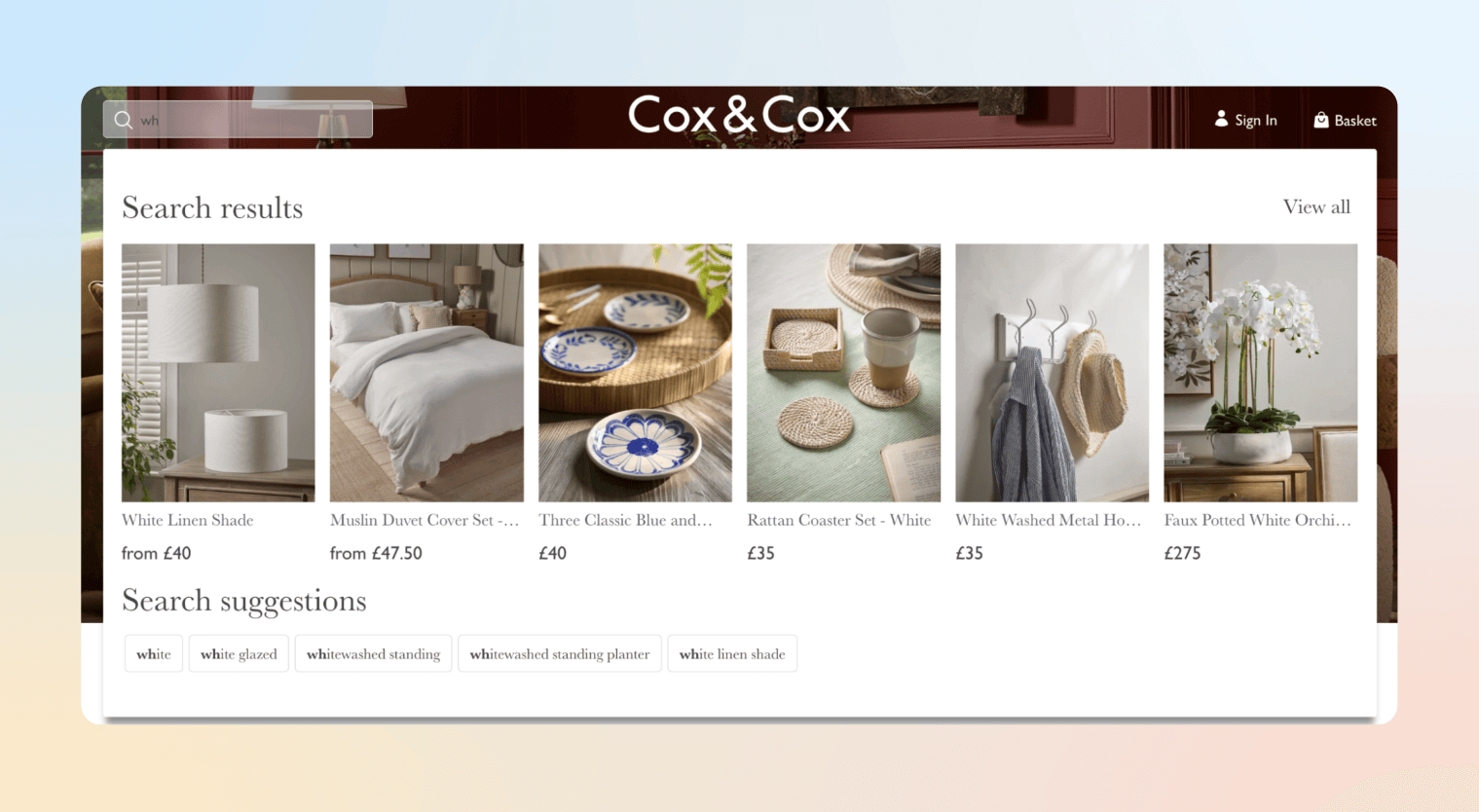
Cox & Cox demonstrates this clearly: when a shopper types “wh,” the system interprets intent and surfaces relevant suggestions like white furniture and white lighting rather than generic keyword matches, helping users find what they want faster
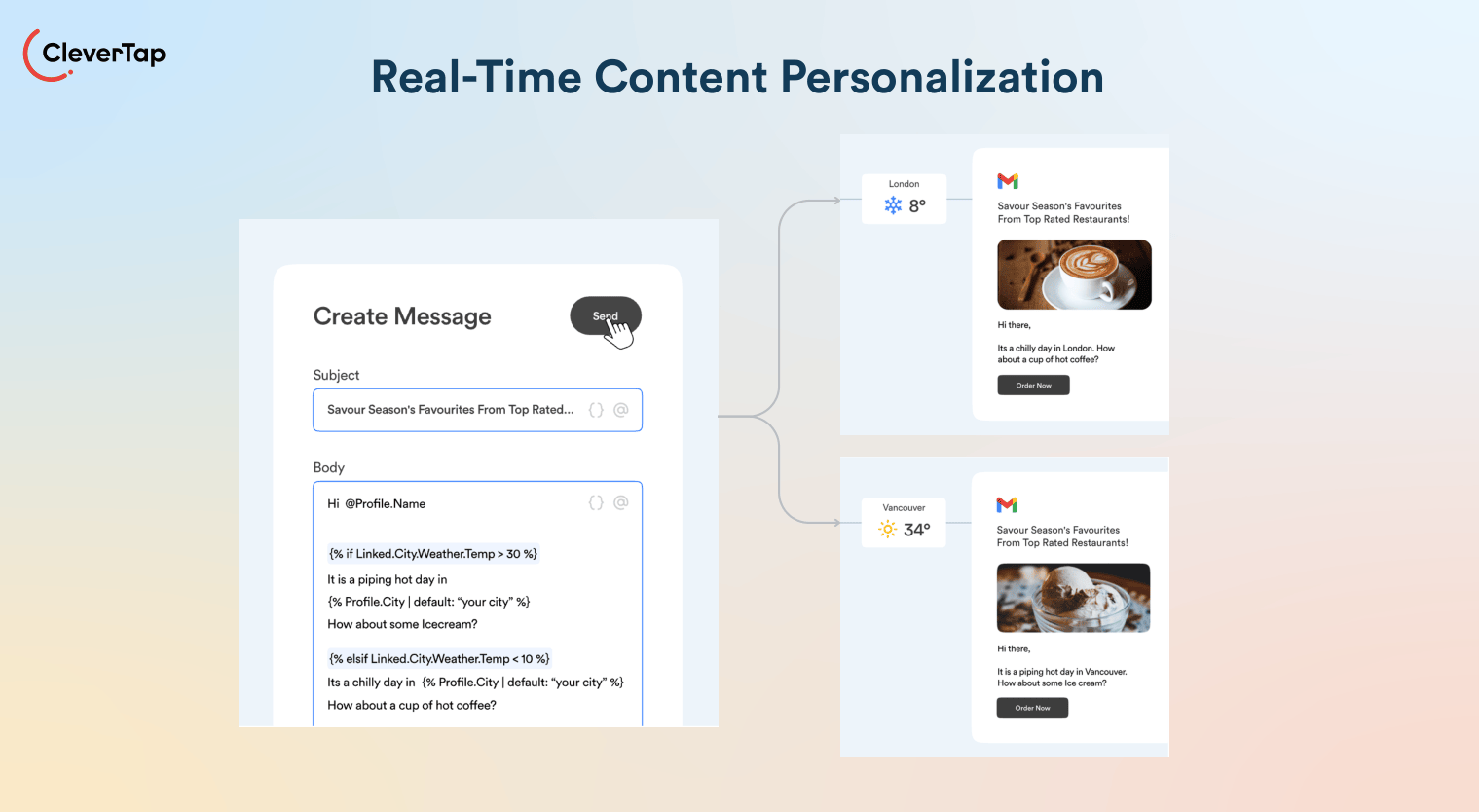
12. Real-Time Content Personalization
Real-time content personalization dynamically updates on-page elements, such as text, images, or modules, within the same session as a user interacts.
A product page might trigger a contextual chat prompt after prolonged viewing, or a news site may refresh its sidebar with related stories as the reader scrolls. The experience feels responsive and context-aware, surfacing relevant content the moment intent signals appear, without requiring a page reload.
CleverTap’s real-time personalization engine makes this possible at scale. It contextualizes experiences based on live user actions, going beyond static promotions to deliver dynamic content and perfectly timed nudges that respond to behavior as it happens. Combined with CleverAI Agents, such as the Predictions Agent, which detects intent shifts in real time, and the Recommendations Agent, which adapts content based on in-session behavior, teams can move from reactive to anticipatory personalization without manual intervention.
13. Lifecycle-Based Website Messaging
Lifecycle-based website messaging adapts on-site content to a user’s stage in the customer journey, such as a new visitor, an active user, or a lapsed customer. For example, new sign-ups might see onboarding prompts, while inactive users are shown comeback offers or renewal incentives.
This works because it aligns messaging with the user’s relationship and familiarity with the brand, ensuring content feels relevant rather than repetitive or mistimed. By syncing site experiences with lifecycle triggers, brands can improve engagement, retention, and conversion.
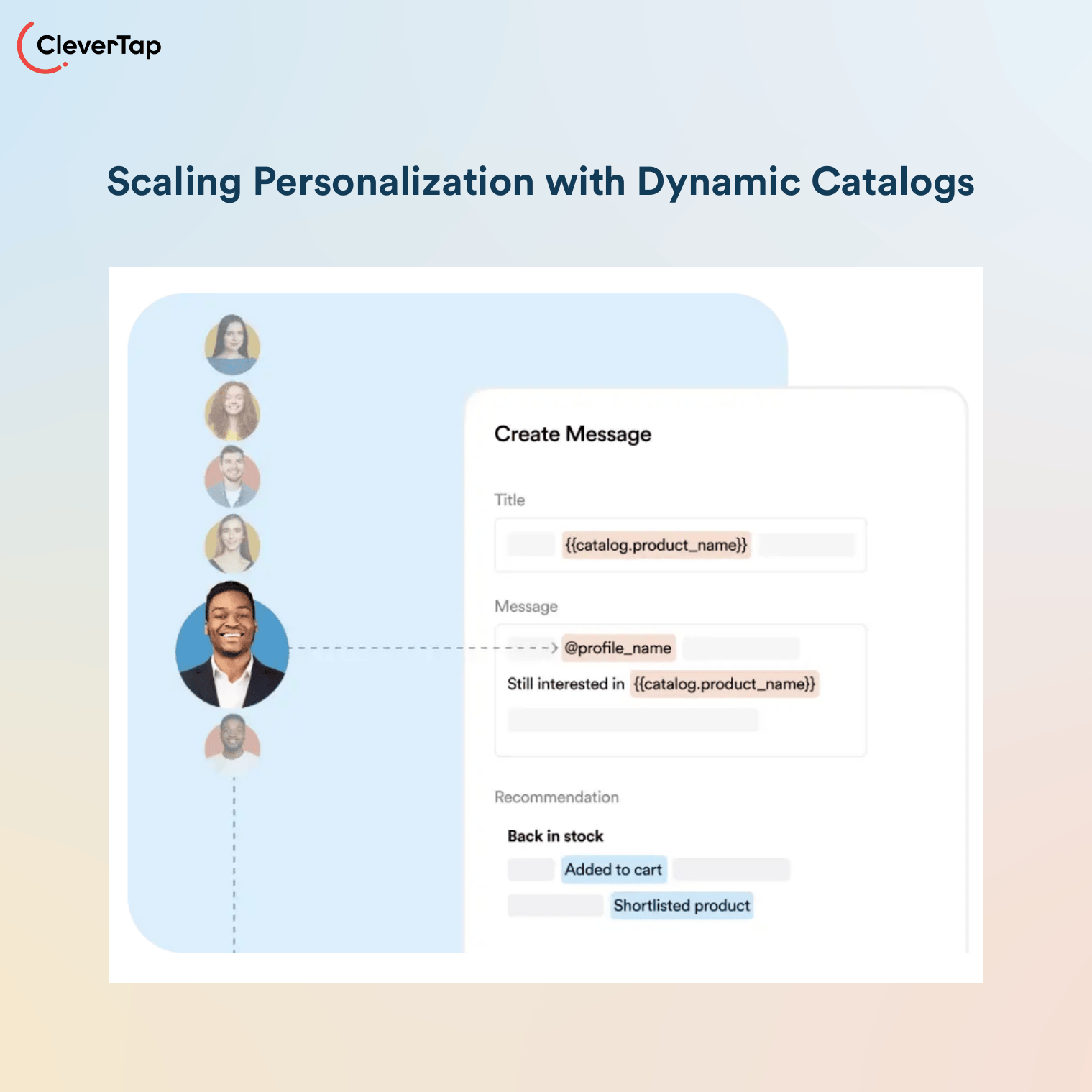
APLAZO streamlined its personalization strategy using CleverTap’s catalogs and liquid tags, shifting from 10+ manual templates per week to a single dynamic template. This allowed lifecycle-aware messaging to adapt automatically for each user segment—new, returning, or cart-abandoning customers.
The result:
- 60% Incremental Lift in Abandoned Cart Conversions
- 94% Repeat Engagement Rate Among Users
- >7% Boost in Pack Purchase Conversions
By aligning content with each user’s journey stage, Aplazo scaled personalization while freeing its team to focus on strategy.
14. AI-Driven Website Experiences
AI-driven website experiences use machine learning and generative AI to personalize the entire user journey, from adaptive chatbots and dynamically generated copy to self-optimizing recommendation systems. Unlike static rules, AI processes complex signals at scale and evolves with every interaction, making experiences more predictive, contextual, and conversion-focused.
AI personalization requires clean, reliable data and strong governance. Poor data quality can lead to irrelevant or off-brand experiences, and generative AI should be closely monitored.
CleverAI Agents take this further with a full suite of decision, creative, and action agents that individualize at scale. From the Recommendations Agent that surfaces the right product for each user, to the Copywriter Agent that generates brand-aligned personalized copy in seconds, CleverAI handles the heavy lifting so teams can focus on strategy rather than execution.
Learn how CleverAI Agents can help you drive personalization at scale.
How to Implement Website Personalization
Data collection: Gather first-party data from forms, accounts, analytics, and cookies. Capture signals like location, traffic source, page views, and purchase history. Use a CDP to unify data into a single customer view, then segment it by demographics and behavior. Clean, accurate data is critical.
Segmentation: Group visitors into clear segments or personas—new vs. returning users, loyalty levels, interests, or buying patterns. Start with broad attributes (geo, device, source) and refine over time with deeper behavioral and preference data.
Personalization logic & testing: Define what each segment should see and when. Use simple rules (e.g., “If a user viewed X, recommend Y”). Validate with A/B or multivariate testing, roll out winners, and iterate continuously.
Delivery & timing: Launch personalization via your website or dedicated tools using dynamic content, banners, pop-ups, and cross-channel messaging. Trigger experiences in real time based on behavior (e.g., after cart abandonment). Advanced setups can include AI models or chatbots.
Measurement & optimization: Track metrics like conversion rate, CTR, AOV, and retention. Measure lift against non-personalized baselines, refine what underperforms, and keep improving. Personalization is ongoing and can evolve into predictive and ML-driven approaches.
At each stage, maintain user privacy (use anonymized segments, allow opt-outs) and test for any unintended effects.
How CleverTap Powers Website Personalization
CleverTap gives teams everything they need to deliver real-time, 1:1 personalization at scale. Its Personalization engine lets you target visitors based on demographics, behavioral data, and loyalty status, contextualizing experiences dynamically as users interact with your site. From surfacing next-best-action product recommendations to triggering perfectly timed nudges, CleverTap turns visitor intent into conversion.
CleverAI Agents layer intelligence on top of that, with a Recommendations Agent that learns from past behavior to surface the right product for each user, a Segment Builder Agent that defines precise audiences in plain language, and a Predictions Agent that forecasts churn or conversion in real time so you can act before opportunities are lost.
Learn how CleverTap can help you achieve 1:1 personalization.
Frequently Asked Questions (FAQs) about Website Personalization Examples
Q1. What is website personalization?
Website personalization is the practice of dynamically tailoring website content, layout, offers, and recommendations based on a visitor’s behavior, preferences, location, or lifecycle stage. Instead of showing the same experience to everyone, the site adapts in real time to increase relevance, engagement, and conversions.
Q2. How does website personalization increase conversions?
Personalization improves conversions by reducing friction and surfacing what users are most likely to act on. Personalized CTAs, product recommendations, lifecycle messaging, and predictive ranking align the experience with visitor intent. Studies consistently show that relevant messaging increases click-through rates, average order value, and repeat purchases.
Q3. What data is needed for effective website personalization?
Effective personalization typically relies on three types of data:
- Behavioral data (clicks, page views, purchases)
- Contextual data (location, device, referral source, time of day)
- Predictive data (AI-based next-best-action or purchase likelihood)
The more unified and real-time the data, the more accurate and impactful personalization becomes.
Q4. What’s the difference between segmentation and 1:1 personalization?
Segmentation groups users into shared categories (e.g., new visitors, returning customers, high-value shoppers) and delivers tailored experiences to each group. 1:1 personalization goes further by adapting content at the individual level using live behavior and AI-driven predictions. Most brands start with segmentation and evolve toward individualized experiences as data maturity increases.
Q5. Is website personalization difficult to implement?
It doesn’t have to be. Early-stage personalization can begin with simple rule-based tactics like location banners or returning visitor messaging. More advanced strategies, such as predictive ranking or AI-driven recommendations, require unified customer data and automation tools. The key is to start small, test continuously, and scale based on measurable lift.
Bring these Website Personalization Examples to Life
Website personalization isn’t about flashy features; it’s about relevance. The right message, offer, or product shown at the right moment can dramatically reduce friction and move visitors closer to conversion.
As you’ve seen from these website personalization examples, you don’t need to start with complex AI models. Begin with simple, high-impact tactics like location-based messaging, dynamic CTAs, or returning visitor recognition. Then, as your data and team maturity grow, layer in behavioral triggers, lifecycle messaging, and predictive personalization.
The brands that win aren’t necessarily the ones doing the most personalization. They’re the ones doing the most meaningful personalization, grounded in real user signals and continuously optimized through testing.
Start small. Measure lift. Scale what works. Over time, personalization shifts from being a conversion tactic to becoming a competitive advantage.

Kiran Pius 
Leads Product Launches, Adoption, & Evangelism.Expert in cross-channel marketing strategies & platforms.
Free Customer Engagement Guides
Join our newsletter for actionable tips and proven strategies to grow your business and engage your customers.