








































Table of Contents
Categories
Most Popular


WhatsApp is a high-impact marketing channel, with around 2.9 billion global active users across 100 countries. WhatsApp messages consistently achieve far higher engagement than email marketing, with a 98% average open rate as compared to 20% for emails.
WhatsApp messaging offers marketers instantaneous, personal outreach, making it one of the most effective channels for real-time customer engagement. However, because WhatsApp is a paid channel, with businesses paying per message or conversation, its true value must be proven with the right WhatsApp metrics.
Many marketers still evaluate the results of their WhatsApp marketing campaigns using outdated or surface-level metrics, without tying the results to tangible business outcomes. Others apply measurement frameworks borrowed from email marketing, ignoring WhatsApp’s unique strengths, such as real-time interaction, two-way conversation, and immediate actionability. This leads to reporting that overstates reach and underrepresents influence on retention or revenue.
In this article, marketers will learn exactly which WhatsApp metrics matter, how to interpret them, and how to report results in business terms. We’ll show how to align metrics to specific business goals, group them into categories, and use benchmarks.
How to Align WhatsApp KPIs With Campaign Goals
WhatsApp key performance indicators (KPIs) should always be tied to the campaign objectives. Different goals require different metrics. Core objectives include:
- Acquisition and lead generation: To measure how effectively you add new contacts or leads, track opt-in growth, and acquisition cost. For example, if 1,000 people see a “Join on WhatsApp” prompt and 200 join, that’s a 20% conversion.
- Engagement and conversation depth: Understand how deeply users interact with your messages by tracking metrics such as open or read rate, reply or response rate, click-through rate (CTR), and conversation depth or average messages per chat. For instance, a high reply rate indicates users are responding with questions or interest instead of just reading silently.
- Retention and re-engagement: Track reactivation rate for lapsed users who return after a message and repeat purchase rate among WhatsApp contacts. Also, monitor how WhatsApp impacts churn. For example, a win-back campaign might measure how many inactive customers re-engage after a WhatsApp reminder.
- Revenue and conversion influence: Measure how much business WhatsApp drives. Track conversion rate as the percentage of message recipients who take a desired action, and revenue per recipient (RPR). For instance, if 5% of your broadcast recipients place an order worth $50 each on average, that defines the campaign’s ROI. These metrics tie WhatsApp to the bottom line.
No single metric defines success on its own. For example, a 90% open rate means little if only 1% of users click through or convert. Each metric you report should map back to a clear business outcome, which may be a lead, a sale, or improved retention.
Understanding WhatsApp Metric Categories
Grouping WhatsApp metrics into clear categories makes performance reporting sharper and more actionable. It helps marketers align metrics with funnel stages and spot where a campaign needs optimization.
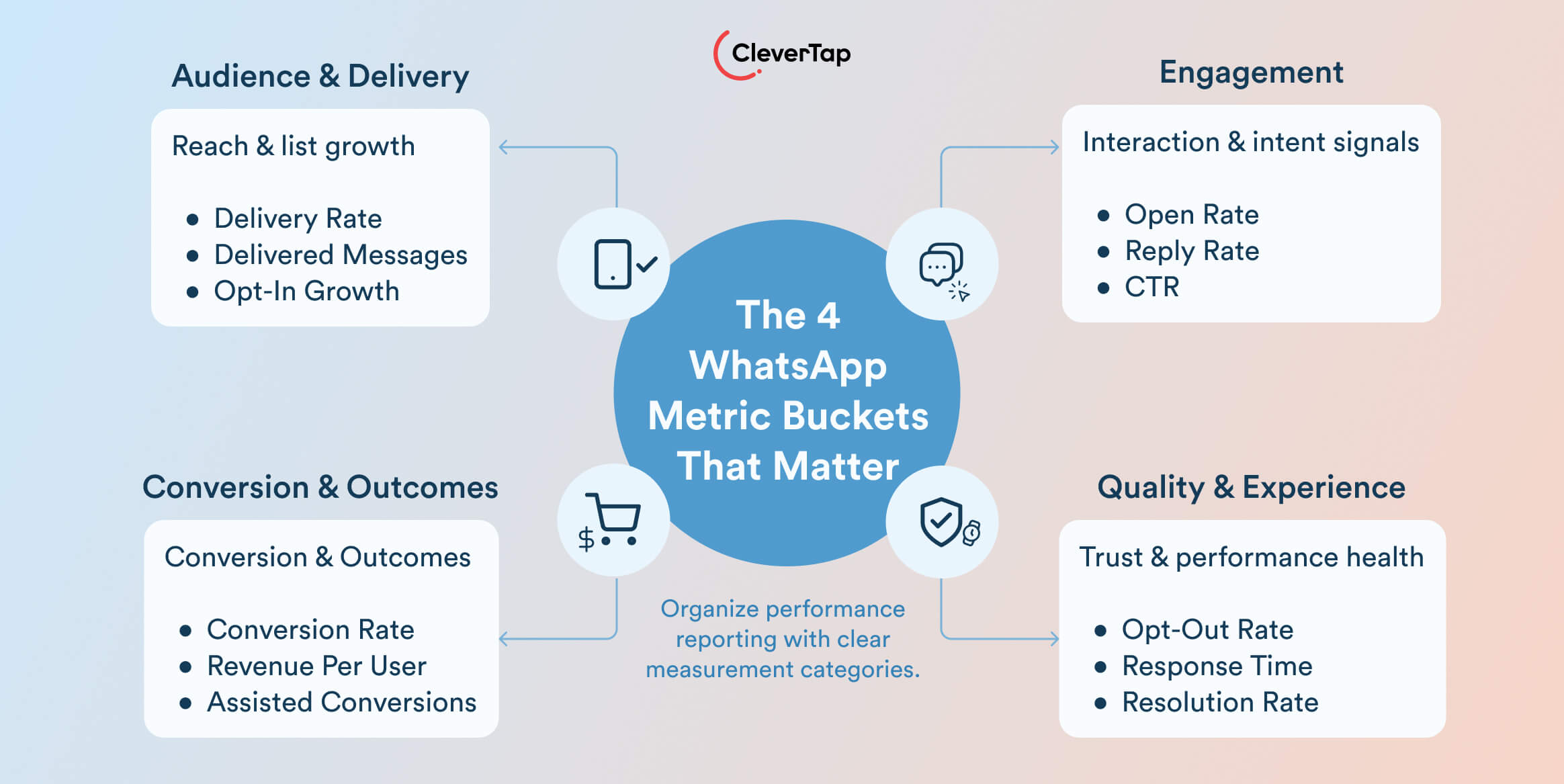
There are four essential WhatsApp metric categories:
- Audience and delivery metrics reflect message reach. These include messages delivered, delivery rate, and opt-in growth rate. A 98% delivery rate means your messages are reaching 98 out of 100 users on the list. Growing opt-ins show your list is expanding.
- Engagement metrics measure how users interact. Key indicators are open rate, reply rate, click-through rate (CTR), and conversation depth. High engagement shows content is relevant and low engagement despite high delivery points to messaging or targeting issues.
- Conversion and outcome metrics track business impact. These include conversion rate, revenue per user, and assisted conversions. They reveal how effectively WhatsApp drives actions like purchases or sign-ups.
- Quality and experience metrics reflect user satisfaction. Watch opt-out or block rate, response time, and resolution rate. These metrics protect long-term channel health.
These categories often mirror campaign goals across awareness, engagement, or conversion stages, making it easier to report outcomes and identify performance gaps across WhatsApp marketing efforts.
Core WhatsApp Marketing Metrics Explained
To measure WhatsApp marketing performance meaningfully, go beyond basic message counts. Start by tracking the core metrics that define audience size and message delivery, as these tell how far the messages are reaching.
A. Audience and Delivery Metrics
Understanding how far your WhatsApp messages travel is the first step to measuring performance. These metrics help gauge your campaign’s potential reach and audience growth over time.
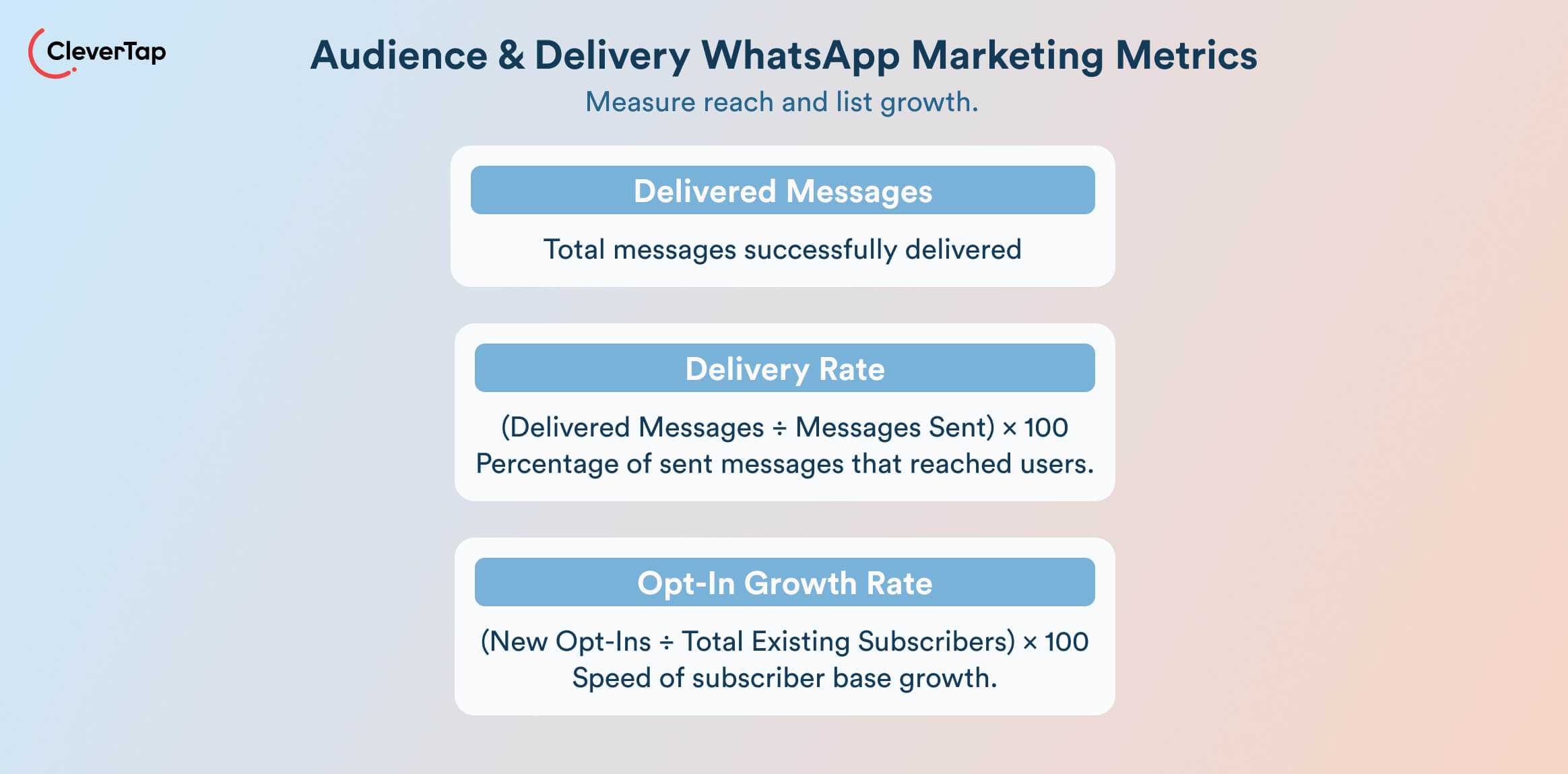
1. Delivered messages
This metric counts how many messages successfully reach users’ devices. For instance, if you send 10,000 messages and 9,800 are delivered, you have 9,800 delivered messages. This figure represents your actual reach and forms the baseline for evaluating engagement and conversions.
2. Delivery rate
Formula:
(Delivered ÷ Sent) × 100%
WhatsApp generally sees high delivery rates, typically between 95% and 99%, due to verified user numbers and real-time infrastructure. A drop below 90% could signal problems like invalid phone numbers, blocks, or delivery throttling. Monitor this regularly to ensure list hygiene and platform compliance.
3. Opt-in growth rate:
This measures the rate at which your WhatsApp subscriber base is expanding. For example, adding 5,000 new opt-ins to a 50,000-user list in a month equals a 10% growth rate. This reflects your audience-building efforts. A consistent rise in opt-ins indicates strong acquisition efforts. A flat or declining rate may signal saturation or low CTA performance.
Important: These delivery metrics measure reach over effectiveness. High delivery or opt-in rates are meaningless if your messages don’t lead to engagement or action. Use these as top-of-funnel indicators, but always analyze them alongside engagement and conversion KPIs.
B. Engagement Metrics
Engagement metrics reveal how users interact with your messages and are crucial for understanding message relevance, content strength, and user intent.
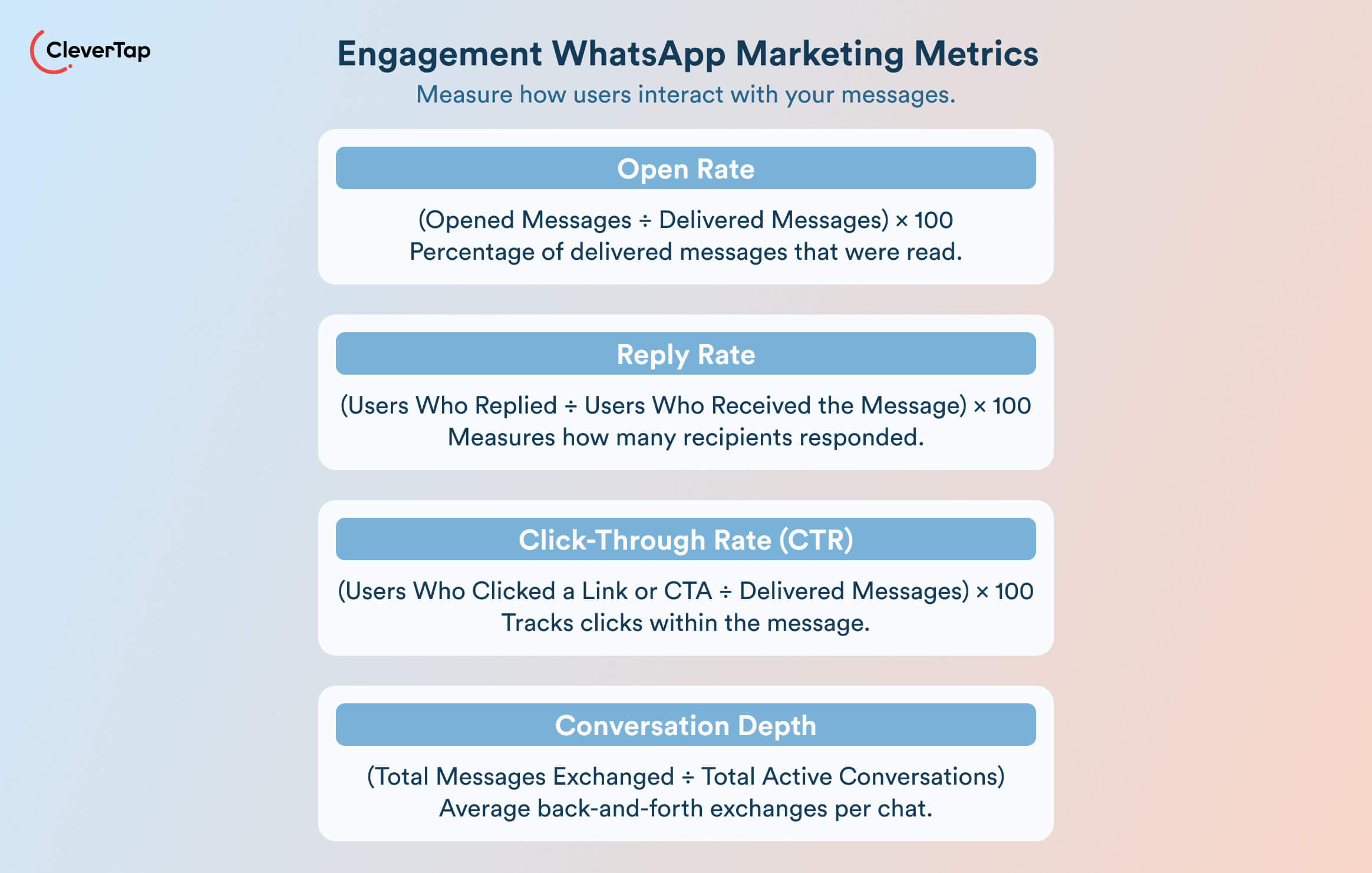
1. Open rate on WhatsApp
This shows how many delivered messages were opened. Measured using WhatsApp’s read receipts, open rates can reach as high as 98% in some campaigns, making WhatsApp one of the highest-engagement marketing channels.
Formula:
Open rate = (Opened messages ÷ Delivered messages) × 100
A low open rate suggests poor message previews, bad timing, or audience fatigue.
2. Reply rate
The percentage of users who respond to a message. WhatsApp is inherently conversational, so reply rates are generally above 40%.
Formula: Reply rate = (Users who replied ÷ Users who received the message) × 100
High rates signal active interest or intent, while low response rates may indicate that your messaging is too passive or not actionable.
3. Click-through rate (CTR)
CTR tracks users who clicked a link or button within your message.
Formula:
CTR = (Users who clicked a link or CTA ÷ Delivered messages) × 100
WhatsApp CTRs often outperform email and SMS, commonly landing between 40% and 70%, depending on the campaign type and targeting. Strong CTAs, time-sensitive offers, or personalized content can drive this higher.
4. Conversation depth
This measures how many back-and-forth exchanges happen per user. It’s useful for assessing conversation quality.
Formula:
Conversation depth = Total messages exchanged in conversations ÷ Total active conversations
More exchanges often mean higher interest or complexity. Support conversations usually generate deeper threads than promotional messages.
Watch for Pitfalls: Don’t judge success by open rate alone. High reads with low replies, or CTR, may indicate weak copy or misaligned targeting. Similarly, long conversations aren’t always better. They might reflect friction in your flow. Evaluate engagement metrics together to get the full picture.
C. Conversion and Outcome Metrics
Conversion metrics assess whether your WhatsApp campaigns drive real business results. They measure actions that directly impact ROI. These may be purchases, sign-ups, or bookings.
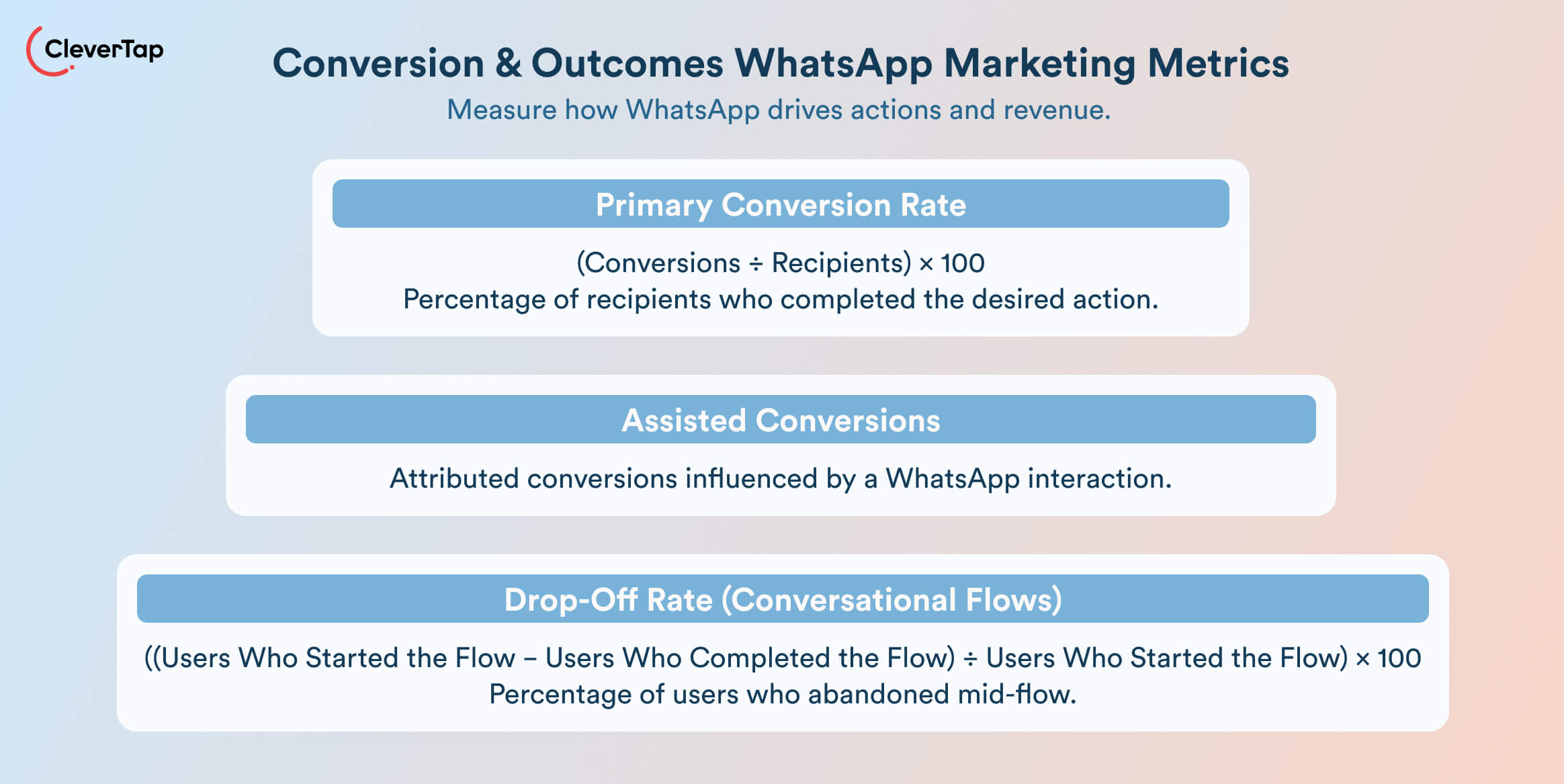
1. Primary conversion rate
This is the percentage of recipients who complete a desired action, e.g., purchase, sign-up, app install, after a WhatsApp interaction.
Formula:
(Conversions ÷ Recipients) × 100%
Depending on offer quality and funnel intent, WhatsApp conversion rates often reach double digits, especially in mid-to-low funnel campaigns like cart recovery or coupon redemption.
2. Assisted conversions
Not all actions happen instantly. Many users engage with a WhatsApp message but convert later on another channel, such as the website or app. These are assisted conversions. To measure this, use tracked URLs or UTM parameters, or connect WhatsApp events to lifecycle analytics platforms such as CleverTap to attribute delayed conversions.
3. Drop-off rates in conversational flows
In multi-step conversational experiences, track how many users abandon mid-flow.
Formula:
Drop-off rate = ((Users who started the flow − Users who completed the flow) ÷ Users who started the flow) × 100
For example, if 1,000 users start a poll and only 600 complete it, you have a 40% drop-off. Identifying where users exit helps optimize question design, pacing, or CTA clarity.
Not every conversion is a sale. It could be a form fill, video view, or app launch, depending on the campaign’s goal. Set clear conversion definitions upfront and align measurement with that outcome.
Pro Tip: Pair conversion rate with volume and business value. For example, “9% converted, generating 200 new subscribers” for more meaningful stakeholder reporting.
D. Quality and Experience Metrics
Quality metrics ensure that WhatsApp remains a trusted, high-performance channel over time. They protect user experience, prevent churn, and help maintain compliance.
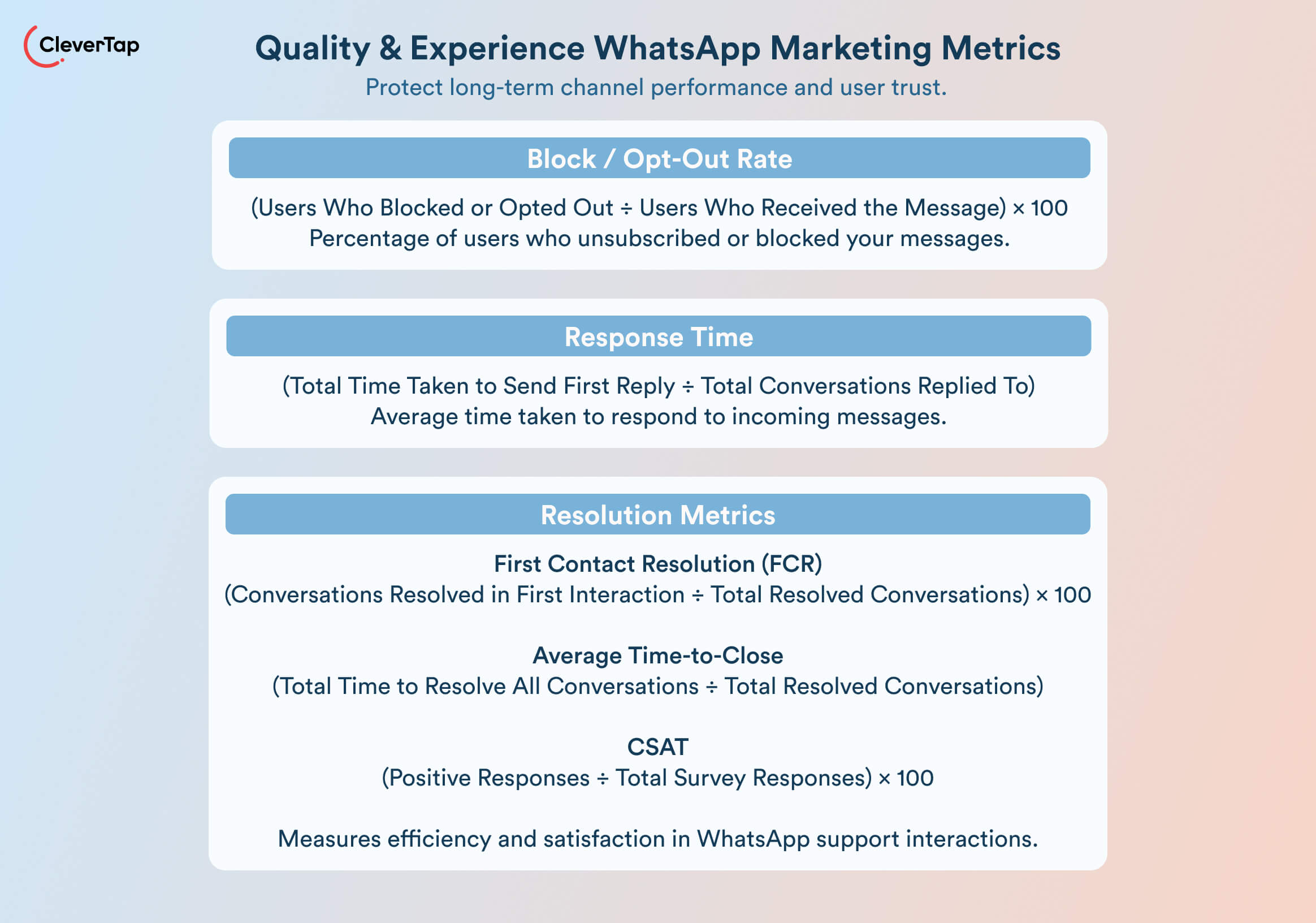
1. Block and opt-out rate
This reflects how many users unsubscribe or block your brand after receiving a message.
Formula:
Block / opt-out rate = (Users who blocked or opted out ÷ Users who received the message) × 100
While WhatsApp doesn’t publish official thresholds, most brands aim to keep this under 3–5% per campaign to maintain strong deliverability and avoid being flagged for low-quality messaging. Higher rates may indicate poor targeting, irrelevant content, or over-messaging.
2. Response time
When users reply, especially in two-way support or transactional flows, speed matters.
Formula:
Response time = Total time taken to send first reply across conversations ÷ Total conversations replied to
Users typically expect replies within a few minutes, especially during business hours. Long delays erode trust and reduce conversion likelihood. Use automation or chat routing to keep this service level agreement (SLA) in check.
3. Resolution indicators
If WhatsApp is part of your customer support or service workflow, track resolution metrics like first contact resolution (FCR) and time-to-close. These help evaluate whether the user experience is effective and efficient. You can also trigger feedback surveys post-resolution to collect customer satisfaction ratings (CSAT) and data.
Formulas:
FCR = (Conversations resolved in the first interaction ÷ Total resolved conversations) × 100
Average time-to-close = Total time taken to resolve all conversations ÷ Total resolved conversations
CSAT = (Number of positive responses ÷ Total survey responses) × 100
Why It Matters: Even high-performing campaigns can underdeliver if they create poor experiences. Rising opt-outs or delays are early warning signs that may impact engagement, deliverability, and platform compliance. Prioritize long-term channel health alongside campaign results.
Discover: Top 10 WhatsApp Marketing Automation Tools for Faster Growth and Better Retention
Mapping WhatsApp KPIs to Business Outcomes
To prove WhatsApp’s value as a marketing channel, reporting clicks and opens no longer suffice. Stakeholders want outcome-level reporting via metrics that directly align with acquisition, engagement, retention, or revenue goals.
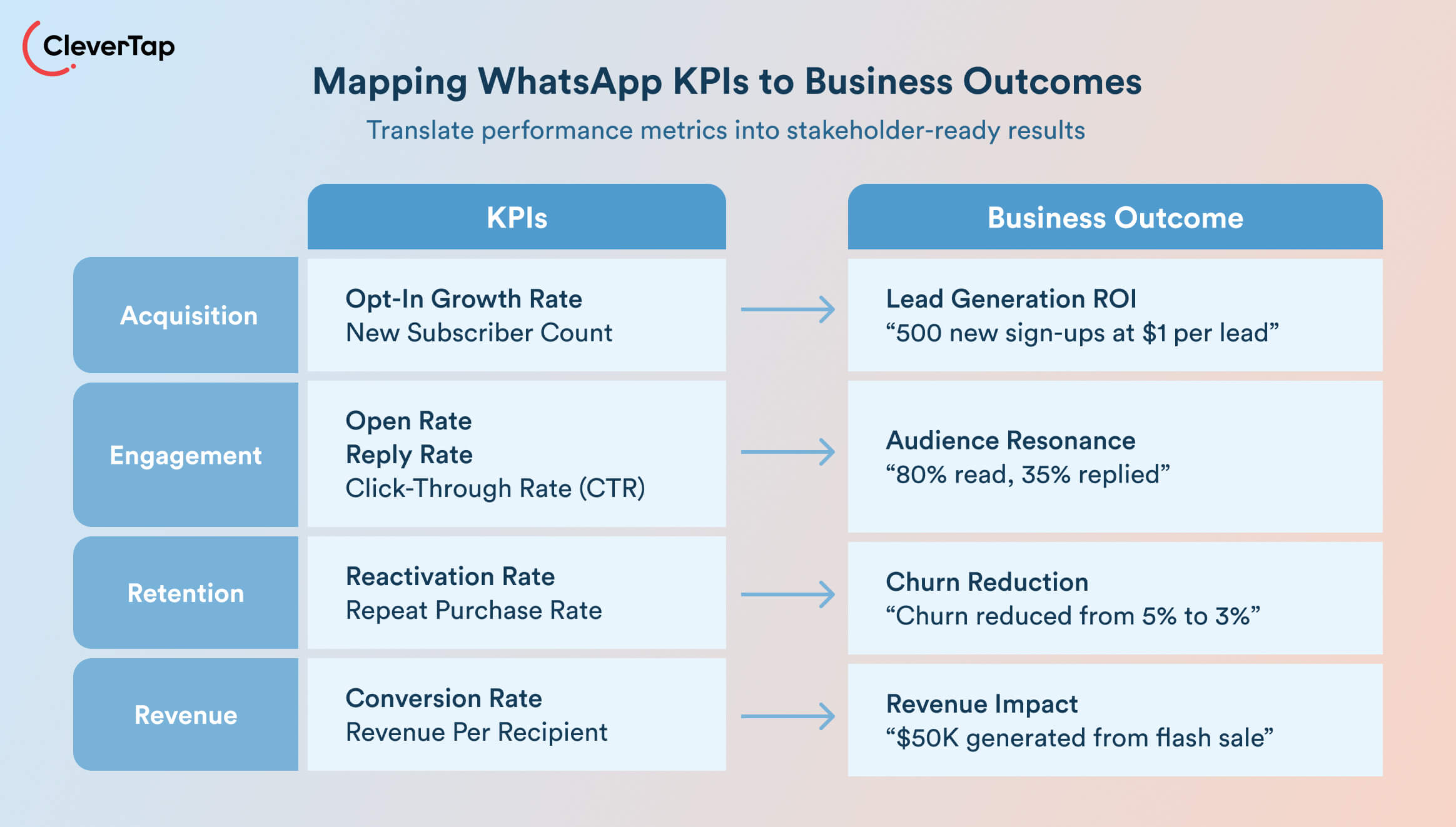
So map WhatsApp metrics to business outcomes as shown below:
- Acquisition: Show how WhatsApp grows your audience. Report new subscriber count and leads generated. For instance, a click-to-WhatsApp ad campaign might highlight “500 new WhatsApp sign-ups for $1 per lead.” This ties WhatsApp to lead-generation ROI.
- Engagement: Demonstrate user interest and responsiveness. Track open rates, reply rates, and click-throughs. For instance, If 80% read your broadcast, and 35% replied. These signals show content resonance and audience quality.
- Retention: Use WhatsApp metrics to highlight reactivation and customer loyalty. KPIs may include re-engagement rate, repeat purchase rate, and churn reduction. Frame it as “Churn among WhatsApp contacts dropped from 5% to 3% after our win-back series.”
- Revenue: Connect campaign performance to conversions and sales. Track conversion rate, revenue per recipient, and uplift compared to a control group. For example: “10% converted from our WhatsApp flash sale, generating $50K in revenue.”
Example KPI combos:
- A cart-recovery flow might report link CTR, the conversion rate of those clicks, and total revenue recovered.
- A product promotion broadcast might report open rate, CTR, opt-out rate, and resulting sales.
- A welcome series could report opt-in rate, next-step completions, and first-purchase rate.
The key is to present WhatsApp numbers in the context that stakeholders care about. Always accompany metrics with results. For instance, don’t just say “CTR 25%” – also say “which led to 10,000 website visits and 500 sales.”
Use dashboards or reports that combine WhatsApp data with overall CRM or loyalty data.
Benchmarks and What Good Performance Looks Like
Benchmarks serve as a directional guide, helping marketers spot outliers, set campaign targets, and focus on optimization. However, they’re not absolute. WhatsApp performance varies based on audience quality, use case, and campaign timing, so it is wise to always compare results against your own internal baselines.
| Metric | Typical Range | Interpretation & Notes |
| Delivery Rate | 95–99% | WhatsApp is a verified, high-deliverability channel. Below 90% may indicate list hygiene or API issues. |
| Open (Read) Rate | 70–98% | High open rates are expected. If <70%, evaluate preview text, timing, or audience targeting. |
| Click-Through Rate | 40-70% | WhatsApp CTRs often outperform email. Low CTR with high opens suggests a weak CTA or offer. |
| Reply Rate | >40% | High replies indicate interest or intent. Useful for service, feedback, or consultation flows. |
| Opt-Out/Block Rate | Under 5% | Anything higher may harm deliverability. Signals content fatigue, poor targeting, or over-messaging. |
Note: WhatsApp technically tracks read receipts rather than traditional email-style opens, so open rate benchmarks refer to the percentage of delivered messages that users have read.
External benchmarks are a useful reference, but the most actionable performance insights come from your own campaign history. Here’s how you can establish internal baselines:
- Track 3–6 campaigns per use case
- Group results by audience segment
- Compare performance across message formats
- Note the send day and time to identify high-performing time slots
- Use A/B testing to find what improves clicks, replies, or conversions
- Exclude extreme outliers (e.g., holiday spikes) when calculating averages
- Create separate benchmarks for each goal
- Review and update baselines quarterly to reflect audience and strategy changes
- Use your best-performing campaign in each category as a reference point
- Track progress over time to measure the impact of optimization efforts
Adjust expectations based on context. Awareness campaigns often deliver high reach and open rates, while transactional flows drive better CTR and conversion. Let the campaign’s objective define what good looks like.
How CleverTap Powers WhatsApp Marketing and Analytics
CleverTap is an all-in-one customer engagement platform that helps B2C businesses run personalized messaging campaigns across channels like WhatsApp, push notifications, email, SMS, and in-app messaging. It combines behavioral data, campaign automation, and analytics in a single platform. CleverTap enables marketers to launch targeted WhatsApp campaigns and measure their performance against real business outcomes with it’s powerful Whatsapp marketing platform.
Launch Targeted WhatsApp Campaigns With Behavioral Triggers
CleverTap allows marketers to send WhatsApp messages based on real user behavior and lifecycle events. Instead of relying only on scheduled broadcasts, campaigns can be triggered automatically by actions such as cart abandonment, app inactivity, product browsing, or completed transactions.
Marketers can also optimize campaigns using built-in A/B testing, where multiple message variants are tested to identify which content drives higher engagement or conversions before sending to the full audience.
Personalize Messages Using Real-Time Customer Data
CleverTap enables contextual personalization at the moment of message delivery. Marketers can dynamically insert customer attributes such as names, locations, or preferences directly into WhatsApp messages. Conditional logic can also be used to adjust content for different customer segments, such as offering different promotions to loyalty members versus new users.
These capabilities help brands move beyond generic broadcasts and deliver WhatsApp messages that feel relevant to each user’s context and behavior.
Track WhatsApp Campaign Performance With Unified Analytics
CleverTap provides built-in analytics dashboards that track the core WhatsApp KPIs covered in this guide. Marketers can monitor delivery, engagement, and conversion metrics from a single view, including:
< messages sent and delivered
< read (viewed) rates
< reply and click-through rates
< conversions and revenue generated
This unified reporting makes it easier to understand how WhatsApp campaigns contribute to outcomes like purchases, sign-ups, and re-engagement.
Connect WhatsApp Metrics to Lifecycle and Revenue Insights
Beyond campaign-level reporting, CleverTap connects WhatsApp engagement data with broader customer behavior. Marketers can analyze how WhatsApp messaging influences onboarding completion, repeat purchases, retention, and reactivation of dormant users.
By linking messaging activity with lifecycle analytics and revenue data, teams can measure WhatsApp performance in terms stakeholders care about most: customer growth and business impact.
Optimize Campaigns With Experimentation and Performance Insights
CleverTap’s dashboards and experimentation tools help marketers continuously improve WhatsApp campaigns. Teams can test different message formats, CTAs, timing strategies, and audience segments to identify what drives the strongest engagement and conversion rates.
Over time, these insights help marketers refine targeting and messaging strategies to maximize WhatsApp campaign ROI.
Maintain Subscription Health and Compliance
Because WhatsApp is a permission-based channel, CleverTap includes tools to manage user subscriptions and prevent unwanted messaging. Automated opt-in and opt-out workflows ensure that users who request to unsubscribe are automatically excluded from future campaigns, helping brands maintain compliance and protect long-term deliverability.
Together, these capabilities allow marketing teams to treat WhatsApp not just as a messaging tool, but as a measurable, performance-driven engagement channel.
Ready to turn WhatsApp into a measurable marketing channel? See how CleverTap helps you launch targeted campaigns, track key KPIs, and optimize engagement.
Optimize WhatsApp Campaigns With Better Reporting
WhatsApp can be a scalable, measurable marketing channel if you track the right KPIs. Focus on metrics that align with your campaign goals rather than simply counting sends or opens. When reporting results, connect WhatsApp engagement to real business outcomes such as conversions, retention, or revenue.
Commit to disciplined measurement by A/B testing message content, analyzing results, and refining your targeting. Over time, even small improvements in click-through rate, reply rate, or conversion can translate into significant ROI gains.
Platforms like CleverTap help make this process easier by combining WhatsApp campaign execution, behavioral targeting, and performance analytics in one place.
Schedule a demo to see how CleverTap helps you run smarter WhatsApp campaigns and track the KPIs that matter most.

Sagar Hatekar 
Leads product managementExpert in Marketing Analytics & Engagement platforms.
Free Customer Engagement Guides
Join our newsletter for actionable tips and proven strategies to grow your business and engage your customers.